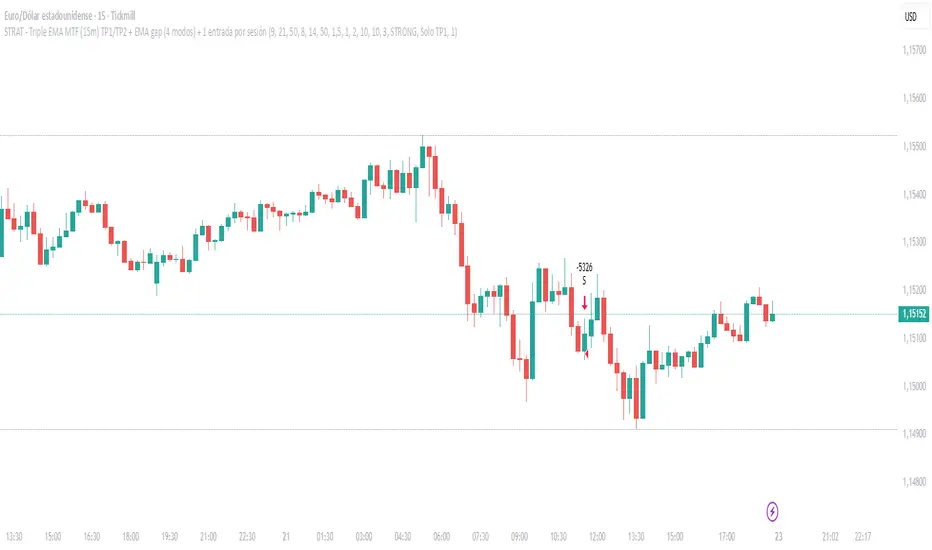
20/50/200 EMA with RVOL Filter Hariss 369Understanding to trade with this indicator is very simple. 20 EMA acts as dynamic support and resistance. 50 EMA is best for intraday/short term trend filter and 200 EMA is best for long term trend filter. One should always trade with the trend. Combination of all threes entails safe trading with trend. Undoubtedly, volume plays vital role to move the price up or down. The volume indicator used here is Relative Volume (RVOL) rather simple volume. 1.5 RVOL is considered as strong trend to trade considering other factors intact. You can tick/untick RVOL and you can also change the level of RVOL from input section.
You can also change the color of EMAs and pattern of buy and sell signal. Place this indicator over the chart. You can choose any type of asset and any time frame.
Though buy and sell signals are there. The concept of trading is buy when price closes above 20 ema and 20 ema >50ema>200 ema. Place stop loss below the low of last candle or just below 20 ema. Target 1.5/2 times of stop loss. You can also trail it with 20 ema or 50 ema depending upon your trading style and risk appetite. You can also take positional trade, in that case 200 ema to be considered as stop loss. Sell when price closes below 20 ema, 20 ema<50ema<200 ema. For intraday trading, 20 ema is best to enter and exit. Taking RVOL into consideration is best way in order to trade with high liquidity-safer way to entry and exit.
볼륨

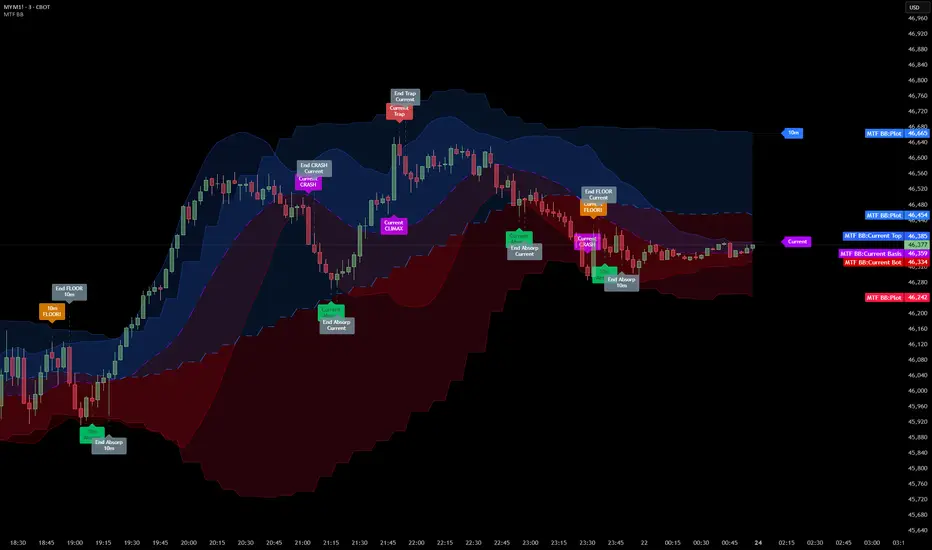
Multi Timeframe Bollinger Bands Spectrum [Ata]Multi-Timeframe Bollinger Bands Spectrum
Technical Overview
This script integrates multi-timeframe volatility analysis with volume-derived order flow estimation. By combining Bollinger Bands (statistical deviation) with internal candle volume logic, the indicator qualifies price movements to differentiate between sustained trends, reversals, and exhaustion events.
The system is designed to provide a structural context for price action, visualizing market regimes through a dual-zone spectrum and filtering signals based on the interaction between price location and specific volume thresholds.
Core Logic & Calculation
1. Volume Decomposition Algorithm
Instead of using total volume, the script estimates Buying Pressure vs. Selling Pressure based on the close position relative to the candle's High/Low range:
- Buying Volume (vb): Increases as the close approaches the High.
- Selling Volume (vs): Increases as the close approaches the Low.
This logic allows the detection of directional flow even within standard volume bars.
2. Statistical Spectrum
The indicator renders deviations from the Basis (SMA) as two distinct zones:
- Bullish Zone (Blue): Price positioning between the Basis and Upper Band.
- Bearish Zone (Red): Price positioning between the Basis and Lower Band.
This structure is applied across multiple timeframes (overlay) to visualize the macro trend context without noise.
3. Non-Repainting Execution
To ensure historical accuracy and reliability for backtesting, all higher-timeframe data is requested using "lookahead_off". Signals are confirmed only upon the closure of the respective timeframe's candle.
Signal Definitions
Signals are generated only when specific Volatility and Volume conditions intersect:
Reversal Setups (Reaction to Liquidity)
- WALL: Triggered when price rejects the Upper Band accompanied by Extreme Selling Volume (vs > Limit). This suggests active limit sell orders absorbing the rally.
- FLOOR: Triggered when price rejects the Lower Band accompanied by Extreme Buying Volume (vb > Limit). This suggests active limit buy orders absorbing the drop.
- ABSORP: Identifies absorption near the lower bands where selling pressure is met with passive buying (indicated by lower wicks and relative buy volume).
Momentum Setups (Trend Continuation)
- POWER: Validates a breakout above the Upper Band only if supported by Dominant Buying Volume and a strong candle body.
- PANIC: Validates a breakdown below the Lower Band only if supported by Dominant Selling Volume.
- TRAP: Marks failed breakouts where price exits the bands but volume analysis contradicts the move (e.g., low directional volume).
Exhaustion Setups (Statistical Extremes)
- CLIMAX/CRASH: Identifies anomalies where price deviates significantly from the mean (Extreme Deviation) or when volume reaches unsustainable levels relative to the average, often preceding a mean reversion.
Input Parameters
- Bollinger Logic: Configuration for Length and Standard Deviation Multiplier.
- Volume Thresholds: Adjustable factors for Minimum Volume (Trend) and Extreme Volume (Reversal/Climax).
- Timeframe Layers: Toggle visibility for up to 5 higher timeframes.
- Theme: Adjusts label contrast for Dark/Light backgrounds.
Disclaimer
This indicator is strictly for analytical purposes. It provides a visualization of past market data based on statistical and volumetric formulas. Users should apply their own risk management protocols.
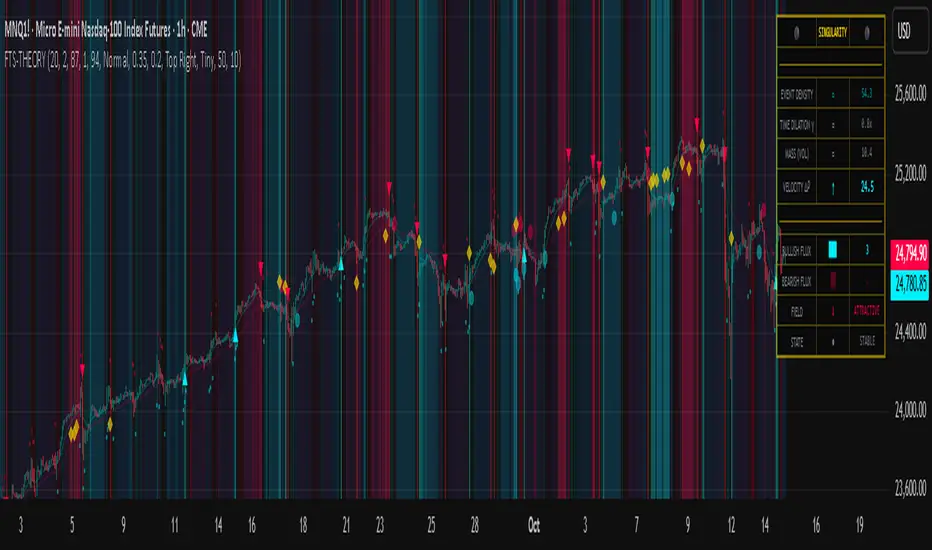
Flux-Tensor Singularity [FTS]Flux-Tensor Singularity - Multi-Factor Market Pressure Indicator
The Flux-Tensor Singularity (FTS) is an advanced multi-factor oscillator that combines volume analysis, momentum tracking, and volatility-weighted normalization to identify critical market inflection points. Unlike traditional single-factor indicators, FTS synthesizes price velocity, volume mass, and volatility context into a unified framework that adapts to changing market regimes.
This indicator identifies extreme market conditions (termed "singularities") where multiple confirming factors converge, then uses a sophisticated scoring system to determine directional bias. It is designed for traders seeking high-probability setups with built-in confluence requirements.
THEORETICAL FOUNDATION
The indicator is built on the premise that market time is not constant - different market conditions contain varying levels of information density. A 1-minute bar during a major news event contains far more actionable information than a 1-minute bar during overnight low-volume trading. Traditional indicators treat all bars equally; FTS does not.
The theoretical framework draws conceptual parallels to physics (purely as a mental model, not literal physics):
Volume as Mass: Large volume represents significant market participation and "weight" behind price moves. Just as massive objects have stronger gravitational effects, high-volume moves carry more significance.
Price Change as Velocity: The rate of price movement through price space represents momentum and directional force.
Volatility as Time Dilation: When volatility is high relative to its historical norm, the "information density" of each bar increases. The indicator weights these periods more heavily, similar to how time dilates near massive objects in physics.
This is a pedagogical metaphor to create a coherent mental model - the underlying mathematics are standard financial calculations combined in a novel way.
MATHEMATICAL FRAMEWORK
The indicator calculates a composite singularity value through four distinct steps:
Step 1: Raw Singularity Calculation
S_raw = (ΔP × V) × γ²
Where:
ΔP = Price Velocity = close - close
V = Volume Mass = log(volume + 1)
γ² = Time Dilation Factor = (ATR_local / ATR_global)²
Volume Transformation: Volume is log-transformed because raw volume can have extreme outliers (10x-100x normal). The logarithm compresses these spikes while preserving their significance. This is standard practice in volume analysis.
Volatility Weighting: The ratio of short-term ATR (5 periods) to long-term ATR (user-defined lookback) is squared to create a volatility amplification factor. When local volatility exceeds global volatility, this ratio increases, amplifying the raw singularity value. This makes the indicator regime-aware.
Step 2: Normalization
The raw singularity values are normalized to a 0-100 scale using a stochastic-style calculation:
S_normalized = ((S_raw - S_min) / (S_max - S_min)) × 100
Where S_min and S_max are the lowest and highest raw singularity values over the lookback period.
Step 3: Epsilon Compression
S_compressed = 50 + ((S_normalized - 50) / ε)
This is the critical innovation that makes the sensitivity control functional. By applying compression AFTER normalization, the epsilon parameter actually affects the final output:
ε < 1.0: Expands range (more signals)
ε = 1.0: No change (default)
ε > 1.0: Compresses toward 50 (fewer, higher-quality signals)
For example, with ε = 2.0, a normalized value of 90 becomes 70, making threshold breaches rarer and more significant.
Step 4: Smoothing
S_final = EMA(S_compressed, smoothing_period)
An exponential moving average removes high-frequency noise while preserving trend.
SIGNAL GENERATION LOGIC
When the tensor crosses above the upper threshold (default 90) or below the lower threshold (default 10), an extreme event is detected. However, the indicator does NOT immediately generate a buy or sell signal. Instead, it analyzes market context through a multi-factor scoring system:
Scoring Components:
Price Structure (+1 point): Current bar bullish/bearish
Momentum (+1 point): Price higher/lower than N bars ago
Trend Context (+2 points): Fast EMA above/below slow EMA (weighted heavier)
Acceleration (+1 point): Rate of change increasing/decreasing
Volume Multiplier (×1.5): If volume > average, multiply score
The highest score (bullish vs bearish) determines signal direction. This prevents the common indicator failure mode of "overbought can stay overbought" by requiring directional confirmation.
Signal Conditions:
A BUY signal requires:
Extreme event detection (tensor crosses threshold)
Bullish score > Bearish score
Price confirmation: Bullish candle (optional, user-controlled)
Volume confirmation: Volume > average (optional, user-controlled)
Momentum confirmation: Positive momentum (optional, user-controlled)
A SELL signal requires the inverse conditions.
INPUTS EXPLAINED - Core Parameters:
Global Horizon (Context): Default 20. Lookback period for normalization and volatility comparison. Higher values = smoother but less responsive. Lower values = more signals but potentially more noise.
Tensor Smoothing: Default 3. EMA period applied to final output. Removes "quantum foam" (high-frequency noise). Range 1-20.
Singularity Threshold: Default 90. Values above this (or below 100-threshold) trigger extreme event detection. Higher = rarer, stronger signals.
Signal Sensitivity (Epsilon): Default 1.0. Post-normalization compression factor. This is the key innovation - it actually works because it's applied AFTER normalization. Range 0.1-5.0.
Signal Interpreter Toggles:
Require Price Confirmation: Default ON. Only generates buy signals on bullish candles, sell signals on bearish candles. Reduces false signals but may delay entry.
Require Volume Confirmation: Default ON. Only signals when volume > average. Critical for stocks/crypto, less important for forex (unreliable volume data).
Use Momentum Filter: Default ON. Requires momentum agreement with signal direction. Prevents counter-trend signals.
Momentum Lookback: Default 5. Number of bars for momentum calculation. Shorter = more responsive, longer = trend-following bias.
Visual Controls:
Colors: Customizable colors for bullish flux, bearish flux, background, and event horizon.
Visual Transparency: Default 85. Master control for all visual elements (accretion disk, field lines, particles, etc.). Range 50-99. Signals and dashboard have separate controls.
Visibility Toggles: Individual on/off switches for:
Gravitational field lines (trend EMAs)
Field reversals (trend crossovers)
Accretion disk (background gradient)
Singularity diamonds (neutral extreme events)
Energy particles (volume bursts)
Event horizon flash (extreme event background)
Signal background flash
Signal Size: Tiny/Small/Normal triangle size
Signal Offsets: Separate controls for buy and sell signal vertical positioning (percentage of price)
Dashboard Settings:
Show Dashboard: Toggle on/off
Position: 9 placement options (all corners, centers, middles)
Text Size: Tiny/Small/Normal/Large
Background Transparency: 0-50, separate from visual transparency
VISUAL ELEMENTS EXPLAINED
1. Accretion Disk (Background Gradient):
A three-layer gradient background that intensifies as the tensor approaches extremes. The outer disk appears at any non-neutral reading, the inner disk activates above 70 or below 30, and the core layer appears above 85 or below 15. Color indicates direction (cyan = bullish, red = bearish). This provides instant visual feedback on market pressure intensity.
2. Gravitational Field Lines (EMAs):
Two trend-following EMAs (10 and 30 period) visualized as colored lines. These represent the "curvature" of market trend - when they diverge, trend is strong; when they converge, trend is weakening. Crossovers mark potential trend reversals.
3. Field Reversals (Circles):
Small circles appear when the fast EMA crosses the slow EMA, indicating a potential trend change. These are distinct from extreme events and appear at normal market structure shifts.
4. Singularity Diamonds:
Small diamond shapes appear when the tensor reaches extreme levels (>90 or <10) but doesn't meet the full signal criteria. These are "watch" events - extreme pressure exists but directional confirmation is lacking.
5. Energy Particles (Dots):
Tiny dots appear when volume exceeds 2× average, indicating significant participation. Color matches bar direction. These highlight genuine high-conviction moves versus low-volume drifts.
6. Event Horizon Flash:
A golden background flash appears the instant any extreme threshold is breached, before directional analysis. This alerts you to pay attention.
7. Signal Background Flash:
When a full buy/sell signal is confirmed, the background flashes cyan (buy) or red (sell). This is your primary alert that all conditions are met.
8. Signal Triangles:
The actual buy (▲) and sell (▼) markers. These only appear when ALL selected confirmation criteria are satisfied. Position is offset from bars to avoid overlap with other indicators.
DASHBOARD METRICS EXPLAINED
The dashboard displays real-time calculated values:
Event Density: Current tensor value (0-100). Above 90 or below 10 = critical. Icon changes: 🔥 (extreme high), ❄️ (extreme low), ○ (neutral).
Time Dilation (γ): Current volatility ratio squared. Values >2.0 indicate extreme volatility environments. >1.5 = elevated, >1.0 = above average. Icon: ⚡ (extreme), ⚠ (elevated), ○ (normal).
Mass (Vol): Log-transformed volume value. Compared to volume ratio (current/average). Icon: ● (>2× avg), ◐ (>1× avg), ○ (below avg).
Velocity (ΔP): Raw price change. Direction arrow indicates momentum direction. Shows the actual price delta value.
Bullish Flux: Current bullish context score. Displayed as both a bar chart (visual) and numeric value. Brighter when bullish score dominates.
Bearish Flux: Current bearish context score. Same visualization as bullish flux. These scores compete - the winner determines signal direction.
Field: Trend direction based on EMA relationship. "Repulsive" (uptrend), "Attractive" (downtrend), "Neutral" (ranging). Icon: ⬆⬇↔
State: Current market condition:
🚀 EJECTION: Buy signal active
💥 COLLAPSE: Sell signal active
⚠ CRITICAL: Extreme event, no directional confirmation
● STABLE: Normal market conditions
HOW TO USE THE INDICATOR
1. Wait for Extreme Events:
The indicator is designed to be selective. Don't trade every fluctuation - wait for tensor to reach >90 or <10. This alone is not a signal.
2. Check Context Scores:
Look at the Bullish Flux vs Bearish Flux in the dashboard. If scores are close (within 1-2 points), the market is indecisive - skip the trade.
3. Confirm with Signals:
Only act when a full triangle signal appears (▲ or ▼). This means ALL your selected confirmation criteria have been met.
4. Use with Price Structure:
Combine with support/resistance levels. A buy signal AT support is higher probability than a buy signal in the middle of nowhere.
5. Respect the Dashboard State:
When State shows "CRITICAL" (⚠), it means extreme pressure exists but direction is unclear. These are the most dangerous moments - wait for resolution.
6. Volume Matters:
Energy particles (dots) and the Mass metric tell you if institutions are participating. Signals without volume confirmation are lower probability.
MARKET AND TIMEFRAME RECOMMENDATIONS
Scalping (1m-5m):
Lookback: 10-14
Smoothing: 5-7
Threshold: 85
Epsilon: 0.5-0.7
Note: Expect more noise. Confirm with Level 2 data. Best on highly liquid instruments.
Intraday (15m-1h):
Lookback: 20-30 (default settings work well)
Smoothing: 3-5
Threshold: 90
Epsilon: 1.0
Note: Sweet spot for the indicator. High win rate on liquid stocks, forex majors, and crypto.
Swing Trading (4h-1D):
Lookback: 30-50
Smoothing: 3
Threshold: 90-95
Epsilon: 1.5-2.0
Note: Signals are rare but high conviction. Combine with higher timeframe trend analysis.
Position Trading (1D-1W):
Lookback: 50-100
Smoothing: 5-7
Threshold: 95
Epsilon: 2.0-3.0
Note: Extremely rare signals. Only trade the most extreme events. Expect massive moves.
Market-Specific Settings:
Forex (EUR/USD, GBP/USD, etc.):
Volume data is unreliable (spot forex has no centralized volume)
Disable "Require Volume Confirmation"
Focus on momentum and trend filters
News events create extreme singularities
Best on 15m-1h timeframes
Stocks (High-Volume Equities):
Volume confirmation is CRITICAL - keep it ON
Works excellently on AAPL, TSLA, SPY, etc.
Morning session (9:30-11:00 ET) shows highest event density
Earnings announcements create guaranteed extreme events
Best on 5m-1h for day trading, 1D for swing trading
Crypto (BTC, ETH, major alts):
Reduce threshold to 85 (crypto has constant high volatility)
Volume spikes are THE primary signal - keep volume confirmation ON
Works exceptionally well due to 24/7 trading and high volatility
Epsilon can be reduced to 0.7-0.8 for more signals
Best on 15m-4h timeframes
Commodities (Gold, Oil, etc.):
Gold responds to macro events (Fed announcements, geopolitical events)
Oil responds to supply shocks
Use daily timeframe minimum
Increase lookback to 50+
These are slow-moving markets - be patient
Indices (SPX, NDX, etc.):
Institutional volume matters - keep volume confirmation ON
Opening hour (9:30-10:30 ET) = highest singularity probability
Strong correlation with VIX - high VIX = more extreme events
Best on 15m-1h for day trading
WHAT MAKES THIS INDICATOR UNIQUE
1. Post-Normalization Sensitivity Control:
Unlike most oscillators where sensitivity controls don't actually work (they're applied before normalization, which then rescales everything), FTS applies epsilon compression AFTER normalization. This means the sensitivity parameter genuinely affects signal frequency. This is a novel implementation not found in standard oscillators.
2. Multi-Factor Confluence Requirement:
The indicator doesn't just detect "overbought" or "oversold" - it detects extreme conditions AND THEN analyzes context through five separate factors (price structure, momentum, trend, acceleration, volume). Most indicators are single-factor; FTS requires confluence.
3. Volatility-Weighted Normalization:
By squaring the ATR ratio (local/global), the indicator adapts to changing market regimes. A 1% move in a low-volatility environment is treated differently than a 1% move in a high-volatility environment. Traditional indicators treat all moves equally regardless of context.
4. Volume Integration at the Core:
Volume isn't an afterthought or optional filter - it's baked into the fundamental equation as "mass." The log transformation handles outliers elegantly while preserving significance. Most price-based indicators completely ignore volume.
5. Adaptive Scoring System:
Rather than fixed buy/sell rules ("RSI >70 = sell"), FTS uses competitive scoring where bullish and bearish evidence compete. The winner determines direction. This solves the classic problem of "overbought markets can stay overbought during strong uptrends."
6. Comprehensive Visual Feedback:
The multi-layer visualization system (accretion disk, field lines, particles, flashes) provides instant intuitive feedback on market state without requiring dashboard reading. You can see pressure building before extreme thresholds are hit.
7. Separate Extreme Detection and Signal Generation:
"Singularity diamonds" show extreme events that don't meet full criteria, while "signal triangles" only appear when ALL conditions are met. This distinction helps traders understand when pressure exists versus when it's actionable.
COMPARISON TO EXISTING INDICATORS
vs. RSI/Stochastic:
These normalize price relative to recent range. FTS normalizes (price change × log volume × volatility ratio) - a composite metric, not just price position.
vs. Chaikin Money Flow:
CMF combines price and volume but lacks volatility context and doesn't use adaptive normalization or post-normalization compression.
vs. Bollinger Bands + Volume:
Bollinger Bands show volatility but don't integrate volume or create a unified oscillator. They're separate components, not synthesized.
vs. MACD:
MACD is pure momentum. FTS combines momentum with volume weighting and volatility context, plus provides a normalized 0-100 scale.
The specific combination of log-volume weighting, squared volatility amplification, post-normalization epsilon compression, and multi-factor directional scoring is unique to this indicator.
LIMITATIONS AND PROPER DISCLOSURE
Not a Holy Grail:
No indicator is perfect. This tool identifies high-probability setups but cannot predict the future. Losses will occur. Use proper risk management.
Requires Confirmation:
Best used in conjunction with price action analysis, support/resistance levels, and higher timeframe trend. Don't trade signals blindly.
Volume Data Dependency:
On forex (spot) and some low-volume instruments, volume data is unreliable or tick-volume only. Disable volume confirmation in these cases.
Lagging Components:
The EMA smoothing and trend filters are inherently lagging. In extremely fast moves, signals may appear after the initial thrust.
Extreme Event Rarity:
With conservative settings (high threshold, high epsilon), signals can be rare. This is by design - quality over quantity. If you need more frequent signals, reduce threshold to 85 and epsilon to 0.7.
Not Financial Advice:
This indicator is an analytical tool. All trading decisions and their consequences are solely your responsibility. Past performance does not guarantee future results.
BEST PRACTICES
Don't trade every singularity - wait for context confirmation
Higher timeframes = higher reliability
Combine with support/resistance for entry refinement
Volume confirmation is CRITICAL for stocks/crypto (toggle off only for forex)
During major news events, singularities are inevitable but direction may be uncertain - use wider stops
When bullish and bearish flux scores are close, skip the trade
Test settings on your specific instrument/timeframe before live trading
Use the dashboard actively - it contains critical diagnostic information
Taking you to school. — Dskyz, Trade with insight. Trade with anticipation.
Turnover (Volume * HLC/3)Let's get the elephant out of the room. Everyone knows volume is the key to validate price movement, but you can't compare two volume candles of the same stock when the price is 3 times different you need to account for that. So here it is, Turnover chart, to replace volume entirely, because why would you look at volume when you can look at turnover instead?

Hull VWMA Crossover StrategyA simple variation on the Hull Moving Average which reacts faster to high volume events, making it more responsive in those cases than even the standard Hull average -- CREDIT GOES TO Saolof - -- Edited into a strategy with some more options that im going to continue to refine. LMK if theres any features or confluence you want me to add -- cheers!

Current Year OHLMV Pro+Current Year OHLV + Anchored VWAP – Professional Edition
OVERVIEW
Real-time display of the current calendar year’s developing Open, High, Low, Close (live), and anchored VWAP with a full-size current-year candle in the right margin.
IMPLEMENTATION & VALUE ADDED
• Live anchored VWAP as a major yearly fair-value line
• Full current-year candle rendered in the right margin
• All levels as exportable plots
• Comprehensive alerts on every level and VWAP interaction
HOW TO USE
Apply to weekly or daily charts. The live VWAP and right-margin candle provide macro-level bias and yearly anchor points.
CREDIT & TRANSPARENCY
Core methodology: public domain (Current Year OHLC + Anchored VWAP).
Independent implementation with original live candle display and features.
DISCLAIMER
For educational and informational purposes only. Not financial advice. Test thoroughly.

Current Month OHLMV Pro+Current Month OHLV + Anchored VWAP – Professional Edition
OVERVIEW
Real-time display of the current calendar month’s developing Open, High, Low, Close (live), and anchored VWAP with a full-size current-month candle in the right margin.
IMPLEMENTATION & VALUE ADDED
• Live anchored VWAP as a powerful monthly fair-value reference
• Full current-month candle in the right margin
• All levels as exportable plots
• Comprehensive alerts on every level and VWAP touch/break
HOW TO USE
Apply to daily or lower timeframes. Use the live VWAP and right-margin candle for monthly trend bias and high-probability reversal zones.
CREDIT & TRANSPARENCY
Core methodology: public domain (Current Month OHLC + Anchored VWAP).
Independent implementation with original presentation and features.
DISCLAIMER
For educational and informational purposes only. Not financial advice. Test thoroughly.

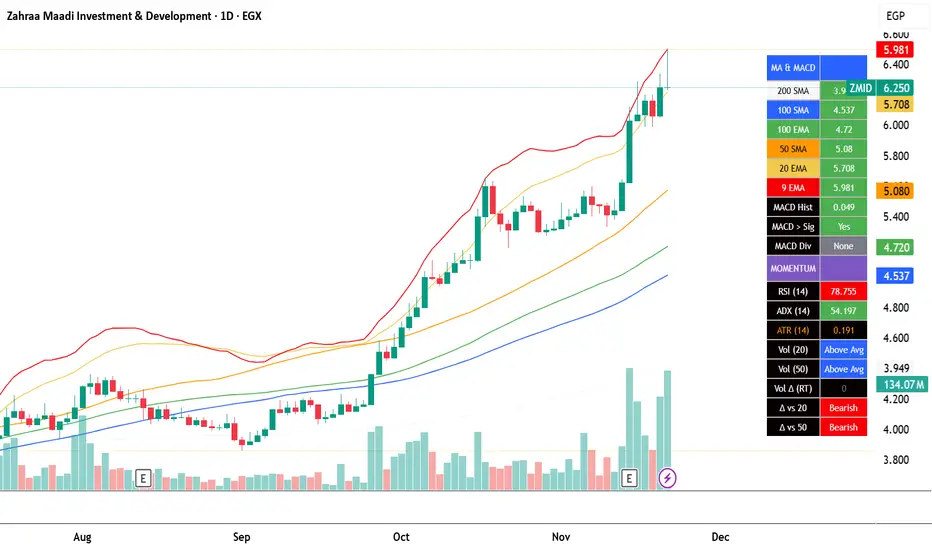
EGX Monitor Dashboard By Biscuits_Trading_Solutionsلوحة مراقبة البورصة المصرية من Biscuits_Trading_Solutions
نظرة عامة:
لوحة مراقبة البورصة المصرية هي أداة تحليل فني شاملة مصممة لتوفير نظرة فورية وواضحة على صحة السوق. تجمع الأداة مؤشرات رئيسية مختارة بعناية لتناسب السوق المصري لتوفر عليك عبء إضافة عدد كبير من المؤشرات في وقت واحد على الشاشة - بما في ذلك متوسطات متحركة، MACD، RSI، ADX، ATR، وتحليل متقدم لحجم التداول (دلتا) - في جدول واحد وسهل القراءة على الرسم البياني. مثالية للمتداولين الذين يحتاجون لتقييم الاتجاه، الزخم، وديناميكيات الحجم في لمحة دون تشويش الشاشة.
English Version is below ⬇️⬇️
المميزات الرئيسية:
* لوحة متابعة للمتوسطات المتحركة: تتابع وتلون وضع السعر بالنسبة لـ 6 متوسطات متحركة رئيسية (200 بسيط، 100 بسيط/آسي، 50 بسيط، 20 آسي، 9 آسي).
* تحليل متقدم لـ MACD: تعرض قيمة هِستوجرام MACD، حالة التقاطع بين MACD وخط الإشارة، وتكشف عن انحرافات صعودية محتملة (Bullish Divergence).
* مقاييس الزخم: تتضمن قراءات RSI و ADX، مع تلوينها للإشارة إلى مناطق الشراء المفرط والبيع المفرط وقوة الاتجاه.
تحليل متطور للحجم:
*دلتا الحجم/السيولة (الفارق بين حجم الشراء وحجم البيع).
* الحجم مقارنة بمتوسطه المتحرك لـ 20 و 50 فترة (لمقارنته بفترة متوسطة 20 شمعة وطويلة 50 شمعة)
* دلتا الحجم مقارنة بمتوسطها المتحرك لـ 20 و 50 فترة لقياس ضغط البيع والشراء.
عرض مرئي نظيف : جميع البيانات معروضة في جدول شبه شفاف يمكن وضعه في أي مكان على الرسم البياني. يتم أيضًا رسم المتوسطات المتحركة بخفة للاستدلال البصري.
مدخلات قابلة للتخصيص : جميع أطوال المؤشرات، المضاعفات، وموضع الجدول قابلة للتعديل كليًا من الإعدادات.
إزاحة الشمعة : تسمح لك بمشاهدة قراءات المؤشر من عدد محدد من الشمعات السابقة، مما يفيد في تحليل الظروف السابقة.
طريقة الاستخدام:
* تقييم الاتجاه: انظر إلى جدول المتوسطات المتحركة. وجود عدة خلايا خضراء (السعر فوق المتوسط) يشير إلى اتجاه صاعد قوي، بينما يشير اللون الأحمر إلى اتجاه هابط.
* تأكيد الزخم: تحقق من مؤشر RSI (شراء مفرط >70، بيع مفرط <30) و ADX (اتجاه قوي >25) لفهم سياق الزخم.
*تأكيد الحجم: استخدم أعمدة الحجم لتأكيد الحركات. حركة السعر المصحوبة بحجم "أعلى من المتوسط" ودلتا "صعودي" تكون أكثر أهمية.
إشارات الدخول/الخروج:
* انحراف MACD الصعودي يمكن أن يشير إلى انعكاس محتمل.
* وجود "نعم" لـ "MACD > Sig" يؤكد الزخم الصعودي.
* قيم ATR المرتفعة تشير إلى زيادة التقلب، وغالبًا ما ترافق الاتجاهات القوية أو اختراقات المستويات.
الإعدادات:
ما عليك سوى إضافة المؤشر إلى الرسم البياني الخاص بك. ستظهر اللوحة تلقائيًا. يمكنك ضبط جميع المعاملات (أطوال المتوسطات المتحركة، إعدادات الحجم، مكان الجدول) في تبويب "الإدخالات" في نافذة المؤشر لتناسب أسلوب تداولك.
إخلاء مسؤولية: جميع الإشارات التي تظهر ليست دعوة للبيع والشراء، هذا المحتوى تعليمي يساعدك على قراءة الشاشة بشكل أفضل، وقرارك الاستثماري يعود لك وحدك.
---
EGX Monitor Dashboard By Biscuits_Trading_Solutions
Overview :
The EGX Monitor Dashboard is a comprehensive technical analysis tool designed to provide a clear and immediate overview of the market's health. It consolidates key indicators, carefully selected for the Egyptian market, saving you the burden of adding a large number of indicators to your screen at once —including moving averages, MACD, RSI, ADX, ATR, and advanced volume delta analysis—into a single, easy-to-read table on your chart. Perfect for traders who need to assess trend, momentum, and volume dynamics at a glance without cluttering their screen.
Key Features :
* Moving Average Dashboard: Tracks and color-codes the price position relative to 6 key moving averages (200 SMA, 100 SMA/EMA, 50 SMA, 20 EMA, 9 EMA).
* Advanced MACD Analysis: Displays the MACD histogram value, the MACD vs. Signal line crossover state, and detects potential bullish divergences.
* Momentum Gauges: Includes RSI and ADX readings, color-coded for overbought/oversold and trend strength conditions.
Advanced Volume/Liquidity Analysis:
* Volume Delta (the difference between buying and selling volume).
* Volume compared to its 20 and 50-period moving averages (for medium-term 20-bar and long-term 50-bar comparisons).
* Volume Delta compared to its 20 and 50-period moving averages to measure buying/selling pressure.
Clean Visualization: All data is presented in a semi-transparent table that can be positioned anywhere on the chart. The moving averages are also plotted lightly for visual reference.
Customizable Inputs: All indicator lengths, multipliers, and the table position are fully adjustable in the settings.
Bar Offset: Allows you to view the indicator readings from a specific number of bars back, useful for analyzing past conditions.
How to Use:
* Trend Assessment: Look at the MA table. A cluster of green "Bullish" cells (price above MA) indicates a strong uptrend, while red indicates a downtrend.
* Momentum Confirmation: Check the RSI (overbought >70, oversold <30) and ADX (strong trend >25) for momentum context.
* Volume Confirmation: Use the volume columns to confirm moves. A price move with "Above Avg" volume and "Bullish" Delta is more significant.
Entry/Exit Clues:
* A "Bullish" MACD divergence can signal a potential reversal.
* A "Yes" for "MACD > Sig" confirms bullish momentum.
* High ATR values indicate increased volatility, often accompanying strong trends or breakouts.
Configuration:
Simply add the indicator to your chart. The dashboard will appear automatically. You can adjust all parameters (MA lengths, volume settings, table position) in the indicator's "Inputs" tab to suit your trading style.
Disclaimer: All signals that appear are not an invitation to buy or sell. This content is educational and is intended to help you read the screen better. Your investment decision is yours alone.
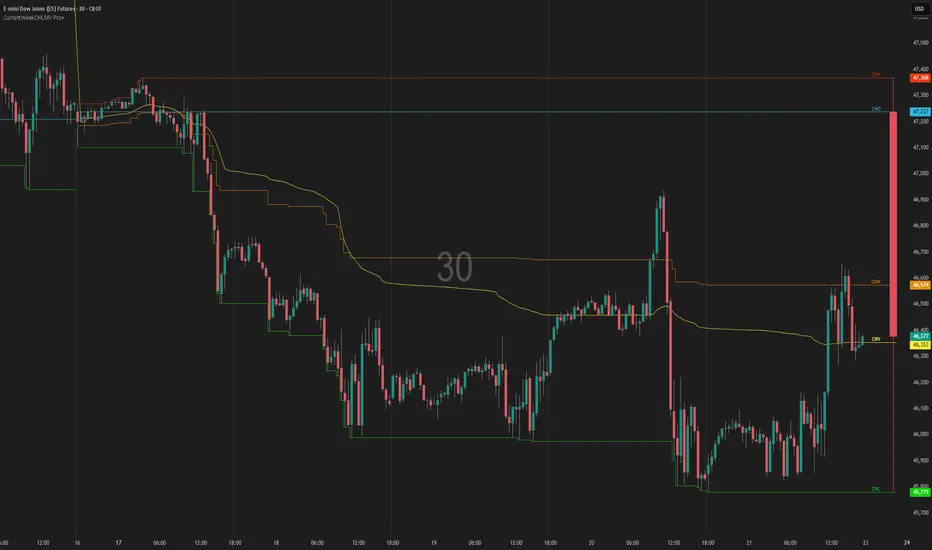
Current Week OHLM + VWAPCurrent Week OHLV + Anchored VWAP – Professional Edition
OVERVIEW
Real-time display of the current trading week’s developing Open, High, Low, Close (live), and anchored VWAP with a full-size current-week candle in the right margin.
IMPLEMENTATION & VALUE ADDED
• Live anchored VWAP updated throughout the week as a dynamic anchor
• Full current-week candle rendered in the right margin
• All levels as exportable plots
• Comprehensive alerts on every level and VWAP interaction
HOW TO USE
Apply to daily or intraday charts. The live VWAP serves as the week’s volume-weighted fair value; the right-margin candle gives instant bias and range context.
CREDIT & TRANSPARENCY
Core methodology: public domain (Current Week OHLC + Anchored VWAP).
Independent implementation with original live candle display, exportable plots, and alerting.
DISCLAIMER
For educational and informational purposes only. Not financial advice. Test thoroughly.
Current Day OHLMV Pro+Current Day OHLM + Anchored VWAP – Professional Edition
OVERVIEW
Real-time display of the current trading day’s developing Open, High, Low, Close (live), and anchored VWAP with a full-size current-day candle rendered in the right margin for instant intraday context.
CONCEPT BACKGROUND
Tracking the live day’s OHLM and anchored VWAP is a public-domain institutional practice used for intraday fair-value assessment and volume-weighted bias.
IMPLEMENTATION & VALUE ADDED
• Live anchored VWAP plotted and updated bar-by-bar as a dynamic key level
• Full current-day candle displayed in the right margin (perfectly aligned with price axis)
• All levels (Open, High, Low, Close, VWAP, Midpoint) as exportable plots for CSV download and custom analysis
• Comprehensive alerts on every level and VWAP touch/break
• Clean, lightweight, no-repaint performance on any intraday timeframe
HOW TO USE
Apply to 1–60 min charts. Use the live VWAP as the primary volume-weighted fair-value line and the right-margin candle for immediate visual context of today’s developing range and bias.
CREDIT & TRANSPARENCY
Core methodology: public domain (Current Day OHLM + Anchored VWAP).
This is an independent implementation. The right-margin live candle display, exportable plots, alerting system, and overall presentation are original.
DISCLAIMER
For educational and informational purposes only. Not financial advice. Test thoroughly.

MMM HVC CDS/CDL @MaxMaserati 3.0MMM HVC CDS/CDL @MaxMaserati 3.0
Highest Volume Candle (HVC) Analysis with Expansion Blocks
This indicator identifies and tracks Highest Volume Candles (HVC) within a customizable lookback period, marking critical institutional activity zones where smart money enters the market. HVC candles represent the highest volume bullish (HBuV) or bearish (HBeV) candles and serve as key structural levels in the Max Maserati Methodology (MMM).
Core Concept
HVC Validation Rules:
HBuV (Highest Bullish Volume): Price can wick below the low for liquidity but must NOT close below it. A confirmed close below triggers a BeBrk (Bearish Break) - signaling a CDS (Change of Direction Short).
HBeV (Highest Bearish Volume): Price can wick above the high for liquidity but must NOT close above it. A confirmed close above triggers a BuBrk (Bullish Break) - signaling a CDL (Change of Direction Long) .
Key Features
HVC Detection & Visualization:
Automatically identifies highest volume candles with customizable arrow labels
Displays volume values and directional bias (↑ HBuV / ↓ HBeV)
Optional auto-hide labels when HVC levels are violated
Market Structure Breaks (BuBrk/BeBrk):
Tracks when HVC levels are broken with confirmed closes
Draws horizontal lines connecting the original HVC to the breaking candle
Labels clearly mark CDS and CDL events for trend reversal identification
HVC eBlocks (Expansion Blocks):
Upon HVC break, creates expansion zones from the break level to the last swing high/low
These zones represent expected revisit and reaction areas where price typically returns to retest institutional activity
Color-coded boxes with automatic extension and violation detection
Configurable maximum box limits to keep charts clean
Smart Violation Management:
Optional auto-removal of violated HVC labels and eBlocks
Visual confirmation when zones remain valid vs. when they're invalidated
Trading Application
After a BuB or BeB occurs, traders anticipate price to revisit the eBlock zone as institutions cover positions or test resolve. These areas become high-probability setups for:
Continuation entries after structural breaks
Reaction zone confirmations for trend alignment
Stop-loss placement beyond institutional activity levels

Better Volume PRO v2.1 (Enhanced + Stats)(Adaptative metrics) Better Volume PRO v2.0 - Quick Reference Guide
## ⚙️ OPTIMAL SETTINGS
```
Timeframe: 1 HOUR (best balance)
Lookback Period: 20
Min Confidence: 70% (85% in volatile markets)
MA Type: EMA
Stats Lookback: 10
Use True Range: ON
Use VWAP: ON
Filter Doji: ON
Multi-Bar Consistency: ON
```
## 🎯 SIGNAL CONDITIONS
### 🟢 BUY Signal
```
✓ Delta > 0 (more buying pressure)
✓ Confidence ≥ 70%
✓ Climax OR Hot Volume
```
### 🔴 SELL Signal
```
✓ Delta < 0 (more selling pressure)
✓ Confidence ≥ 70%
✓ Climax OR Hot Volume
```
### 🔥 HOT Volume
```
Volume > 160% of Volume MA
= Sudden capital influx
```
## 📊 CONFIDENCE SCORE (0-100%)
### Components:
- **40%** Structure (candle body vs wicks)
- **30%** VWAP coherence
- **20%** Volume relative to MA
- **10%** Multi-bar consistency
### Interpretation:
| Range | Quality | Accuracy | Action |
| --- | --- | --- | --- |
| **85-100%** | 🟢 MAXIMUM | 100% | Trade with full confidence |
| **70-85%** | 🟡 HIGH | 67% | Trade with caution |
| **50-70%** | 🟠 MEDIUM | 45% | Context only - don't trade |
| **<50%** | 🔴 LOW | 45% | Ignore completely |
## 📈 TABLE METRICS - QUICK REFERENCE
### CURRENT (single candle):
| Metric | Meaning | Good Value |
| --- | --- | --- |
| **Confidence** | Signal quality | ≥70% |
| **Delta** | Buy - Sell volume | Large absolute value |
| **Vol Excess** | % above MA | ≥60% = Hot |
### AGGREGATED (last N candles):
| Metric | Meaning | Bullish | Bearish |
| --- | --- | --- | --- |
| **Avg Confidence** | Average quality | >70% | >70% |
| **Cum. Delta** | Net accumulation | >0 (positive) | <0 (negative) |
| **Buy Pressure** | % buy candles | >60% | <40% |
| **Net Pressure** | Combined score | >+30 | <-30 |
| **High Conf Count** | Quality consistency | >5/10 | >5/10 |
| **Delta Momentum** | Delta acceleration | Increasing | Decreasing |
| **Volume Trend** | Volume vs avg | Increasing | Increasing |
## ✅ 4-STEP TRADING CHECKLIST
### STEP 1: Context Check (CRITICAL)
```
□ Avg Confidence >70%?
□ Net Pressure supports direction? (>+30 for LONG, <-30 for SHORT)
□ High Conf Count >50%?
If ANY = NO → SKIP THE TRADE
```
### STEP 2: Signal Validation
```
□ BUY or SELL signal present?
□ Confidence ≥70%? (≥85% preferred)
□ Hot Volume or Climax confirming?
```
### STEP 3: Metrics Alignment
```
FOR LONG:
□ Delta > 0 and large
□ Buy Pressure >50%
□ Cum. Delta positive
□ Net Pressure >+10
FOR SHORT:
□ Delta < 0 and large
□ Sell Pressure >50%
□ Cum. Delta negative
□ Net Pressure <-10
```
### STEP 4: Risk Management
```
□ Stop-loss set
□ Position sized based on confidence
□ Monitoring next bars
```
## 🚦 MARKET STATE INTERPRETATION
### 🟢 STRONG LONG SETUP
```
Signal: BUY
Confidence: ≥85%
Delta: Large positive
Net Pressure: >+50
Avg Confidence: >70%
Volume Trend: Increasing
→ TAKE LONG WITH HIGH CONVICTION
```
### 🔴 STRONG SHORT SETUP
```
Signal: SELL
Confidence: ≥85%
Delta: Large negative
Net Pressure: <-50
Avg Confidence: >70%
Volume Trend: Increasing
→ TAKE SHORT WITH HIGH CONVICTION
```
### 🟡 NEUTRAL / CHOPPY
```
Net Pressure: -30 to +30
Avg Confidence: <60%
High Conf Count: <5/10
→ NO TRADE - Wait for clarity
```
### ⚠️ CONTRADICTORY SIGNAL
```
Signal: BUY
BUT Net Pressure: Negative
AND Sell Pressure: >60%
OR Avg Confidence: <50%
→ SKIP - Isolated signal in bad context
```
## ⚡ QUICK TIPS
### DO ✅
- ✓ Use 1H timeframe (optimal)
- ✓ Only trade confidence ≥70%
- ✓ Check context BEFORE signal
- ✓ Combine with on-chain data (Nansen)
- ✓ Trade liquid tokens (>$1M volume)
- ✓ Use stop-loss always
### DON'T ❌
- ✗ Use 5-15min timeframes (too noisy)
- ✗ Ignore aggregated metrics
- ✗ Trade during strong corrections
- ✗ Use on illiquid tokens
- ✗ Trade all signals (quality > quantity)
- ✗ Over-optimize settings
## 🎨 VISUAL REFERENCE
### Signal Shapes:
- **▲ Green Triangle (bottom):** BUY Signal
- **▼ Red Triangle (top):** SELL Signal
- **♦ Orange Diamond (top):** HOT Volume
- **✕ Green/Red X:** Bullish/Bearish Divergence
### Volume Bars:
- **Green (up):** Buy Volume estimate
- **Red (down):** Sell Volume estimate
- **Colors by BV Class:**
- 🟣 Purple: Climax + Churn
- 🟢 Green: Climax Up
- 🔴 Red: Climax Down
- 🟡 Yellow: Churn
- 🔵 Blue: Low Volume
- ⚪ Gray: Normal
### Lines:
- **Yellow:** Volume MA
- **Green/Red (thick):** Delta (transparency = confidence)
- **Blue (thin):** Confidence line
- **Orange dashed:** Min Confidence threshold
## 📊 NET PRESSURE SCORE GUIDE
```
+80 to +100: 🟢🟢🟢 EXTREME BUYING (consider strong LONG)
+50 to +80: 🟢🟢 STRONG BUYING
+30 to +50: 🟢 MODERATE BUYING
-30 to +30: 🟡 NEUTRAL (no clear direction - WAIT)
-50 to -30: 🔴 MODERATE SELLING
-80 to -50: 🔴🔴 STRONG SELLING
-100 to -80: 🔴🔴🔴 EXTREME SELLING (consider strong SHORT)
```
## 🔬 EXPECTED ACCURACY
### Solo BV PRO:
- **Confidence ≥85%:** ~100% (limited samples)
- **Confidence ≥70%:** ~70%
- **Trending markets:** Better performance
- **Volatile corrections:** Lower performance (~40%)
### Combined BV PRO + On-Chain:
- **Expected:** ~80%+ accuracy
- **Filters false signals** from retail traps
- **Confirms institutional positioning**
## ⚠️ WHEN TO AVOID TRADING
```
✗ Avg Confidence <60% (choppy market)
✗ Net Pressure -30 to +30 (no clear direction)
✗ High Conf Count <30% (inconsistent signals)
✗ Volume Trend <-30% (drying liquidity)
✗ Strong market correction ongoing
✗ Major news event imminent
✗ Illiquid token (<$100K daily volume)
```
## 🎓 REMEMBER
1. **Context > Signal:** Never trade signal without checking aggregated metrics
2. **Quality > Quantity:** 7 high-quality signals >> 120 low-quality signals
3. **Combine Tools:** BV PRO (technical) + Nansen (on-chain) = Best results
4. **Risk Management:** Always use stop-loss, even with 100% confidence
5. **Market Conditions:** Indicator performs differently in trending vs choppy markets
---
**Version:** 2.0 | **Optimal TF:** 1H | **Min Confidence:** 70% (85% volatile)
**Created by:** Joe | **License:** Open Source

Market Momentum in Premium & Discount-Delta @MaxMaserati 3.0Market Delta Momentum in Premium & Discount-Delta @MaxMaserati 3.0
══════════════════════════════════════════════════════
Overview
The MMPD 3.0 indicator is an advanced momentum oscillator that combines market structure analysis with institutional order flow concepts. It transforms price action into a normalized 0-100 scale, identifying premium and discount zones where institutional traders typically operate, while simultaneously tracking momentum through specialized body close candles and multi-timeframe synchronization.
This indicator is designed for traders who want to:
══════════════════════════════════════════════════════
Identify high-probability reversal zones using premium/discount analysis
Track momentum divergence between price and the MMPD oscillator
Recognize institutional rejection and acceptance zones
Synchronize multiple timeframes for confluence-based trading decisions
Core Methodology
══════════════════════════════════════════════════════
MMPD Calculation
The Market Delta Momentum indicator uses a proprietary calculation that:
Normalizes price position within a specific period range (0-100 scale)
Applies double smoothing to filter noise
Calculates a balance line (similar to a moving average) to determine bullish/bearish momentum
The relationship between the MMPD line and balance line creates directional candles
Key Zones:
══════════════════════════════════════════════════════
90-100: Extreme Premium (Institutional Selling Zone)
80-90: High Premium (Caution Zone)
65-80: Premium (Bullish Bias)
50-65: Light Premium (Neutral-Bullish)
35-50: Light Discount (Neutral-Bearish)
20-35: Discount (Bearish Bias)
10-20: High Discount (Institutional Buying Zone)
0-10: Extreme Discount (High Probability Buy Zone)
MMM 3.0 Body Close Logic BC and the MMPD 3.0 Body Close Logic MBC
══════════════════════════════════════════════════════
1️⃣ Body Close Analysis (BC & MBC)
Price Body Close (BC)
Bullish BC: Price closes above the previous high AND closes above its open (green candle showing aggressive buying)
Bearish BC: Price closes below the previous low AND closes below its open (red candle showing aggressive selling)
No Body Close (NBC): All other candles - representing consolidation, pause, or loss of momentum
MMPD Body Close (MBC)
Bullish MBC: MMPD closes higher than previous MMPD structure (continuation or reversal momentum)
Bearish MBC: MMPD closes lower than previous MMPD structure (continuation or reversal momentum)
MNBC: MMPD No Body Close - weak or ranging MMPD momentum
BC + MBC Confirmation
When Price BC and MMPD MBC align in the same direction, it signals high-conviction momentum:
Deep Green: Bullish BC + Bullish MBC (Strongest Bullish Signal)
Pale Green: Bullish BC only (Moderate Bullish Signal)
Deep Red: Bearish BC + Bearish MBC (Strongest Bearish Signal)
Pale Pink: Bearish BC only (Moderate Bearish Signal)
2️⃣ Momentum Synchronization System
The indicator compares MBC (MMPD Body Close) momentum against BC (Price Body Close) momentum to identify divergence and synchronization:
Synchronized States:
BULLISH+: High volatility bullish synchronization (BC+MBC aligned, high ATR)
BULLISH-: Low volatility bullish synchronization (BC+MBC aligned, low ATR)
BEARISH+: High volatility bearish synchronization (BC+MBC aligned, high ATR)
BEARISH-: Low volatility bearish synchronization (BC+MBC aligned, low ATR)
SYNCHRONIZED: Both MMPD and Price moving together (standard bullish or bearish move)
Divergence States (Reversal Warnings):
MMPD FAST | PRICE SLOW: MMPD showing strong directional MBC candles while Price shows NBC (pause/consolidation) - Reversal Warning!
If MMPD is bullish MBC but Price is NBC → Potential Bearish Reversal
If MMPD is bearish MBC but Price is NBC → Potential Bullish Reversal
Status Indicators:
BULL / BEAR: Standard synchronized moves
BULL+ / BEAR+: High volatility synchronized moves (aggressive trending)
BULL- / BEAR-: Low volatility synchronized moves (grinding trends)
POT. BULL / POT. BEAR: Potential reversal zones (divergence detected)
BALANCED: Neutral conditions, no clear momentum alignment which is price efficiency
3️⃣ Premium/Discount Breakout Markers
🔴 Red Circle Dots (Premium Exit)
Appears when MMPD closes below 80 after being completely in the 80-100 extreme premium zone
Signals institutional distribution complete, potential reversal or correction
🟢 Green Circle Dots (Discount Exit)
Appears when MMPD closes above 20 after being completely in the 0-20 extreme discount zone
Signals institutional accumulation complete, potential rally or reversal
🔴 Red Squares (Premium Rejection)
Appears on the first candle that fails to touch 80-100 after a Bullish MBC touched that zone
Indicates rejection of premium pricing, bearish signal
🟢 Green Squares (Discount Rejection)
Appears on the first candle that fails to touch 0-20 after a Bearish MBC touched that zone
Indicates rejection of discount pricing, bullish signal
🔻 Red Triangles Down (Bearish Midline Rejection)
Signals potential bearish Resumption
🔺 Green Triangles Up (Bullish Midline Bounce)
Signals potential Bullish Resumption
4️⃣ Multi-Timeframe Dashboard with Candle time to close
The MTF table displays:
6 customizable timeframes (default: 5min, 15min, 1H, 4H, Daily, Weekly)
Premium/Discount Status with color-coded zones for each timeframe
Time to Close (T2C): Live countdown timer for each timeframe candle close
Red warning color when the candle closing time is imminent
4H timeframe auto-detects exchange-specific session starts (ES, NQ, CL, GC, etc.)
Momentum Sync Status: Shows the current synchronization state between MMPD and Price across the chart timeframe
Color Coding:
Premium zones: Green/Cyan colors
Discount zones: Purple/Magenta colors
Intensity increases with extremeness (darker = more extreme)
5️⃣ Delta MMPD Alternative View
Toggle between two oscillator calculations:
MMPD: Original MMPD
Delta MMPD: Volume-weighted delta calculation emphasizing buying/selling pressure
TIPS
══════════════════════════════════════════════════════
Use Multi-Timeframe Confluence: The strongest signals occur when multiple timeframes align in premium/discount zones
Wait for Body Close Confirmation: BC+MBC alignment = highest probability setups
Respect Momentum Sync Warnings: "MMPD FAST | PRICE SLOW" is a critical reversal warning
Trade Premium → Discount or Discount → Premium: Mean reversion from extremes offers best risk/reward
Combine with Price Action: MMPD is a momentum oscillator - always confirm with price structure (support/resistance, trendlines, chart patterns)
Educational Notes
══════════════════════════════════════════════════════
What is Premium/Discount Pricing?
Institutional traders operate based on value zones:
Premium: Price is expensive relative to recent range - institutions distribute (sell)
Discount: Price is cheap relative to recent range - institutions accumulate (buy)
Fair Value (50 line): Equilibrium pricing where institutions pause
MMM 3.0 Body Close Approach Importance
══════════════════════════════════════════════════════
BC (Body Close): Shows price commitment and aggressivity
NBC (No Body Close): Shows indecision, consolidation, or loss of momentum
Consecutive BC candles = strong momentum
NBC candles breaking BC sequence = momentum loss → potential reversal
Momentum Synchronization Theory
══════════════════════════════════════════════════════
When MMPD (momentum) moves aggressively but Price shows NBC (pause), it indicates:
Momentum exhaustion
Smart money distribution/accumulation
Imminent reversal as retail traders get trapped
⚠️ Disclaimer
This indicator is for educational purposes only. Past performance does not guarantee future results. Always practice proper risk management and never risk more than you can afford to lose. Trading involves substantial risk of loss. The creator assumes no responsibility for trading losses incurred using this indicator.

Volume/ADX MarketSession and Economic Calendar Data
Volume / ADX Market Session & Economic Calendar Suite
A multi-asset market intelligence tool combining Volume, ADX/DI trend strength, CVD, VMO, Market Sessions, Divergence, Options Expiry, and a full Forex-Factory Economic Calendar — all auto-adapting to Forex, Oil, Gold, Indices, and Equities.
Key Features
Real-Time Market Sessions
Live-growing session boxes for Sydney, Tokyo, London, New York.
Market Data Dashboard
Cross-asset insights: DXY, VIX, Yields, Oil momentum, Gold ratios, FX trend bias.
Macro Economic Calendar (Forex Factory)
Auto-currency detection, event markers, and alerts before/after events.
CVD (Cumulative Volume Delta)
Real buy/sell pressure + session CVD delta.
Divergence Detection
CVD-based bullish and bearish divergence.
ADX / DI Trend Strength
Strong/weak trend signals with DI cross alerts.
Volume MA Oscillator (VMO)
Volume-based momentum and volatility bands.
Options Expiry Countdown
Auto-detects asset type and shows daily expiry times
(FX 10AM, Gold 1:30PM, Oil 2:30PM, Equity 4PM)
Buy/Sell Score
Grades (A+, A, B, C, D)
Long/Short signal triggers

Demand & Supply Zones With Volume Candle🧬 Demand & Supply Zones With Volume Color Candles — Multi-Timeframe S/R & Liquidity Zones.
🔥Automatic detects and plots dynamic Support & Resistance zones, liquidity areas, and Break-of-Structure (BoS) levels across multiple timeframes.
🔥 Key Factors
Body-Based Swings: Identifies swing highs/lows using Close or Open for precise S/R detection.
Auto Supply & Demand Zones: Creates ATR-sized S/R boxes that extend forward with touch-count tracking.
BoS Detection: Converts broken zones into dotted BoS lines for instant structure shift visibility.
Multi-TF Mapping (TF1–TF9): Plots higher-timeframe S/R levels directly on your chart for confluence.
Clean Overlap Filtering: Removes zones that are too close using ATR-based spacing logic.
Custom Swing Length: Controls sensitivity of pivots for strong or frequent zone formation.
Lookback Management: Stores only the most relevant recent S/R zones to avoid clutter.
Color-Coded Structure: Red = Supply, Blue = Demand, with labels showing touch count + timeframe.
Non-Repainting: Zones are drawn only after confirmed pivots for accurate, reliable structure.
📊 Volume Color Candle — Advanced Market Strength Visualization
Volume Color Candle is a powerful and visually enhanced tool designed to help traders instantly identify high-impact volume events, body-size anomalies, and market imbalances directly on any chart.
This indicator uses Z-Score statistical modeling to classify candles into Normal, Large, and Extreme categories — giving traders a deeper understanding of momentum, volatility, and unusual market activity.
🔍 Key Features
✅ Multi-Source Outlier Detection
Choose what drives the signal:
Volume
Body Size
Any (either becomes an outlier)
All (both must confirm)
This flexibility helps highlight genuine strength or weakness in price action.
🎨 Dynamic Candle Coloring
The script colors candles based on statistical threshold levels:
Normal Moves
Large Moves
Extreme Moves (High Impact)
You can display them as colored bars or full candles, depending on your charting preference.
📉 Low Volume Detection
Spot weak or imbalanced price moves with a dedicated low-volume algorithm:
Highlight candles with unusually low participation
Option to only show candles where volume is low but body is large (imbalance conditions)
Perfect for identifying fake breakouts or trapped liquidity zones.
⚙️How to use :-
default color schemes:
- Blue -> excheme bullish imbalance
- Green -> large bullish imbalance
- Black -> excheme bearish imbalance
- Red -> large bearish imbalance
- yellow -> low volume bars, indicates "balance", after which volatility usually increases and tends to continue the previous trend
🔔 Built-in Alerts
Receive instant alerts when the script detects:
Extreme Outlier Activity
Large Outlier Activity
Ideal for catching volatility spikes, early trend acceleration, or institutional-level moves.
🎯 What This Helps You Identify
Momentum surges
Volume-based breakouts
Manipulation or low-volume traps
Extreme candle events
Trend strength vs weakness
Liquidity pushes and imbalance signals
This makes it a highly valuable tool for scalpers, intraday traders, swing traders, and anyone relying on volume-price analysis.
Protected script
ForexArchitects
Disclaimer
The information and publications are not meant to be, and do not constitute, financial, investment, trading, or other types of advice or recommendations supplied or endorsed by TradingView. Read more in the Terms of Use.

VWAP and IVP Volatility Screener AlertVWAP and IVP Volatility Screener Alert is a multi-asset, institutional-grade market scanner that combines Auto-Anchored VWAP, Implied Volatility Percentile (IVP), Choppiness Index, Strike Price Structure, and Volume Profile (POC / Value Area) to generate high-probability trade signals across multiple symbols.
Designed for traders who rely on volatility regimes, VWAP interactions, trend confirmation, and strike-based price behavior, this tool automatically evaluates up to 10 assets simultaneously and displays actionable BUY/SELL conditions in a unified dashboard and screener panel.
Key Features
1. Multi-Asset Screener (10 Symbols)
Scans FX, indices, commodities, and metals. Displays RSI, ADX, trend, score, volatility regime, VWAP/POC/Value Area position, IVP, and Choppiness. Custom strike increments per asset.
2. Auto-Anchored VWAP System
Auto anchors by Session, Day, Week, Month, or Auto. Includes VWAP bands and bounce detection to show when price is Above, Below, or interacting with VWAP.
3. Volume Profile + POC / Value Area
Generates intraday/session POC, VAH, and VAL. Detects breaks, retests, and bounce signals.
4. IV Percentile (IVP) Engine
Converts realized volatility into IVP and classifies regimes (EXT.HI → EXT.LO). Supports Favorable, Extreme, and High-Volatility modes for different trading styles.
5. Choppiness Index (CHOP)
Identifies trending vs ranging conditions and feeds directly into scoring and alerts.
6. 11-Criteria Alert System
Alert logic includes RSI, ADX, trend, volume, VWAP, POC/VA, strike proximity, std-dev breaks, IVP, CHOP, and score thresholds. Supports Score-Based or Multi-Criteria modes.
7. Price-to-Strike Mapping
Rounds price to the correct strike ladder, detecting reversals, continuation, breakout levels, and helping frame stop-loss/TP zones.
8. Session-Aware Filtering
Filters signals for Asian, London, and NY sessions with custom timezone support.

Volume Color Candle 📊 Volume Color Candle — Advanced Market Strength Visualization
Volume Color Candle is a powerful and visually enhanced tool designed to help traders instantly identify high-impact volume events, body-size anomalies, and market imbalances directly on any chart.
This indicator uses Z-Score statistical modeling to classify candles into Normal, Large, and Extreme categories — giving traders a deeper understanding of momentum, volatility, and unusual market activity.
🔍 Key Features
✅ Multi-Source Outlier Detection
Choose what drives the signal:
Volume
Body Size
Any (either becomes an outlier)
All (both must confirm)
This flexibility helps highlight genuine strength or weakness in price action.
🎨 Dynamic Candle Coloring
The script colors candles based on statistical threshold levels:
Normal Moves
Large Moves
Extreme Moves (High Impact)
You can display them as colored bars or full candles, depending on your charting preference.
📉 Low Volume Detection
Spot weak or imbalanced price moves with a dedicated low-volume algorithm:
Highlight candles with unusually low participation
Option to only show candles where volume is low but body is large (imbalance conditions)
Perfect for identifying fake breakouts or trapped liquidity zones.
⚙️How to use :-
default color schemes:
- Blue -> excheme bullish imbalance
- Green -> large bullish imbalance
- Black -> excheme bearish imbalance
- Red -> large bearish imbalance
- yellow -> low volume bars, indicates "balance", after which volatility usually increases and tends to continue the previous trend
🔔 Built-in Alerts
Receive instant alerts when the script detects:
Extreme Outlier Activity
Large Outlier Activity
Ideal for catching volatility spikes, early trend acceleration, or institutional-level moves.
🎯 What This Helps You Identify
Momentum surges
Volume-based breakouts
Manipulation or low-volume traps
Extreme candle events
Trend strength vs weakness
Liquidity pushes and imbalance signals
This makes it a highly valuable tool for scalpers, intraday traders, swing traders, and anyone relying on volume-price analysis.

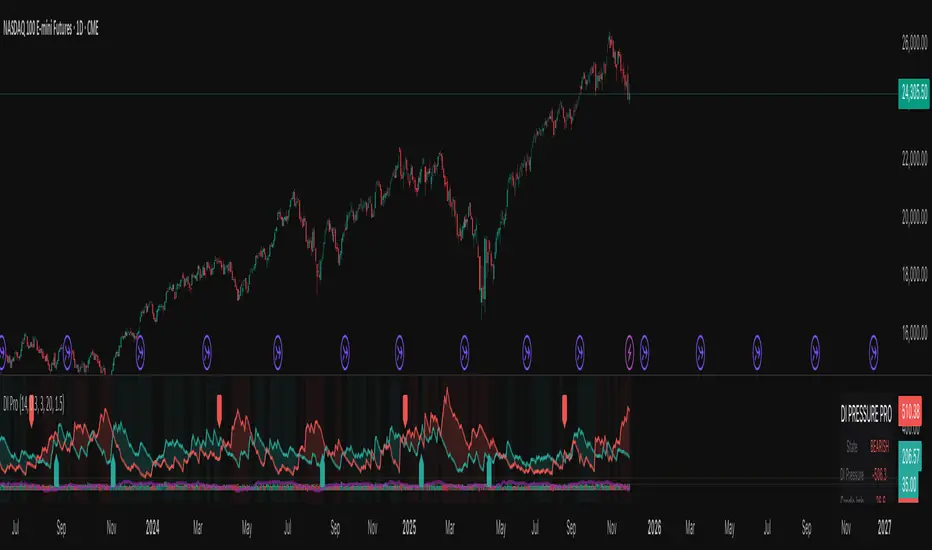
Nexural DI Pressure ImbalanceNexural DI Pressure Imbalance
Overview
This indicator combines traditional Directional Index (DI) analysis with modern order flow concepts to help you identify buying and selling pressure in the market. I built this because I wanted something that goes beyond basic DI calculations and actually shows what's happening inside each candle.
What Makes This Different
Instead of just looking at directional movement, this indicator analyzes:
Candle-by-candle pressure - Where did the price actually close within the candle's range? This tells us who won the battle between buyers and sellers.
Volume-weighted calculations - Low volume moves get less weight, because they're less reliable.
Order flow approximation - Estimates buying versus selling volume based on price action and where the close ended up.
Cumulative delta - Tracks the running total of buy/sell imbalance over your chosen period.
How to Read It
The main display shows two lines:
DI+ (green) - Buying pressure
DI- (red) - Selling pressure
When DI+ is above DI-, buyers are in control. When DI- is on top, sellers have the edge.
The volume bars at the bottom change color based on whether the candle was bought or sold, with brighter colors indicating stronger order flow.
The candle imbalance histogram (middle section) shows you the internal pressure within each candle. Positive values mean the close was near the high, negative means it closed near the low.
The purple cumulative delta line tracks the overall buying/selling imbalance over time. When it's rising, there's more buying volume. When falling, more selling.
Info Table
The table in the top-right gives you a quick summary:
State - Current market condition (Strong Buy, Bullish, Bearish, Strong Sell)
DI Pressure - Net directional pressure
Candle Imb - Current candle imbalance score
Delta - Cumulative volume delta
Composite - Combined score from all components
Volume - Current volume level (Low, Normal, High, Extreme, Strong)
Flow - Order flow strength (Weak, Moderate, Strong)
Settings You Can Adjust
Core Settings:
DI Length - How many periods to use for DI calculation (default 14)
Volume Weighting - Whether to reduce the impact of low volume bars
ATR Normalization - Scales the indicator to match current volatility
Low Volume Threshold - What counts as "low volume" (default 0.3 = 30% of average)
Candle Analysis:
Imbalance Smoothing - How much to smooth the candle imbalance line
Delta Lookback Period - How far back to track cumulative delta
Order Flow:
Flow Sensitivity - Higher values = stricter requirements for "strong flow" signals
Visual:
Toggle various display elements on/off to clean up your chart
Alerts
The indicator includes several alert conditions:
Strong buy/sell signals (DI crossovers with strong volume)
Candle imbalance flips (pressure shifts)
Extreme pressure conditions (composite score above 70 or below -70)
Divergences between price and indicator
Strong order flow detection
Best Use Cases
This works well for:
Confirming trend strength
Identifying potential reversals when price and pressure diverge
Spotting low-conviction moves (weak volume plus conflicting signals)
Finding high-probability entries when all components align
A Few Notes
Low volume periods get a gray background warning - be careful with signals during these times
The indicator combines multiple analysis methods, so you're getting a more complete picture than any single metric alone
Extreme readings (bright green/red backgrounds) often precede reversals or consolidation
Works on any timeframe, though I find it most useful on 5-minute charts and up
This is not a magic bullet, but it does help you see what's actually happening beneath price action. Use it alongside your other analysis tools and always manage your risk.
Buy, Sell and Trend Signal by ToluThis indicator is a simple guidance for the trend. Best works in index charts to show general market trend. Use it in daily graphs. In lower periods there may be more fake signals due to daily noise. Also intraday signals may be fake so better use , is more meaningful when close to trading session. I do not accept any responsiblity from the use of this indicator.
Risk Disclaimer
It is important to understand that this indicator is purely for educational purposes, and the information presented must be considered only general in nature.
The information or the signals provided does not take your specific needs or circumstances into consideration, and you must look at your own personal situation and requirements before making any financial decisions, and seek independent financial advice if necessary.

RSI + 55 EMA + Volume (SL Marked, No Engulfing)This is to help entering in trades by considering 50 EMA and RSI indicators, Volume is used for confirmations

VWAP ±2σ Entry Signals (volume Weighted)This indicator builds a session based VWAP and plots the upper and lower 2nd standard deviation bands around it. These bands act as dynamic volatility edges for the session. When price reaches these outer bands, it often represents an extreme stretch away from fair value a place where mean reversion or exhaustion can occur.
The indicator generates trade signals only when price approaches the band from the correct direction, which filters out a lot of noise and reduces false touches.
How It Works
VWAP is calculated from the start of each session.
Standard deviation is computed using volume weighted prices, so the bands expand and contract with real market activity.
The upper and lower 2σ bands form natural "overextended" zones around VWAP.
Most VWAP band strategies fire signals every time price touches a band which produces a lot of junk signals.
This version avoids that by requiring direction based touches, meaning:
If price is already above the band, no sell signal appears.
If price is already below the band, no buy signal appears.

Time-Decay Liquidity Zones [BackQuant]Time-Decay Liquidity Zones
A dynamic liquidity map that turns single-bar exhaustion events into fading, color-graded zones, so you can see where trapped traders and unfinished business still matter, and when those areas have finally stopped pulling price.
What this is
This indicator detects unusually strong impulsive moves into wicks, converts them into supply or demand “zones,” then lets those zones decay over time. Each zone carries a strength score that fades bar by bar. Zones that stop attracting or rejecting price are gradually de-emphasized and eventually removed, while the most relevant areas stay bright and obvious.
Instead of static rectangles that live forever, you get a living liquidity map where:
Zones are born from objective criteria: volatility, wick size, and optional volume spikes.
Zones “age” using a configurable decay factor and maximum lifetime.
Zone color and opacity reflect current relative strength on a unified clear → green → red gradient.
Zones freeze when broken, so you can distinguish “active reaction areas” from “historical levels that have already given way”.
Conceptual idea
Large wicks with strong volatility often mark areas where aggressive orders met hidden liquidity and got absorbed. Price may revisit these areas to test leftover interest or to relieve trapped positions. However, not every wick matters for long. As time passes and more bars print, the market “forgets” some areas.
Time-Decay Liquidity Zones turns that idea into a rule-based system:
Find bars that likely reflect strong aggressive flows into liquidity.
Mark a zone around the wick using ATR-based thickness.
Assign a strength score of 1.0 at birth.
Each bar, reduce that score by a decay factor and remove zones that fall below a threshold or live too long.
Color all surviving zones from weak to strong using a single gradient scale and a visual legend.
How events are detected
Detection lives in the Event Detection group. The script combines range, wick size, and optional volume filters into simple rules.
Volatility filter
ATR Length — computes a rolling ATR over your chosen window. This is the volatility baseline.
Min range in ATRs — bar range (High–Low) must exceed this multiple of ATR for an event to be considered. This avoids tiny bars triggering zones.
Wick filters
For each bar, the script splits the candle into body and wicks:
Upper wick = High minus the max(Open, Close).
Lower wick = min(Open, Close) minus Low.
Then it tests:
Upper wick condition — upper wick must be larger than Min wick size in ATRs × ATR.
Lower wick condition — lower wick must be larger than Min wick size in ATRs × ATR.
Only bars with a sufficiently long wick relative to volatility qualify as candidate “liquidity events”.
Volume filter
Optionally, the script requires a volume spike:
Use volume filter — if enabled, volume must exceed a rolling volume SMA by a configurable multiplier.
Volume SMA length — period for the volume average.
Volume spike multiplier — how many times above the SMA current volume needs to be.
This lets you focus only on “heavy” tests of liquidity and ignore quiet bars.
Event types
Putting it together:
Upper event (potential supply / long liquidation, etc.)
Occurs when:
Upper wick is large in ATR terms.
Full bar range is large in ATR terms.
Volume is above the spike threshold (if enabled).
Lower event (potential demand / short liquidation, etc.)
Symmetric conditions using the lower wick.
How zones are constructed
Zone geometry lives in Zone Geometry .
When an event is detected, the script builds a rectangular box that anchors to the wick and extends in the appropriate direction by an ATR-based thickness.
For upper (supply-type) zones
Bottom of the zone = event bar high.
Top of the zone = event bar high + Zone thickness in ATRs × ATR.
The zone initially spans only the event bar on the x-axis, but is extended to the right as new bars appear while the zone is active.
For lower (demand-type) zones
Top of the zone = event bar low.
Bottom of the zone = event bar low − Zone thickness in ATRs × ATR.
Same extension logic: box starts on the event bar and grows rightward while alive.
The result is a band around the wick that scales with volatility. On high-ATR charts, zones are thicker. On calm charts, they are narrower and more precise.
Zone lifecycle, decay, and removal
All lifecycle logic is controlled by the Decay & Lifetime group.
Each zone carries:
Score — a floating-point “importance” measure, starting at 1.0 when created.
Direction — +1 for upper zones, −1 for lower zones.
Birth index — bar index at creation time.
Active flag — whether the zone is still considered unbroken and extendable.
1) Active vs broken
Each confirmed bar, the script checks:
For an upper zone , the zone is counted as “broken” when the close moves above the top of the zone.
For a lower zone , the zone is counted as “broken” when the close moves below the bottom of the zone.
When a zone breaks:
Its right edge is frozen at the previous bar (no further extension).
The zone remains on the chart, but is no longer updated by price interaction. It still decays in score until removal.
This lets you see where a major level was overrun, while naturally fading its influence over time.
2) Time decay
At each confirmed bar:
Score := Score × Score decay per bar .
A decay value close to 1.0 means very slow decay and long-lived zones.
Lower values (closer to 0.9) mean faster forgetting and more current-focused zones.
You are controlling how quickly the market “forgets” past events.
3) Age and score-based removal
Zones are removed when either:
Age in bars exceeds Max bars a zone can live .
This is a hard lifetime cap.
Score falls below Minimum score before removal .
This trims zones that have decayed into irrelevance even if their age is still within bounds.
When a zone is removed, its box is deleted and all associated state is freed to keep performance and visuals clean.
Unified gradient and color logic
Color control lives in Gradient & Color . The indicator uses a single continuous gradient for all zones, above and below price, so you can read strength at a glance without guessing what palette means what.
Base colors
You set:
Mid strength color (green) — used for mid-level strength zones and as the “anchor” in the gradient.
High strength color (red) — used for the strongest zones.
Max opacity — the maximum visual opacity for the solid part of the gradient. Lower values here mean more solid; higher values mean more transparent.
The script then defines three internal points:
Clear end — same as mid color, but with a high alpha (close to transparent).
Mid end — mid color at the strongest allowed opacity.
High end — high color at the strongest allowed opacity.
Strength normalization
Within each update:
The script finds the maximum score among all existing zones.
Each zone’s strength is computed as its score divided by this maximum.
Strength is clamped into .
This means a zone with strength 1.0 is currently the strongest zone on the chart. Other zones are colored relative to that.
Piecewise gradient
Color is assigned in two stages:
For strength between 0.0 and 0.5: interpolate from “clear” green to solid green.
Weak zones are barely visible, mid-strength zones appear as solid green.
For strength between 0.5 and 1.0: interpolate from solid green to solid red.
The strongest zones shift toward the red anchor, clearly separating them from everything else.
Strength scale legend
To make the gradient readable, the indicator draws a vertical legend on the right side of the chart:
About 15 cells from top (Strong) to bottom (Weak).
Each cell uses the same gradient function as the zones themselves.
Top cell is labeled “Strong”; bottom cell is labeled “Weak”.
This legend acts as a fixed reference so you can instantly map a zone’s color to its approximate strength rank.
What it plots
At a glance, the indicator produces:
Upper liquidity zones above price, built from large upper wick events.
Lower liquidity zones below price, built from large lower wick events.
All zones colored by relative strength using the same gradient.
Zones that freeze when price breaks them, then fade out via decay and removal.
A strength scale legend on the right to interpret the gradient.
There are no extra lines, labels, or clutter. The focus is the evolving structure of liquidity zones and their visual strength.
How to read the zones
Bright red / bright green zones
These are your current “major” liquidity areas. They have high scores relative to other zones and have not yet decayed. Expect meaningful reactions, absorption attempts, or spillover moves when price interacts with them.
Faded zones
Pale, nearly transparent zones are either old, decayed, or minor. They can still matter, but priority is lower. If these are in the middle of a long consolidation, they often become background noise.
Broken but still visible zones
Zones whose extension has stopped have been overrun by closing price. They show where a key level gave way. You can use them as context for regime shifts or failed attempts.
Absence of zones
A chart with few or no zones means that, under your current thresholds, there have not been strong enough liquidity events recently. Either tighten the filters or accept that recent price action has been relatively balanced.
Use cases
1) Intraday liquidity hunting
Run the indicator on lower timeframes (e.g., 1–15 minute) with moderately fast decay.
Use the upper zones as potential sell reaction areas, the lower zones as potential buy reaction areas.
Combine with order flow, CVD, or footprint tools to see whether price is absorbing or rejecting at each zone.
2) Swing trading context
Increase ATR length and range/wick multipliers to focus only on major spikes.
Set slower decay and higher max lifetime so zones persist across multiple sessions.
Use these zones as swing inflection areas for larger setups, for example anticipating re-tests after breakouts.
3) Stop placement and invalidation
For longs, place invalidation beyond a decaying lower zone rather than in the middle of noise.
For shorts, place invalidation beyond strong upper zones.
If price closes through a strong zone and it freezes, treat that as additional evidence your prior bias may be wrong.
4) Identifying trapped flows
Upper zones formed after violent spikes up that quickly fail can mark trapped longs.
Lower zones formed after violent spikes down that quickly reverse can mark trapped shorts.
Watching how price behaves on the next touch of those zones can hint at whether those participants are being rescued or squeezed.
Settings overview
Event Detection
Use volume filter — enable or disable the volume spike requirement.
Volume SMA length — rolling window for average volume.
Volume spike multiplier — how aggressive the volume spike filter is.
ATR length — period for ATR, used in all size comparisons.
Min wick size in ATRs — minimum wick size threshold.
Min range in ATRs — minimum bar range threshold.
Zone Geometry
Zone thickness in ATRs — vertical size of each liquidity zone, scaled by ATR.
Decay & Lifetime
Score decay per bar — multiplicative decay factor for each zone score per bar.
Max bars a zone can live — hard cap on lifetime.
Minimum score before removal — score cut-off at which zones are deleted.
Gradient & Color
Mid strength color (green) — base color for mid-level zones and the lower half of the gradient.
High strength color (red) — target color for the strongest zones.
Max opacity — controls the most solid end of the gradient (0 = fully solid, 100 = fully invisible).
Tuning guidance
Fast, session-only liquidity
Shorter ATR length (e.g., 20–50).
Higher wick and range multipliers to focus only on extreme events.
Decay per bar closer to 0.95–0.98 and moderate max lifetime.
Volume filter enabled with a decent multiplier (e.g., 1.5–2.0).
Slow, structural zones
Longer ATR length (e.g., 100+).
Moderate wick and range thresholds.
Decay per bar very close to 1.0 for slow fading.
Higher max lifetime and slightly higher min score threshold so only very weak zones disappear.
Noisy, high-volatility instruments
Increase wick and range ATR multipliers to avoid over-triggering.
Consider enabling the volume filter with stronger settings.
Keep decay moderate to avoid the chart getting overloaded with old zones.
Notes
This is a structural and contextual tool, not a complete trading system. It does not account for transaction costs, execution slippage, or your specific strategy rules. Use it to:
Highlight where liquidity has recently been tested hard.
Rank these areas by decaying strength.
Guide your attention when layering in separate entry signals, risk management, and higher-timeframe context.
Time-Decay Liquidity Zones is designed to keep your chart focused on where the market has most recently “cared” about price, and to gradually forget what no longer matters. Adjust the detection, geometry, decay, and gradient to fit your product and timeframe, and let the zones show you which parts of the tape still have unfinished business.
