Volume Highlighter(VM) by Tirano안녕하세요. 다이너스티 팀의 안드레아 입니다.
기존에 티라노라는 이름으로 활동했습니다
Volume Highlighter (Vm) 소개
주식시장에서 흔히 중요하게 생각하는 지표 중 하나가 거래량 입니다.
거래량이 "많이" 나올때가 하나의 기준이 되지요.
본 지표는 평균 거래량을 파란색 선으로, 평균 거래량의 일정 배수를 빨간색 선으로 표현하여 발생한 거래량이 빨간색 선을 상향돌파할때 노란색으로 강조해 주는 기능을 가지고있습니다.
기타 문의사항은 댓글 남겨주시면 감사하겠습니다.
Hi. this is Andreas of the Dynasty team.
Introduction to Volume Highlighter (Vm)
One of the most important indicators in the stock market is trading volume.
It is a standard when the volume of transactions is "much".
This indicator has the function of highlighting the average trading volume as blue line and a certain number of average trading volume as red line and highlighting when the trading volume exceeds the red line.
If you have any other questions, please leave a comment.
스크립트에서 "volume"에 대해 찾기

vRSI-volume detectorVolume RSI and standart deviation of mean volume calculation impose on one another
for easy detection of breakout volumes

VolumeS as stochThis volume indicator is my design. in this example we can use it as stoch but only this one based on pure volume .
since it a volume and not price based it allow us to see the real trend before the price go up or down. And by simple math of conversion volume number to real number . we can add this indicator to any indicator that we choose and we can enhance it affect.
this is just concept idea. as the real best setting for this need still to be found:)
if you want o make it faster or slower just change the smooth or length setting
so have fun

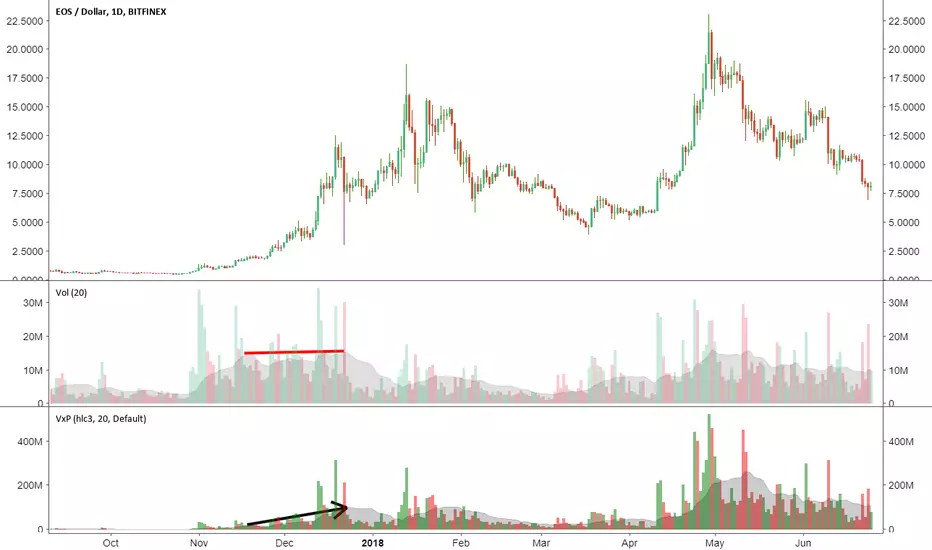
Volume x PriceThis is a simple indicator that calculates volume times price (money volume). Both asset volume and money volume are important indicators in TA. As you can see in the chart above, money volume (moving average) was increasing while the asset volume was not during late 2017. This could have led to wrong interpretations. Money volume becomes more important to consider when the difference in asset price is 'relatively' high.
Features:
- In addition to default options on volume indicator, it is possible to color volume bars based on "money flow multiplier" sign (close-(low+high)/2)
- Money factor can be disabled to show regular volume
Note: Most exchanges show asset volume but there are some like Bitmex that show money volume. Using this indicator on Bitmex type tickers should be avoided.
PS: I couldn't find any indicator for money volume so I had to develop this.
Your feedback is very welcome. If you know similar indicators, please let me know.
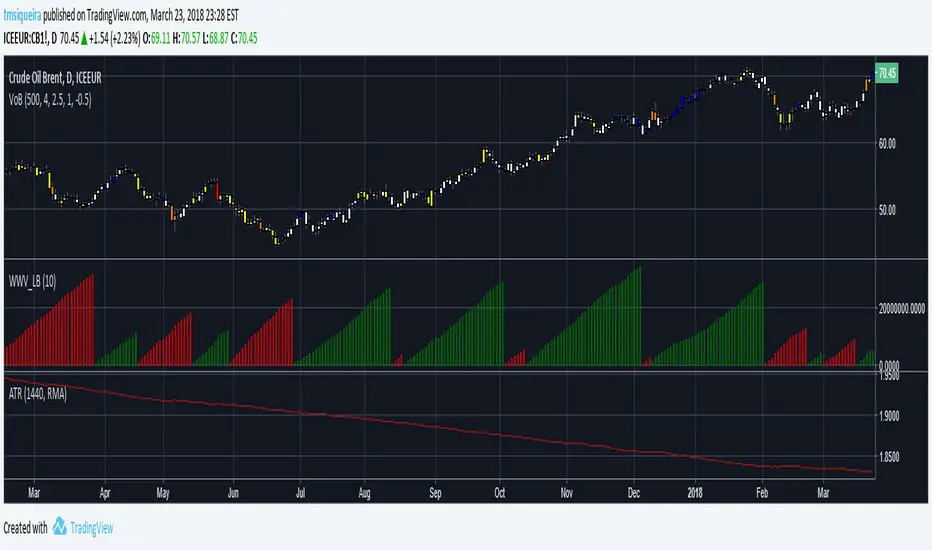
Volumes on BarEste indicador colore as cores do candle de acordo com o volume.
Desabilitar a visibilidade do candle original.
Volume-Based Candle Shading Pro [LTS]Overview
Volume-Based Candle Shading Pro is a visual aid that highlights how “unusual” each bar’s volume is compared to recent activity. It adjusts candle colors based on whether volume is above, below, or near its average, helping you quickly spot high-activity pushes and quiet rotations on any symbol or timeframe.
How it works
For each bar, the script calculates a simple moving average of volume over a user-defined lookback. It then compares the current bar’s volume to that average.
Bullish candles start from a bullish base color, and bearish candles from a bearish base color. Depending on the volume ratio, that base color is blended toward a “high volume mix” color when volume is elevated, or toward a “low volume mix” color when volume is muted. The strength of the blend increases as the bar’s volume moves further away from the average, so extreme volume stands out visually while average bars remain close to the base colors.
Colors are applied with the built-in barcolor() function, so the indicator only affects candle appearance; it does not modify price, volume, or any other chart values.
Inputs
Bullish Base Color / Bearish Base Color
Primary colors used for up and down candles when volume is close to its average.
High Volume Mix Color
Color that is blended into the base color when volume is above its moving average. This is typically chosen as a darker or more intense shade to make heavy-volume bars stand out.
Low Volume Mix Color
Color that is blended into the base color when volume is below its moving average. Many users choose a lighter shade to visually de-emphasize low-participation bars.
Volume MA Length
Number of previous bars used to compute the average volume. Shorter lengths make the shading respond more quickly to recent changes in activity; longer lengths provide a smoother, more stable baseline.
Typical use cases
Highlighting high-volume breakouts, breakdowns, or rejection candles without adding extra panels or indicators.
Distinguishing between strong, well-participated moves and low-volume drifts that may be less significant.
Combining with your existing price-action tools to visually filter which candles deserve more attention based on relative volume.
All calculations are based on historical volume and the current bar only; the script does not use future data or repaint past candles. It is intended as a visual aid and should be combined with your own analysis and risk management.

Volume Weekdays/WeekendsShow weekend volumes in a difference colour and calculate two separate moving averages over the lookback period.

Volume Ratio(出来高比率)This bar chart shows the ratio of volume.
It is a ratio to the number of shares issued, and floating shares.
You will need to enter number of shares issued, and floating shares.
The value to be entered is in millions.
If the volume continues to exceed the float, there is a possibility that some kind of major movement will occur.
この棒グラフは発行済株式、浮動株に対する出来高の比率を示します。
利用には発行済株式数、浮動株数を入力する必要があります。
浮動株を上回るような出来高が続く場合、何かしらの大きな動きが起こる可能性があります。

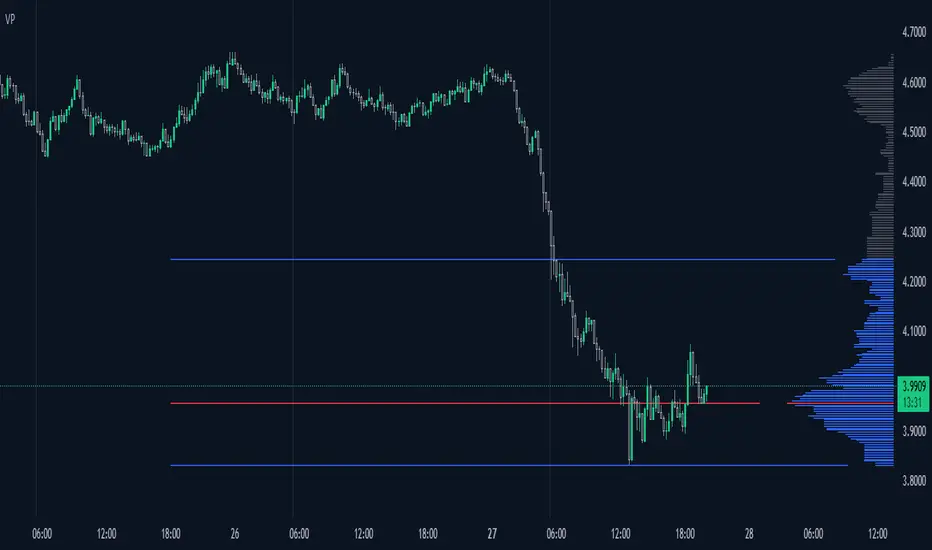
Volume ProfileThis is a Volume Profile based on pine script arrays.
The main idea behind this script is from the user @IldarAkhmetgaleev .
He created an awesome piece of code for free users on tradingview.
Here are some changes to the main script:
0. Used Pine Script Arrays for doing/storing calculations.
1. The bar labels are replaced with lines.
2. Added a POC line.
3. Bar growing directions changed from right to left.
4. Added an option to change bar width.
Inputs:
0. Volume Lookback Depth : Number of bars to look back for volume calculations.
1. Bar Length Multiplier : Bar length multiplier to make bar long or short.
2. Bar Horizontal Offset : Horizontal distance from the current bar in the right direction.
3. Bar Width : Width of the bars.
4. Show POC Line : Show or hide the POC line.
Happy trading.

Volume/Price Alert (idea from a dear TV trader)Simple code that finds a sell candle following a buy candle that has higher volume.

Volume Weighted Initial Balance This indicator dynamically calculates and plots a Volume-Weighted Initial Balance (VW-IB) for U.S. equity trading sessions (Regular Trading Hours: 9:30–16:00 ET). Unlike traditional time-based Initial Balance (fixed first 30/60 minutes), this version ends the IB formation when a user-defined percentage of the 20-day Average Daily Volume (ADV) is reached – providing a more adaptive, market-activity-driven range that better reflects actual participation.
Key Concepts and Methodology:
- 20-day Average Daily Volume (ADV20) is calculated using daily volume from the security's daily timeframe.
- A customizable target volume percentage (default 25%, adjustable 10–50%) determines the threshold (e.g., 25% of ADV20).
- The Initial Balance period begins at 9:30 AM ET and accumulates intrabar volume in real time.
- The IB completes on the first bar where either:
- Cumulative volume since open reaches or exceeds the target, OR
- A safety time cap (default 30 minutes, adjustable 15–60) is hit.
- Once complete, the script locks in the high and low of the IB period and plots them as horizontal lines.
- Additionally, it maintains a rolling 20-day history of prior IB ranges and computes their average. This average range is projected as a centered band around today's 9:30 open price, giving traders a statistical expectation of "normal" early-session volatility based on recent behavior.
Visual Features:
- Solid green/red lines for today's completed IB high and low.
- Blue circled lines and lightly filled band showing the 20-day average IB projection (centered on actual 9:30 open price).
- Subtle background shading while the IB is still forming.
- A clean top-right table displaying live status: completion state, today's IB range, 20-day average range, ADV20, and volume target.
- A label appears at completion showing exact range, minutes taken, and volume reached.
Usage Ideas:
- Use the VW-IB high/low as early support/resistance or breakout levels.
- Compare today's actual IB range to the 20-day average band for expansion/contraction context (wide today = high volatility day potential).
- Ideal for day traders on stocks, ETFs, or futures with clear RTH sessions (e.g., ES, NQ, SPY, QQQ, AAPL).
- Built-in alert fires only once per day when the VW-IB completes.
This is not a simple replication of fixed-time Initial Balance indicators. The volume-weighted termination (instead of rigid clock time), combined with real-time intrabar volume accumulation, safety time cap, rolling 20-day average projection band centered on actual open, and comprehensive live table, makes it uniquely adaptive and informative.

Montosca's Volume Delta Volume Delta Montosca - Indicator Summary
Volume Delta Montosca is a specialized Pine Script indicator for TradingView designed to analyze buying and selling pressure within each candle. It focuses on identifying high-impact volume events combined with strong directional dominance.
Key Features
1. Volume Delta Visualization
Displays volume bars split into Buy Volume (Blue) and Sell Volume (Red).
Includes centered text labels inside the bars showing the exact percentage of buy and sell volume for clear readability.
2. Signal Generation Logic (Triangles)
The indicator generates Buy (Blue Triangle) and Sell (Red Triangle) signals based on two strict criteria that must be met simultaneously:
Criterion A: Significant Volume (SMA Filter)
The current candle's volume must exceed a dynamic threshold.
This threshold is calculated using a Simple Moving Average (SMA) of the volume (e.g., 20 periods) multiplied by a user-defined Adjustment Factor (e.g., 150%).
Example: If the factor is 150%, the volume must be 1.5x higher than the average.
Criterion B: Directional Dominance
The candle must show strong internal conviction.
The Buy Percentage (for long signals) or Sell Percentage (for short signals) must exceed a specific Dominance Threshold (e.g., 70%).
3. Simplified Analysis
Alerts: Integrated alert conditions for both Buy and Sell signals for automated trading or notifications.

Volume breakdownThis indicator is not granted for buying and selling confirmation, it is only for analysis. Enter or exist buy or sell is your decision and under your responsibility.
explanation:
1- Blue color is the average buy volume in current used timeframe.
- When blue color start to appear, the cal volume is begin.
- As blue color rise, the buy volume is increasing.
- When blue color switched to light blue, cal volume will start to decrease.
- When blue color decline and disappear, cal considered to end.
2- Orange color is the average sell volume in current used timeframe.
- When orange color appears without blue color, put volume is begin.
- As orange color rise, the sell volume is increasing.
- When orange color start to decline, put volume will start to decrease.
- When blue color appears, put considered to end.
3- Green color is the actual buy volume in current used timeframe.
4- Red color is the actual sell volume in current used timeframe.
5- The volume numbers on the right is very important for accuracy.

Volume High Alert by ToledoCandelariaThis custom TradingView indicator visualizes volume activity by plotting colored boxes under each bar, highlighting different volume levels relative to a moving average. It helps traders identify significant volume spikes or drops, which can signal potential market moves or reversals.Key Features:Volume Analysis: The indicator compares the current bar's volume to a user-defined Simple Moving Average (SMA) of volume, calculated over a customizable period (default: 30 bars).
Color-Coded Boxes: Each bar is represented by a box with a color indicating its volume strength:Purple: Ultra-high volume (exceeds the SMA by a user-set multiplier, default: 2.0x).
Yellow: High volume (exceeds the SMA by a smaller multiplier, default: 1.5x, but below ultra-high).
Blue: Low volume (below the SMA by a user-set multiplier, default: 0.5x).
Green: Normal volume (falls within the defined thresholds).
Customizable Settings:Adjust the SMA length to fine-tune the volume baseline.
Modify the multipliers for ultra-high, high, and low volume thresholds.
Set the width of the boxes (in bars) for visual clarity.
Limit the number of displayed boxes (default: 500) to manage chart performance.
Alerts: The indicator includes an alert condition that triggers when a high-volume (yellow) bar is detected, allowing traders to stay informed of significant volume spikes in real-time.
How to Use:
Add the indicator to your TradingView chart (not as an overlay) and adjust the input settings to match your trading strategy. Watch for purple and yellow boxes to spot potential breakout or reversal signals, and use blue boxes to identify periods of low activity. Enable the alert to receive notifications for high-volume bars.This indicator is ideal for traders looking to monitor volume surges and lulls, providing a clear visual representation of market activity directly on the chart.
I hope that helps!
by Excalibur

Volume mura visionOverview
A simple, readable volume tool that highlights volume spikes relative to a moving-average baseline. Bars are color-coded:
Spike UP (price closed up)
Spike DOWN (price closed down)
Below-average volume
Near/above MA but not a spike (neutral)
Optional: plot the selected Volume MA as a line.
How it works
1. Compute a Volume MA (SMA/EMA/RMA/WMA) over Volume MA Length.
2. A spike occurs when Volume ≥ MA × (1 + Spike threshold%).
3. Bar color:
Spike + up candle → Spike UP color
Spike + down candle → Spike DOWN color
Volume < MA → Below-MA grey
Otherwise → Base grey
4. The MA line can be shown/hidden.
Inputs
Volume MA Length (len) — lookback for the volume moving average.
Spike threshold (%) over MA (thr_pct) — how far above the MA a bar must be to count as a spike.
MA Type (ma_type) — SMA / EMA / RMA / WMA for the volume baseline.
Show MA line (showMA) — toggle the MA overlay on the volume pane.
Colors
Base grey — volume near/above MA but below spike threshold.
Below-MA grey — volume below the MA.
Spike UP — spike on an up candle (close ≥ open).
Spike DOWN — spike on a down candle.
Alert
Volume spike — fires when Volume ≥ MA × (1 + threshold).
Usage tips
Lower the threshold to catch more activity; raise it to see only major bursts.
Shorter MA length reacts faster (more spikes); longer length smooths noise.
Combine with price action (breakouts, reversals) to confirm whether spikes signal participation or exhaustion.
Disclaimer
Educational tool, not financial advice. Trading involves risk.

Volume Stack with Dollar Volume ScoreThis script is designed to analyze candles for buy/sell pressure, volume flows, and generate intuitive emoji-based signals. Its core function is to help traders visually and quantitatively interpret price and volume behavior for potential bullish, bearish, or neutral market states.
Key Features and Logic
Price Range Analysis: Calculates the candle's price range and determines the proportion of volume attributed to buyers and sellers using buy_percent and sell_percent.
Market State Classification:
Bullish/Bearish/Neutral: Based on buy/sell percentage comparisons.
Strong Signals: Flags when buy/sell pressure exceeds defined thresholds (≥0.75).
Transitions: Detects when states shift sharply (e.g., from bull to strong bear).
Visual Cue System:
Uses different emojis (📈, 📉, 🚀, 🔥, 💎, 💀, ❌) to mark normal, strong, transition, and neutral signals for easy chart interpretation.
Dollar Volume Calculation: Multiplies close price by volume to derive "dollar volume" per bar. Normalizes this with a moving average for context-sensitive spike detection.
Scoring Mechanism:
Dollar Volume Score: Evaluates the normalized change in dollar volume, assigning scores for strong (±2), mild (±1), or neutral (0) changes.
Buy/Sell Pressure Score: Calculates a simple pressure score based on buy/sell proportions for each candle.
Composite Score: Combines both scores to define the overall bullish/bearish/neutral state.
State & Emoji Plotting:
Plots respective emojis at the chart bottom depending on composite score and state (bullish, bearish, strong moves, transitions, neutral).
Alerts:
Sends alerts for key transitions (like bull-to-strong-bear), strong moves, and neutral states, aiding automated signal handling and decision-making.
What This Script Helps You Achieve
Quick Visual Insights: Instantly see important market states and transitions with chart emojis.
Volume Context Awareness: Incorporates both price action and normalized volume changes for more reliable signals.
Automated Alerts: Supports smart trading decisions via pop-up notifications on major shifts or important conditions.
This script provides a layered analysis approach for volume and price action, blending quantifiable scores with intuitive chart markers and automated alerts, making it highly suited for traders who rely on both visual and quantitative cues in their strategy.
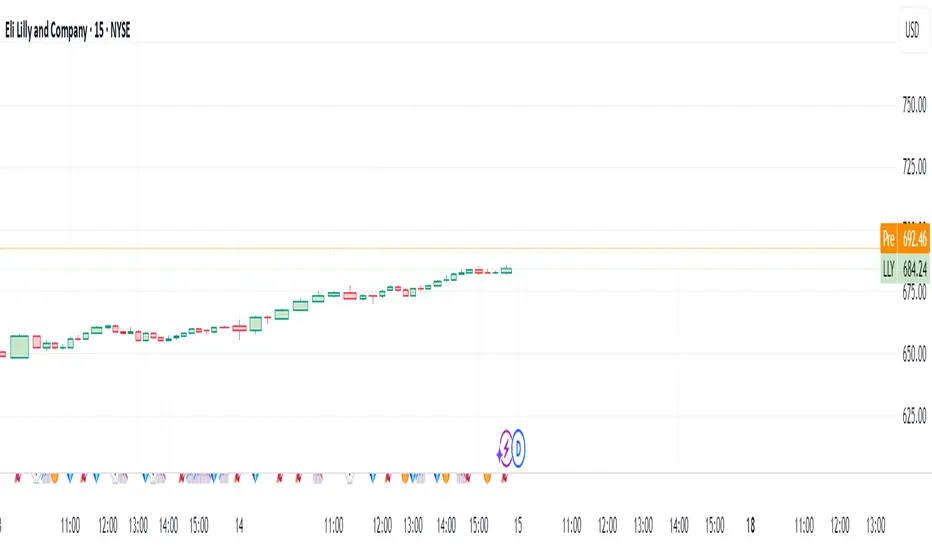
Volume Pulse Pro📊 Volume Pulse Pro – Advanced Volume Spike Detector
🔍 What is it?
Volume Pulse Pro is an advanced tool designed to detect and highlight significant volume spikes in real-time. This indicator helps traders:
✅ Identify strong market momentum shifts.
✅ Spot institutional activity and market maker moves.
✅ Avoid fake breakouts by filtering volume anomalies.
✅ Receive instant alerts for critical volume changes without staring at the chart.
⚙️ How does it work?
The indicator analyzes volume relative to a 50-period SMA and dynamically colors volume bars based on their significance:
🔵 Moderate Volume Spike (Lvl 1) → Volume exceeds 1.3x the average.
🟠 Strong Volume Spike (Lvl 2) → Volume exceeds 2.5x the average.
🔴 Extreme Volume Spike (Lvl 3) → Volume exceeds 3.5x the average.
Each threshold can be customized and enabled/disabled in the settings, allowing full control over alerts and visual display.
🚀 Why use Volume Pulse Pro?
✅ Flexible customization – choose which volume spikes to track.
✅ Real-time alerts – never miss a critical volume event.
✅ Clear visual representation – gradient-colored bars for easy interpretation.
✅ Perfect for scalpers & swing traders – filter out noise and focus on key moves.
🎯 How to Use It?
1️⃣ Add the indicator to your TradingView chart.
2️⃣ Adjust the volume thresholds and enable alerts for key levels.
3️⃣ Trade with confidence by spotting high-impact volume surges instantly.
🔥 Volume Pulse Pro gives traders a clear edge by revealing hidden volume signals that drive the market! 📈💰
📢 Get started now and take your trading to the next level! 🚀
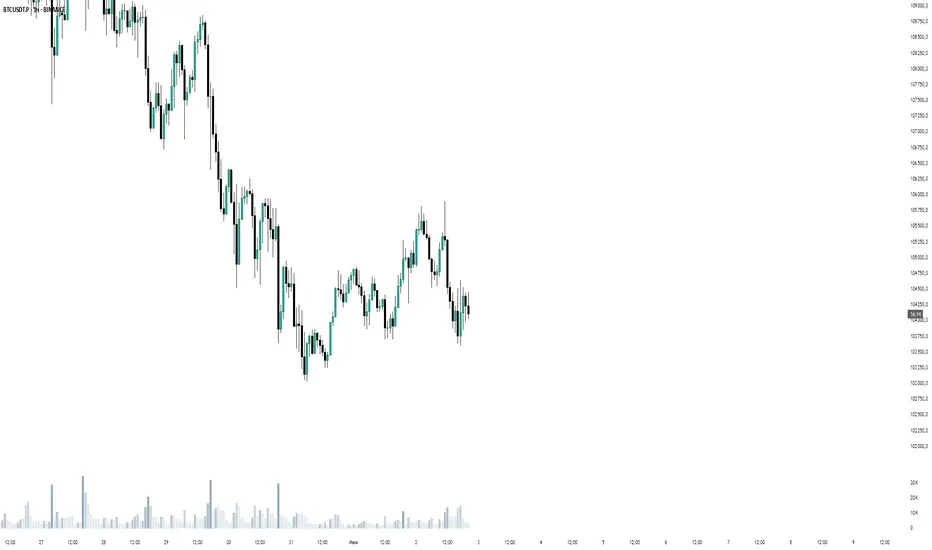
Volume Spike IndicatorThe Volume Spike Indicator is designed to identify significant volume spikes in the market. This tool helps traders recognize unusual trading activity, which may indicate potential reversals, breakouts, or increased volatility. The indicator uses a simple moving average (SMA) of volume over a specified period and highlights bars where the current volume exceeds a multiple of this average.
Features:
Volume SMA Calculation:
The indicator calculates the SMA of volume over a customizable period (default: 20 bars).
Spike Multiplier:
A threshold multiplier (default: 4) determines what qualifies as a "spike."
Spikes occur when the current volume is greater than the SMA multiplied by this threshold.
Visual Alerts:
If a spike is detected, a red cross ( Cross ) and X-shape ( X-Cross ) are plotted above the corresponding bar for easy identification.
How to Use:
Spot High-Activity Areas:
Use this indicator to find points of unusually high trading activity, which can signify key levels or moments of interest in the market.
Adjust Settings for Sensitivity:
Length : Change the SMA period to match your trading timeframe.
Spike Multiplier : Lower values detect smaller spikes; higher values focus on extreme events.
Combine with Other Indicators:
This tool works best when combined with price action analysis, support/resistance levels, or trend indicators to confirm trading signals.
Customization Options:
Length: Number of bars for SMA calculation (default: 20).
Spike Multiplier: Threshold for defining volume spikes (default: 4).
This indicator is suitable for traders looking to enhance their analysis by identifying abnormal market activity.

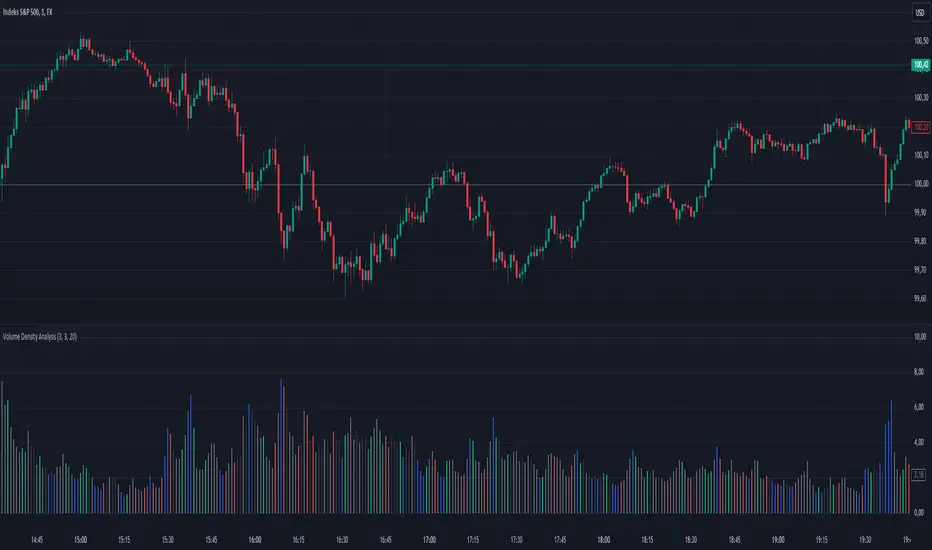
Volume Density AnalysisVolume Density Analysis
Overview
The "Volume Density Analysis" indicator is designed to provide traders with insights into volume dynamics relative to price movements. By analyzing the density of volume against price spread, this indicator helps identify potential reversal points and extreme volume conditions, enhancing decision-making in trading strategies.
Key Features
Volume Density Calculation: The indicator computes the density of volume by dividing the total volume by the price spread (high - low) for each bar. This allows for a more nuanced understanding of volume activity in relation to price movements.
Extremum Detection: Users can specify the number of bars to consider when identifying extreme volume conditions, allowing for tailored analysis based on market behavior.
Reversal Bar Conditions: The indicator includes options to determine if low or high volume bars must coincide with reversal patterns, providing additional context for potential trade signals.
Dynamic Coloring*: The histogram displays colored bars based on specific conditions:
Blue Bars: Indicate the lowest and highest volume density within a specified range, highlighting significant volume extremes.
Gray Bars: Represent lower or higher volume density that meets reversal criteria.
Green and Red Bars: Indicate bullish or bearish reversal signals based on historical density patterns.
User Inputs
nl: Number of previous lower bars to consider for comparison (default is 8).
nh: Number of previous higher bars to consider for comparison (default is 8).
ext: Number of bars for detecting extremum volume (default is 30).
LReversalBar: Boolean option to determine if low volume bar spread must indicate a reversal.
HReversalBar: Boolean option to determine if high volume bar spread must indicate a reversal.
Suggested Timeframes
M15: Without reversal considerations, use `nl=3`, `nh=3`, and `ext=20`.
M5: Without reversal considerations, use `nl=4`, `nh=4`, and `ext=35`.
M1: Use `nl=8`, `nh=8`, and `ext=58` for more detailed analysis.
Volume OscillatorThe Volume Oscillator is a powerful tool for analyzing volume dynamics and identifying potential divergences and trend confirmations. This indicator combines multiple volume analysis techniques to provide a comprehensive view of market participation and potential turning points.
At its core, the Volume Oscillator calculates a custom volume delta, taking into account the true range of each candle. The volume delta is adjusted based on the relationship between the open and close prices, assigning a higher weight to the candle body when the close is higher than the open. This approach captures the nuances of buying and selling pressure within each candle.
The cumulative volume delta is then calculated using one of three user-selectable methods: On-Balance Volume (OBV), Cumulative Volume Delta (CVD), or Price-Volume Trend (PVT). These options allow traders to choose the volume accumulation method that best suits their analysis style.
The Volume Oscillator plots the difference between two exponential moving averages (EMAs) of the selected cumulative volume. The short-term EMA length and long-term EMA length can be customized by the user, providing flexibility to adapt to different trading timeframes and market conditions.
A key feature of this indicator is the divergence detection. It identifies bullish and bearish divergences between the Volume Oscillator and price action. Bullish divergence occurs when the oscillator forms a higher low while the price forms a lower low, suggesting potential buying pressure. Conversely, bearish divergence occurs when the oscillator forms a lower high while the price forms a higher high, indicating potential selling pressure. The divergence detection algorithm uses a configurable lookback range and pivot point detection to improve the accuracy of divergence signals.
The indicator also incorporates a signal line, which is an EMA of the Volume Oscillator. Crossovers between the Volume Oscillator and the signal line provide additional confirmation of potential trend changes. Bullish crossovers occur when the oscillator crosses above the signal line, while bearish crossovers occur when the oscillator crosses below the signal line.
To enhance the reliability of crossover signals, the indicator utilizes deviation bands based on the average volume delta. Bullish crossovers are confirmed when the signal line is below the lower deviation band, and the Volume Oscillator is negative. Bearish crossovers are confirmed when the signal line is above the upper deviation band, and the Volume Oscillator is positive.
The Volume Oscillator employs a dynamic color scheme to visually represent the strength and direction of the oscillator. The color gradually changes based on the normalized gradient between two colors, providing an intuitive view of the oscillator's momentum.
Customization options include:
- Short and long EMA lengths for the Volume Oscillator calculation
- Cumulative volume type (OBV, CVD, or PVT)
- Signal line length
- Divergence detection parameters (lookback range and pivot point settings)
This indicator is designed to be used in conjunction with other technical analysis tools and should not be relied upon as a standalone trading system. It is intended to provide insights into volume dynamics and potential trend changes, aiding in the decision-making process for professional traders.
Please note that this indicator is a complex tool that requires a solid understanding of volume analysis and technical analysis concepts. It is recommended to thoroughly test and validate the indicator's performance in different market conditions and timeframes before incorporating it into a live trading strategy.

Volume Grid [SS Premium]Hey everyone!
This is the Volume Grid indicator. It is essentially very similar to the Volume Profile Histogram indicator I released, but this premium version overlays on the chart and provides you with the tradeable ranges and the volume composition in each range. So let's get into it!
What it does:
This indicator cumulates buy and sell volume over a user defined lookback period in addition to calculating the average ranges that the stock trades in and the volume composition in each respective range.
It then paints these ranges based on the volume composition. Red means selling and green means buying. However, the brighter the red or green, the higher the buying or selling (essentially a heatmap).
The indicator will also provide you alerts when there are buying or selling volume spikes and circle the candle in which that has happened on (see example in main chart).
These alerts can of course be toggled on or off.
Trading with it:
This indicator can be used as a stand alone trading indicator, and here is how:
The ranges act as support and resistance. Within each range you can see whether the composition is buying or selling.
If we are in a green zone, it means there is buying and it is essentially a buy the dip situation (see below example):
When we are in a heavy selling zone, its essentially a short the rip situation:
You can also see when a zone transfers from a bearish or bullish zone, to the inverse:
The indicator also will plot a POC (point of control). Because we are not only pulling from daily volume data, we will already have a well established POC going into open:
This was SPY on Friday. The POC marked the current point of control from a volume perspective, which was at 482.
And here is what happened:
The POC will change colours between Red and Green, if its a bearish POC it will turn Red, bullish green. For the most part, both the bearish and bullish POCs remain within the same range but sometimes they will diverge and the indicator will alert you when this happens.
Additional options:
In addition to toggling off and on the alerts, you can also change the text colour and size.
As well, there is an option to "Condense Range". What that will do is reduce the range by a factor of 2 (in half). This will give you more aggressive support and resistance levels that you can play.
Condensed Range:
Uncondensed Range:
Personally, I prefer the condensed range, especially when trading leveraged shares, because I treat them as support and resistance levels and play breaks of them in either direction.
And last but not least, you can adjust the ranges to the daily, hourly, monthly or any timeframe you want, you simply select your desired timeframe and it will plot the ranges for that specific period:
SOXL on the week:
The yellow line represents the current period open. It is your reference line and frequently will act as support and resistance, depending on the market sentiment at the time.
That is the indicator in a nut shell, as always, please let me know your questions and suggestions below!
Safe trades and enjoy!
For access, please review the instructions below.

Volume Pressure Based Buy and Sell SignalsThis script uses a volume pressure indicator to generate buy and sell signals. The volume pressure indicator is calculated by taking the sum of the product of volume and price change over a specified period of time, and then dividing that sum by the total volume over the same period. This gives a measure of the amount of buying pressure or selling pressure in the market.
The script then compares the volume pressure indicator to a moving average of the volume pressure indicator. When the volume pressure indicator crosses above the moving average, a buy signal is generated. When the volume pressure indicator crosses below the moving average, a sell signal is generated.
This script is beneficial to traders because it can help them to identify potential trend reversals. When the volume pressure indicator crosses above the moving average, it indicates that there is a growing amount of buying pressure in the market. This could be a sign that the trend is about to reverse from a downtrend to an uptrend. Conversely, when the volume pressure indicator crosses below the moving average, it indicates that there is a growing amount of selling pressure in the market. This could be a sign that the trend is about to reverse from an uptrend to a downtrend.
