Cloud MasterSwap Between Traditional, Crypto and AI Ichimoko Cloud Settings with one Indicator. You can also input your own custom settings if you're a brainiac.Pine Script® 인디케이터profudu의업데이트됨 119
[CASH] Crypto And Stocks Helper (MultiPack w. Alerts)ATTENTION! I'm not a good scripter. I have just learned a little basics for this project, stolen code from other public scripts and modified it, and gotten help from AI LLM's. If you want recognition from stolen code please tell me to give you the credit you deserve. The script is not completely finished yet and contains alot of errors but my friends and family wants access so I made it public. _________________________________________________________________________________ CASH has multiple indicators (a true all-in-one multipack), guides and alerts to help you make better trades/investments. It has: - Bitcoin Bull Market Support Band - Dollar Volume - 5 SMA and 5 EMA - HODL Trend (a.k.a SuperTrend) indicator - RSI, Volume and Divergence indicators w. alerts More to come as well, like Backburner and a POC line from Volume Profile. Everything is fully customizable, appearance and off/on etc. More information and explainations along with my guides you can find in settings under "Input" and "Style". Pine Script® 인디케이터SenorBufoAlvarius의업데이트됨 17
Advanced Elliott Wave PlotterAdvanced Elliott Wave plotter, Parameters can be adjusted. AI Generated, so no particular credits to anyone.Pine Script® 인디케이터arunac88의업데이트됨 47
【SY】AI量化指标📌 TradingView Strategy Description (English) Strategy Overview This strategy combines trend-following and momentum confirmation to identify high-probability entries in the direction of the prevailing market trend. The objective is not to trade every move, but to capture the strongest phases of price expansion while minimizing exposure during choppy periods. How It Works A trend filter determines whether the market is currently in a bullish or bearish environment Trades are only taken in the direction of the trend — no counter-trend entries A breakout / momentum signal triggers entry when conditions align Risk management uses a combination of fixed take-profit, stop-loss and trailing stop Positions are closed when price strength weakens or when exit criteria are triggered Risk Management Fixed stop-loss protects capital during adverse movement Trailing stop locks in floating profits once the trade is in profit No martingale, grid or averaging-down — each position is managed independently Avoids overtrading during sideways markets by requiring trend confirmation Markets & Timeframes Suitable for: Crypto / Indices / Commodities / Forex Recommended timeframes: 15m – 4H Can be used for both backtesting and automated trading (Webhook / API compatible) Disclaimer This script is for educational and research purposes only and does not constitute financial advice. Past performance does not guarantee future results. Trading involves risk — manage leverage and position size responsibly. If you'd like, I can also provide: 🔹 A short description for the TradingView title area 🔹 A marketing-style preview text to drive more script saves & followers 🔹 A customized version including key terms from your strategy (EMA / KDJ / Supertrend / ATR / RSI / volatility filter / etc.)Pine Script® 인디케이터rlfstbtu의0
Stochastic Ensembling of OutputsStochastic Ensembling of Outputs 🙏🏻 This is a simple tool/method that would solve naturally many well known problems: “Price reversed 1 tick before the actual level, not executing my limit order” “I consider intraday trend change by checking whether price is above/below VWAP, but is 1 tick enough? What to do, price is now whipsawing around vwap...”. “I want to gradually accumulate a position around a chosen anchor. But where exactly should I put my orders? And I want to automate it ofc.“ “All these DSP adepts are telling you about some kind of noise in the markets… But how can I actually see it?” The easy fix is to make things more analog less digital, by synthesizing numerous noise instances & adding it to any price-applied metric of yours. The ones who fw techno & psytrance, and other music, probably don’t need any more explanations. Then by checking not just 2 lines or 1 process against another one, you will be checking cloud vs cloud of lines, even allowing you to introduce proxies of probabilities. More crosses -> more confirmation to act. How-to use: The tool has 2 inputs: source and target: Sources should always be the underlying process. If you apply the tool to price based metric, leave it hlcc4 unless you have a better one point estimate for each bar; Target is your target, e.g if you want to apply it to VWAP, pick VWAP as target. You can thee on the chart above how trading activity recently never exactly touched VWAP, however noised instances of VWAP 'were' touched The code is clean and written in modular form, you can simply copy paste it to any script of yours if you don't want to have multiple study-on-study script pairs. ^^ applied to prev days highs and lows ^^ applied to MBAD extensions and basis ^^ applied to input series itself Here’s how it works, no ML, no “AI”, no 1k lines of code, just stats: The problem with metrics, even if they are time aware like WMA, is that they still do not directly gain information about “changes” between datapoints. If we pick noise characteristics to match these changes, we’d effectively introduce this info into our ops. ^^ this screenshot represents 2 very different processes: a sine wave and white noise, see how the noise instances learned from each process differ significantly. Changes can be represented as AR1 process . It’s dead simple, no PHD needed, it’s just how the current datapoint is related (or not) to the previous datapoint, no more than 1, and how this relationship holds/evolves over time. Unlike the mainstream approach like MLE, I estimate this relationship (phi parameter) via MoM but giving more weights to more recent datapoints via exponential smoothing over all the data available on your charts (so I encode temporal information), algocomplexity is O(1), lighting fast, just one pass. <- that gives phi , we’d use it as color for our noise generator Then we just need to estimate noise amplitude ( gamma ) via checking what AR1 model actually thought vs the reality, variance of these innovations. Same via exponential smoothing, time aware, O(1), one pass, it’s all it does. Then we generate white gaussian noise, and apply 2 estimated parameters (phi and gamma), and that’s all. Omg, I think I just made my first real DSP script xd Just like Monte Carlo for risk management, this is so simple and natural I can’t believe so many “pros” hide it and never talk about it in open access. Sharing it here on TradingView would’ve not done anything critical for em, but many would’ve benefited. ∞Pine Script® 인디케이터gorx1의업데이트됨 3322
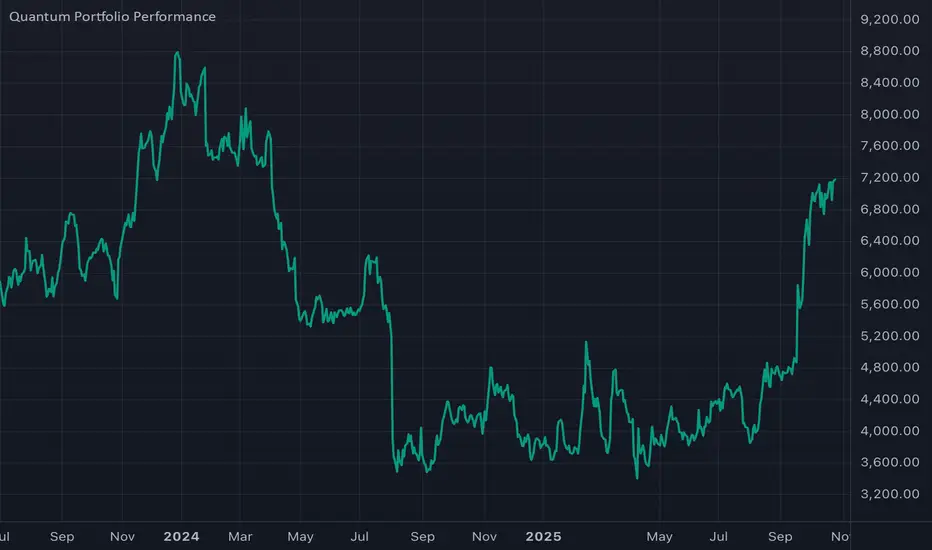
Major Crypto Relative Strength Portfolio System Majors RSPS - Relative Strength Portfolio System for Major Cryptocurrencies Overview Majors RSPS (Relative Strength Portfolio System) is an advanced portfolio allocation indicator that combines relative strength analysis, trend consensus, and macro risk factors to dynamically allocate capital across major cryptocurrency assets. The system leverages the NormalizedIndicators Library to evaluate both absolute trends and relative performance, creating an adaptive portfolio that automatically adjusts exposure based on market conditions. This indicator is designed for portfolio managers, asset allocators, and systematic traders who want a data-driven approach to cryptocurrency portfolio construction with automatic rebalancing signals. 🎯 Core Concept What is RSPS? RSPS (Relative Strength Portfolio System) evaluates each asset on two key dimensions: Relative Strength: How is the asset performing compared to other major cryptocurrencies? Absolute Trend: Is the asset itself in a bullish trend? Assets that show both strong relative performance AND positive absolute trends receive higher allocations. Weak performers are automatically filtered out, with capital reallocated to cash or stronger assets. Dual-Layer Architecture Layer 1: Majors Portfolio (Orange Zone) Evaluates 14 major cryptocurrency assets Calculates relative strength against all other majors Applies trend filters to ensure absolute momentum Dynamically allocates capital based on comparative strength Layer 2: Cash/Risk Position (Navy Zone) Evaluates macro risk factors and market conditions Determines optimal cash allocation Acts as a risk-off mechanism during adverse conditions Provides downside protection through dynamic cash holdings 📊 Tracked Assets Major Cryptocurrencies (14 Assets) BTC - Bitcoin (Benchmark L1) ETH - Ethereum (Smart Contract L1) SOL - Solana (High-Performance L1) SUI - Sui (Move-Based L1) TRX - Tron (Payment-Focused L1) BNB - Binance Coin (Exchange L1) XRP - Ripple (Payment Network) FTM - Fantom (DeFi L1) CELO - Celo (Mobile-First L1) TAO - Bittensor (AI Network) HYPE - Hyperliquid (DeFi Exchange) HBAR - Hedera (Enterprise L1) ADA - Cardano (Research-Driven L1) THETA - Theta (Video Network) 🔧 How It Works Step 1: Relative Strength Calculation For each asset, the system calculates relative strength by: RSPS Score = Average of: - Asset/BTC trend consensus - Asset/ETH trend consensus - Asset/SOL trend consensus - Asset/SUI trend consensus - ... (all 14 pairs) - Asset's absolute trend consensus Key Logic: Each pair is evaluated using the eth_4d_cal() calibration from NormalizedIndicators If an asset's absolute trend is extremely weak (≤ 0.1), it receives a penalty score (-0.5) Otherwise, it gets the average of all its relative strength comparisons Step 2: Trend Filtering Assets must pass a trend filter to receive allocation: Trend Score = Average of: - Asset/BTC trend (filtered for positivity) - Asset/ETH trend (filtered for positivity) - Asset's absolute trend (filtered for positivity) Only positive values contribute to the trend score, ensuring bearish assets don't receive allocation. Step 3: Portfolio Allocation Capital is allocated proportionally based on filtered RSPS scores: Asset Allocation % = (Asset's Filtered RSPS Score / Sum of All Filtered Scores) × Main Portfolio % Example: SOL filtered score: 0.6 BTC filtered score: 0.4 All others: 0 Total: 1.0 SOL receives: (0.6 / 1.0) × Main% = 60% of main portfolio BTC receives: (0.4 / 1.0) × Main% = 40% of main portfolio Step 4: Cash/Risk Allocation The system evaluates macro conditions across 6 factors: Inverse Major Crypto Trends (40% weight) When BTC, ETH, SOL, SUI, DOGE, etc. trend down → Cash allocation increases Evaluates total market cap trends (TOTAL, TOTAL2, OTHERS) Stablecoin Dominance (10% weight) USDC dominance vs. major crypto dominances Higher stablecoin dominance → Higher cash allocation MVRV Ratios (10% weight) BTC and ETH Market Value to Realized Value High MVRV (overvaluation) → Higher cash allocation BTC/ETH Ratio (15% weight) Relative performance between two market leaders Indicates market phase (BTC dominance vs. alt season) Active Address Ratios (5% weight) USDC active addresses vs. BTC/ETH active addresses Network activity comparison Macro Indicators (15% weight) Global currency circulation (USD, EUR, CNY, JPY) Treasury yield curve (10Y-2Y) High yield spreads Central bank balance sheets and money supply Cash Allocation Formula: Cash % = (Sum of Risk Factors × 0.5) / (Risk Factors + Majors TPI) When risk factors are elevated, cash allocation increases, reducing exposure to volatile assets. 📈 Visual Components Orange Zone (Majors Portfolio) Fill: Light orange area showing aggregate portfolio strength Line: Average trend power index (TPI) of allocated assets Baseline: 0 level (neutral) Interpretation: Above 0: Bullish allocation environment Rising: Strengthening portfolio momentum Falling: Weakening portfolio momentum Below 0: No allocation (100% cash) Navy Zone (Cash Position) Fill: Navy blue area showing cash allocation strength Line: Risk-adjusted cash allocation signal Baseline: 0 level Interpretation: Higher navy zone: Elevated risk-off signal → More cash Lower navy zone: Risk-on environment → Less cash Zero: No cash allocation (100% invested) Performance Line (Orange/Blue) Orange: Main portfolio allocation dominant (risk-on mode) Blue: Cash allocation dominant (risk-off mode) Tracks: Cumulative portfolio returns with dynamic rebalancing Allocation Table (Bottom Left) Shows real-time portfolio composition: ColumnDescriptionAssetCryptocurrency nameRSPS ValuePercentage allocation (of main portfolio)CashDollar amount (if enabled) Color Coding: Orange: Active allocation Gray: Weak signal (borderline) Blue: Cash position Missing: No allocation (filtered out) ⚙️ Settings & Configuration Required Setup Chart Symbol MUST USE: INDEX:BTCUSD or similar major crypto index Recommended Timeframe: 1D (Daily) or 4D (4-Day) Why: System needs price data for all 14 majors, BTC provides stable reference Hide Chart Candles For clean visualization: Right-click on chart Select "Hide Symbol" or set candle opacity to 0 This allows the indicator fills and table to be clearly visible User Inputs plot_table (Default: true) Enable/disable the allocation table Set to false if you only want the visual zones use_cash (Default: false) Enable portfolio dollar value calculations Shows actual dollar allocations per asset cash (Default: 100) Total portfolio size in dollars/currency units Used when use_cash is enabled Example: Set to 10000 for a $10,000 portfolio 💡 Interpretation Guide Entry Signals Strong Allocation Signal: ✓ Orange zone elevated (> 0.3) ✓ Navy zone low (< 0.2) ✓ Performance line orange ✓ Multiple assets in allocation table → Action: Deploy capital to allocated assets per table percentages Risk-Off Signal: ✓ Orange zone near zero ✓ Navy zone elevated (> 0.4) ✓ Performance line blue ✓ Few or no assets in table (high cash %) → Action: Reduce exposure, increase cash holdings Rebalancing Triggers Monitor the allocation table for changes: New assets appearing: Add to portfolio Assets disappearing: Remove from portfolio Percentage changes: Rebalance existing positions Cash % changes: Adjust overall exposure Market Regime Detection Risk-On (Bull Market): Orange zone high and rising Navy zone minimal Many assets allocated (8-12) High individual allocations (15-30% each) Risk-Off (Bear Market): Orange zone near zero or negative Navy zone elevated Few assets allocated (0-3) Cash allocation dominant (70-100%) Transition Phase: Both zones moderate Medium number of assets (4-7) Balanced cash/asset allocation (40-60%) 🎯 Trading Strategies Strategy 1: Pure RSPS Following 1. Check allocation table daily 2. Rebalance portfolio to match percentages 3. Follow cash allocation strictly 4. Review weekly, act on significant changes (>5%) Best For: Systematic portfolio managers, passive allocators Strategy 2: Threshold-Based Entry Rules: - Orange zone > 0.4 AND Navy zone < 0.3 - At least 5 assets in allocation table - Total non-cash allocation > 60% Exit Rules: - Orange zone < 0.1 OR Navy zone > 0.5 - Fewer than 3 assets allocated - Cash allocation > 70% Best For: Active traders wanting clear rules Strategy 3: Relative Strength Overlay 1. Use RSPS for broad allocation framework 2. Within allocated assets, overweight top 3 performers 3. Scale position sizes by RSPS score 4. Use individual asset charts for entry/exit timing Best For: Discretionary traders with portfolio focus Strategy 4: Risk-Adjusted Position Sizing For each allocated asset: Position Size = Base Position × (Asset's RSPS Score / Max RSPS Score) × (1 - Cash Allocation) Example: - $10,000 portfolio - SOL RSPS: 0.6 (highest) - BTC RSPS: 0.4 - Cash allocation: 30% SOL Size = $10,000 × (0.6/0.6) × (1-0.30) = $7,000 BTC Size = $10,000 × (0.4/0.6) × (1-0.30) = $4,667 Cash = $10,000 × 0.30 = $3,000 Best For: Risk-conscious allocators 📊 Advanced Usage Multi-Timeframe Confirmation Use on multiple timeframes for robust signals: 1D Chart: Tactical allocation (daily rebalancing) 4D Chart: Strategic allocation (weekly review) Strong Confirmation: - Both timeframes show same top 3 assets - Both show similar cash allocation levels - Orange zones aligned on both Weak/Conflicting: - Different top performers - Diverging cash allocations → Wait for alignment or use shorter timeframe Sector Rotation Analysis Group assets by type and watch rotation: L1 Dominance: BTC, ETH, SOL, SUI, ADA high → Layer 1 season Alt L1s: TRX, FTM, CELO rising → Alternative platform season Specialized: TAO, THETA, HYPE strong → Niche narrative season Payment/Stable: XRP, BNB allocation → Risk reduction phase Divergence Trading Bullish Divergence: Navy zone declining (less risk-off) Orange zone flat or slightly rising Few assets still allocated but strengthening → Early accumulation signal Bearish Divergence: Orange zone declining Navy zone rising Asset count decreasing in table → Distribution/exit signal Performance Tracking The performance line (overlay) shows cumulative strategy returns: Compare to BTC/ETH: Is RSPS outperforming? Drawdown analysis: How deep are pullbacks? Correlation: Does it track market or provide diversification? 🔬 Technical Details Data Sources Price Data: COINEX: Primary exchange for alt data CRYPTO: Alternative price feeds INDEX: Aggregated index prices (recommended for BTC) Macro Data: Dominance metrics (SUI.D, BTC.D, etc.) MVRV ratios (on-chain valuation) Active addresses (network activity) Global money supply and macro indicators Calculation Methodology RSPS Scoring: For each asset, calculate 14 relative trends (vs. all others) Calculate asset's absolute trend Average all 15 values Apply penalty filter for extremely weak trends (≤ 0.1) Trend Consensus: Uses eth_4d_cal() from NormalizedIndicators library Combines 8 normalized indicators per measurement Returns value from -1 (bearish) to +1 (bullish) Performance Calculation: Daily Return = Σ(Asset ROC × Asset Allocation) Cumulative Performance = Previous Perf × (1 + Daily Return / 100) Assumes perfect rebalancing and no slippage (theoretical performance). Filtering Logic filter() function: pinescriptfilter(input) => input >= 0 ? input : 0 This zero-floor filter ensures: Only positive trend values contribute to allocation Bearish assets receive 0 weight No short positions or inverse allocations Anti-Manipulation Safeguards Null Handling: All values wrapped in nz() to handle missing data Prevents calculation errors from data gaps Normalization: Allocations always sum to 100% Prevents over/under-allocation Conditional Logic: Assets need positive values on multiple metrics Single metric cannot drive allocation alone ⚠️ Important Considerations Required Timeframes 1D (Daily): Recommended for most users 4D (4-Day): More stable, fewer rebalances Other timeframes: Use at your own discretion, may require recalibration Data Requirements Needs INDEX:BTCUSD or equivalent major crypto symbol All 14 tracked assets must have available data Macro indicators require specific TradingView data feeds Rebalancing Frequency System provides daily allocation updates Practical rebalancing: Weekly or on significant changes (>10%) Consider transaction costs and tax implications Performance Notes Theoretical returns: No slippage, fees, or execution delays Backtest carefully: Validate on your specific market conditions Past performance: Does not guarantee future results Risk Warnings ⚠️ High Concentration Risk: May allocate heavily to 1-3 assets ⚠️ Volatility: Crypto markets are inherently volatile ⚠️ Liquidity: Some allocated assets may have lower liquidity ⚠️ Correlation: All assets correlated to BTC/ETH to some degree ⚠️ System Risk: Relies on continued availability of data feeds Not Financial Advice This indicator is a tool for analysis and research. It does not constitute: Investment advice Portfolio management services Trading recommendations Guaranteed returns Always perform your own due diligence and risk assessment. 🎓 Use Cases For Portfolio Managers Systematic allocation framework Objective rebalancing signals Risk-adjusted exposure management Performance tracking vs. benchmarks For Active Traders Identify strongest assets to focus trading on Gauge overall market regime (risk-on/off) Time entry/exit for portfolio shifts Complement technical analysis with allocation data For Institutional Allocators Quantitative portfolio construction Multi-asset exposure optimization Drawdown management through cash allocation Compliance-friendly systematic approach For Researchers Study relative strength dynamics in crypto markets Analyze correlation between majors Test macro factor impact on crypto allocations Develop derived strategies and signals 🔧 Setup Checklist ✅ Chart Configuration Set chart to INDEX:BTCUSD Set timeframe to 1D or 4D Hide chart candles for clean visualization Add indicator from library ✅ Indicator Settings Enable plot_table (see allocation table) Set use_cash if tracking dollar amounts Input your portfolio size in cash parameter ✅ Monitoring Setup Bookmark chart for daily review Set alerts for major allocation changes (optional) Create spreadsheet to track allocations (optional) Establish rebalancing schedule (weekly recommended) ✅ Validation Verify all 14 assets appear in table (when allocated) Check that percentages sum to ~100% Confirm performance line is tracking Test cash allocation calculation if enabled 📋 Quick Reference Signal Interpretation ConditionOrange ZoneNavy ZoneActionStrong BullHigh (>0.4)Low (<0.2)Full allocationModerate BullMid (0.2-0.4)Low-MidStandard allocationNeutralLow (0.1-0.2)Mid (0.3-0.4)Balanced allocationModerate BearVery Low (<0.1)Mid-HighReduce exposureStrong BearZero/NegativeHigh (>0.5)High cash/exit Rebalancing Thresholds Change TypeThresholdActionIndividual asset±5%Consider rebalanceIndividual asset±10%Strongly rebalanceCash allocation±10%Adjust exposureAsset entry/exitAnyAdd/remove position Color Legend Orange: Main portfolio strength/allocation Navy: Cash/risk-off allocation Blue text: Cash position in table Orange text: Active asset allocation Gray text: Weak/borderline allocation White: Headers and labels 🚀 Getting Started Beginner Path Add indicator to INDEX:BTCUSD daily chart Hide candles for clarity Enable plot_table to see allocations Check table daily, note top 3-5 assets Start with small allocation, observe behavior Gradually increase allocation as you gain confidence Intermediate Path Set up on both 1D and 4D charts Enable use_cash with your portfolio size Create tracking spreadsheet Implement weekly rebalancing schedule Monitor divergences between timeframes Compare performance to buy-and-hold BTC Advanced Path Modify code to add/remove tracked assets Adjust relative strength calculation methodology Customize cash allocation factors and weights Integrate with portfolio management platform Develop algorithmic rebalancing system Create alerts for specific allocation conditions 📖 Additional Resources Related Indicators NormalizedIndicators Library: Core calculation engine Individual asset trend indicators for deeper analysis Macro indicator dashboards for cash allocation factors Complementary Analysis On-chain metrics (MVRV, active addresses, etc.) Order book liquidity for execution planning Correlation matrices for diversification analysis Volatility indicators for position sizing Learning Materials Study relative strength portfolio theory Research tactical asset allocation strategies Understand crypto market cycles and phases Learn about risk management in volatile assets 🎯 Key Takeaways ✅ Systematic allocation across 14 major cryptocurrencies ✅ Dual-layer approach: Asset selection + Cash management ✅ Relative strength focused: Invests in comparatively strong assets ✅ Trend filtering: Only allocates to assets in positive trends ✅ Dynamic rebalancing: Automatically adjusts to market conditions ✅ Risk-managed: Increases cash during adverse conditions ✅ Transparent methodology: Clear calculation logic ✅ Practical visualization: Easy-to-read table and zones ✅ Performance tracking: See cumulative strategy returns ✅ Highly customizable: Adjust assets, weights, and factors 📋 License This code is subject to the Mozilla Public License 2.0 at mozilla.org Majors RSPS transforms complex multi-asset portfolio management into a systematic, data-driven process. By combining relative strength analysis with trend consensus and macro risk factors, it provides traders and portfolio managers with a robust framework for navigating cryptocurrency markets with discipline and objectivity.WiederholenClaude kann Fehler machen. Bitte überprüfen Sie die Antworten. Sonnet 4.5Pine Script® 인디케이터Unicorpus의업데이트됨 6
Floos 💸This is the final Script .. after long time trading Just "WaW" ألافضل بلا منازع الي حاب يجرب يراسلني Floos 💸 Complete is an advanced trading indicator designed for SPX (S&P 500) options trading, combining: - AI-enhanced London/New York session analysis - Pre-market predictions - Swing high/low detection - EMA crossover signals with accuracy tracking - Dynamic support/resistance levels Pine Script® 인디케이터Mokamoon의3
O'Neil Market TimingBill O'Neil Market Timing Indicator - User Guide Overview This Pine Script indicator implements William O'Neil's market timing methodology, which assigns one of four distinct states to a market index (such as SPY or QQQ) to help traders identify optimal market conditions for investing. The indicator is designed to work exclusively on Daily timeframe charts. The Four Market States The indicator tracks the market through four distinct states, with specific transition rules between them: 1. Confirmed Uptrend (Green) - Meaning: The market is in a healthy uptrend with institutional support - Action: Favorable conditions for building positions in leading stocks - Can transition to: State 2 (Uptrend Under Pressure) 2. Uptrend Under Pressure (Yellow) - Meaning: The uptrend is showing signs of weakness with increasing distribution - Action: Be cautious, tighten stops, reduce position sizes - Can transition to: State 1 (Confirmed Uptrend) or State 3 (Downtrend) 3. Downtrend (Red) - Meaning: The market is in a confirmed downtrend - Action: Stay mostly in cash, avoid new purchases - Can transition to: State 4 (Rally Attempt) 4. Rally Attempt (Pink/Fuchsia) - Meaning: The market is attempting to bottom and reverse - Action: Watch for Follow-Through Day to confirm new uptrend - Can transition to: State 1 (Confirmed Uptrend) or State 3 (Downtrend) Key Concepts Distribution Day A distribution day occurs when: 1. The index closes down by more than the critical percentage (default 0.2%) 2. Volume is higher than the previous day's volume Distribution days indicate institutional selling and are marked with red triangles on the indicator. Follow-Through Day A follow-through day occurs during a Rally Attempt when: 1. The index closes up by more than the critical percentage (default 1.6%) 2. Volume is higher than the previous day's volume A Follow-Through Day confirms a new uptrend and triggers the transition from Rally Attempt to Confirmed Uptrend. State Transition Logic Valid Transitions The system only allows specific transitions: - 1 → 2: When distribution days reach the "pressure number" (default 5) within the lookback period (default 25 bars) - 2 → 1: When distribution days drop below the pressure number - 2 → 3: When distribution days reach "downtrend number" (default 7) AND price drops by "downtrend criterion" (default 6%) from the lookback high - 3 → 4: When the market doesn't make a new low for 3 consecutive days - 4 → 3: When a new low is made, undercutting the downtrend low - 4 → 1: When a Follow-Through Day occurs during the Rally Attempt Input Parameters Distribution Day Parameters - Distribution Day % Threshold (default 0.2%, range 0.1-2.0%) - Minimum percentage decline required to qualify as a distribution day. While 0.2% seems to be the canonical number I see in literature about this, I use a much higher threshold (at least 0.5%) Follow-Through Day Parameters - Follow-Through Day % Threshold (default 1.6%, range 1.0-2.0%) - Minimum percentage gain required to qualify as a follow-through day ### State Transition Parameters - Pressure Number (default 5, range 3-6) - Number of distribution days needed to transition from Confirmed Uptrend to Uptrend Under Pressure - Lookback Period (default 25 bars, range 20-30) - Number of days to count distribution days - Downtrend Number (default 7, range 4-10) - Number of distribution days needed (with price drop) to transition to Downtrend - Downtrend % Drop from High (default 6%, range 5-10%) - Percentage drop from lookback high required for downtrend confirmation Visual Settings - Color customization for each state - Table position selection (Top Left, Top Right, Bottom Left, Bottom Right) ## How to Use This Indicator ### Installation 1. Open TradingView and navigate to SPY or QQQ (or another major index) 2. **Important**: Switch to the Daily (1D) timeframe 3. Click on "Indicators" at the top of the chart 4. Click "Pine Editor" at the bottom of the screen 5. Copy and paste the Pine Script code 6. Click "Add to Chart" ### Interpretation **When the indicator shows:** - **Green (State 1)**: Market is healthy - consider adding quality positions - **Yellow (State 2)**: Exercise caution - tighten stops, be selective - **Red (State 3)**: Defensive mode - preserve capital, avoid new buys - **Pink (State 4)**: Watch closely - prepare for potential Follow-Through Day ### The Information Table The table displays: - **Current State**: The current market condition - **Distribution Days**: Number of distribution days in the lookback period - **Lookback Period**: Number of bars being analyzed - **Rally Attempt Day**: (Only in State 4) Days into the current rally attempt ### Visual Elements 1. **State Line**: A stepped line showing the current state (1-4) 2. **Red Triangles**: Mark each distribution day 3. **Horizontal Reference Lines**: Dotted lines marking each state level 4. **Color-Coded Display**: The state line changes color based on the current market condition ## Trading Strategy Guidelines ### In Confirmed Uptrend (State 1) - Build positions in stocks breaking out of proper bases - Use normal position sizing - Focus on stocks showing institutional accumulation - Hold winners as long as they act properly ### In Uptrend Under Pressure (State 2) - Take partial profits in extended positions - Tighten stop losses - Be more selective with new entries - Reduce overall exposure ### In Downtrend (State 3) - Move to cash or maintain very light exposure - Avoid new purchases - Focus on preservation of capital - Use the time for research and watchlist building ### In Rally Attempt (State 4) - Stay mostly in cash but prepare - Build a watchlist of strong stocks - On Day 4+ of the rally attempt, watch for Follow-Through Day - If FTD occurs, begin cautiously adding positions ## Best Practices 1. **Use with Major Indices**: This indicator works best with SPY, QQQ, or other broad market indices 2. **Daily Timeframe Only**: The indicator is designed for daily bars - do not use on intraday timeframes 3. **Combine with Stock Analysis**: Use the market state as a filter for individual stock decisions 4. **Respect the Signals**: When the market enters Downtrend, reduce exposure regardless of individual stock setups 5. **Monitor Distribution Days**: Pay attention when distribution days accumulate - it's a warning sign 6. **Wait for Follow-Through**: Don't jump back in too early during Rally Attempt - wait for confirmation ## Alert Conditions The indicator includes built-in alert conditions for: - State changes (entering any of the four states) - Distribution Day detection - Follow-Through Day detection during Rally Attempt To set up alerts: 1. Click the "Alert" button while the indicator is on your chart 2. Select "O'Neil Market Timing" 3. Choose your desired alert condition 4. Configure notification preferences ## Customization Tips ### For More Sensitive Detection - Lower the "Pressure Number" to 3-4 - Lower the "Distribution Day % Threshold" to 0.15% - Reduce the "Downtrend Number" to 5-6 ### For More Conservative Detection - Raise the "Pressure Number" to 6 - Raise the "Distribution Day % Threshold" to 0.3-0.5% - Increase the "Downtrend Number" to 8-9 ### For Different Market Conditions - **Bull Market**: Consider slightly higher thresholds - **Bear Market**: Consider slightly lower thresholds - **Volatile Market**: May need to increase percentage thresholds ## Limitations and Considerations 1. **Not a Crystal Ball**: The indicator identifies conditions but doesn't predict the future 2. **False Signals**: Follow-Through Days can fail - use proper risk management 3. **Whipsaws Possible**: In choppy markets, the indicator may switch states frequently 4. **Confirmation Lag**: By design, there's a lag as the system waits for confirmation 5. **Works Best with Price Action**: Combine with your analysis of individual stocks ## Historical Context This methodology is based on William J. O'Neil's decades of market research, documented in books like "How to Make Money in Stocks" and through Investor's Business Daily. O'Neil's research showed that: - Most major market tops are preceded by accumulation of distribution days - Most successful rallies begin with a Follow-Through Day on Day 4-7 of a rally attempt - Identifying market state helps prevent buying during unfavorable conditions ## Troubleshooting **Problem**: Indicator shows "Initializing" - **Solution**: Let the chart load at least 5 bars to establish the initial state **Problem**: No distribution day markers appear - **Solution**: Verify you're on daily timeframe and check if volume data is available **Problem**: Table not visible - **Solution**: Check the table position setting and ensure it's not off-screen **Problem**: State seems to change too frequently - **Solution**: Increase the lookback period or adjust threshold parameters ## Support and Further Learning For deeper understanding of this methodology: - Read "How to Make Money in Stocks" by William J. O'Neil - Study Investor's Business Daily's "Market Pulse" - Review historical market tops and bottoms to see the pattern - Practice identifying distribution days and follow-through days manually ## Version History **Version 1.0** (November 2025) - Initial implementation - Four-state system with proper transitions - Distribution day detection and marking - Follow-through day detection - Customizable parameters - Information table display - Alert conditions --- ## Quick Reference Card | State | Number | Color | Action | |-------|--------|-------|--------| | Confirmed Uptrend | 1 | Green | Buy quality setups | | Uptrend Under Pressure | 2 | Yellow | Tighten stops, be selective | | Downtrend | 3 | Red | Cash position, no new buys | | Rally Attempt | 4 | Pink | Watch for Follow-Through Day | **Distribution Day**: Down > 0.2% on higher volume (red triangle) **Follow-Through Day**: Up > 1.6% on higher volume during Rally Attempt (triggers State 4→1) --- *Remember: This indicator is a tool to help identify market conditions. It should be used as part of a comprehensive trading strategy that includes proper risk management, position sizing, and individual stock analysis.* Also, I created this with the help of an AI coding framework, and I didn't exhaustively test it. I don't actually use this for my own trading, so it's quite possible that it's materially wrong, and that following this will lead to poor investment decisions.. This is "copy left" software, so feel free to alter this to your own tastes, and claim authorship.Pine Script® 인디케이터matthias의30
ReqoverAI Indicator Zero Lag🔑 Overview ReqoverAI Indicator ZeroLag is a precision-engineered advanced AI detection tool for multi-asset trading strategies. This tool is designed to work for all time frames and asset classes (like Stocks, Commodities, Forex, Crypto and other Digital Assets). It uses advanced detection techniques that reduces lag and adapts to volatility. It combines a smoothing technique with adaptive reversal logic to highlight meaningful trend shifts earlier than conventional methods. It provides clear signals with built-in alerts, helping traders identify meaningful trend shifts earlier and with greater clarity. ⚙️Core Concepts Smoothing Technique Reduces the delay found in traditional moving averages, allowing faster response to price changes. Adaptive Reversal Detection Uses volatility- or percentage-based thresholds to identify potential pivots, helping filter out insignificant moves. Signals * Green “Buy” labels mark potential upward pivots. * Red “Sell” labels mark potential downward pivots. * Optional guideline plotted for trend visualization. Alerts Built-in TradingView alerts for Buy/Sell pivots, ready for automation or notifications. 📘 How to Use Apply to chart: Works directly on price charts with Buy/Sell labels. Select reversal mode: * ATR-based (default, recommended for volatile assets). * Percent-based (for more stable assets). Interpret signals: * Green “Buy” → potential upward movement. * Red “Sell” → potential downward movement. Combine with your strategy: Use ReqoverAI as a confirmation tool alongside your existing methods. 🧩 Originality & Value Unique Approach: Integrates smoothing with a proprietary detection framework. Not Just Another Indicator: Goes beyond standard moving averages or ATR scripts by dynamically managing pivots and reversals. Vendor Justification: While it uses familiar elements, the hybrid detection logic is proprietary and unavailable in public domain scripts, making it valuable for traders seeking earlier and cleaner signals. ⚠️ Disclaimer This indicator is a technical analysis tool. It does not guarantee profits or predict the future. Past performance does not ensure future results. Use responsibly and in combination with your own trading plan.Pine Script® 인디케이터DrSumith의334
RhAiA TradingView indicator that plots AI-generated LONG /SHORT signals on BTC/USDT charts, entering trades at signal timestamps with customizable take-profit (TP) and stop-loss (SL) levels, exit priority, and holding windows. Signals are blocked if a prior trade remains active, with color-coded lines and labels for entries, TP/SL hits, and window expirations.Pine Script® 인디케이터PZgADEBnMtMoTpzU64FVjwUa의업데이트됨 2
Qullamaggie Long ScannerQullamaggie Breakout/EP/HTF Scanner with Float & AI CleanPine Script® 인디케이터cbmclean의10
Analog Flow [KedArc Quant]Overview AnalogFlow is an advanced analogue based market projection engine that reconstructs future price tendencies by matching current price behavior to historical analogues in the same instrument. Instead of using traditional indicators such as moving averages, RSI, or regression, AnalogFlow applies pattern vector similarity analysis - a data driven technique that identifies historically similar sequences and aggregates their subsequent movements into a smooth, forward looking curve. Think of it as a market memory system: If the current pattern looks like one we have seen before, how did price move afterward? Why AnalogFlow Is Unique 1. Pattern centric - it does not rely on any standard indicator formula; it directly analyzes price movement vectors. 2. Adaptive - it learns from the same instrument's past behavior, making it self calibrating to volatility and regime shifts. 3. Non repainting - the projection is generated on the latest completed bar and remains fixed until new data is available. 4. Noise resistant - the EMA Blend engine smooths the projected trajectory, reducing random variance between analogues. Inputs and Configuration Pattern Bars Number of bars in the reference pattern window: 40 Projection Bars Number of bars forward to project: 30 Search Depth Number of bars back to look for matching analogues: 600 Distance Metric Comparison method: Euclidean, Manhattan, or Cosine (default Euclidean) Matches Number of top analogues to blend (1-5): Top 3 Build Mode Projection type: Cumulative, MeanStep, or EMA Blend (default EMA Blend) EMA Blend Length Smoothness of the projected path: 15 Normalize Pattern Enable Z score normalization for shape matching: true Dissimilarity Mode If true, finds inverse analogues for mean reversion analysis: false Line Color and Width Style settings for projection curve: Blue, width 2 How It Works with Past Data 1. The system builds a memory bank of patterns from the last N bars based on the scanDepth value. 2. It compares the latest Pattern Bars segment to each historical segment. 3. It selects the Top K most similar or dissimilar analogues. 4. For each analogue, it retrieves what happened after that pattern historically. 5. It averages or smooths those forward moves into a single composite forecast curve. 6. The forecast (blue line) is drawn ahead of the current candle using line.new with no repainting. Output Explained Blue Path The weighted mean future trajectory based on historical analogues. Smoother when EMA Blend mode is enabled. Flat Section Indicates low directional consensus or equilibrium across analogues. Upward or Downward Slope Represents historical tendency toward continuation or reversal following similar conditions. Recommended Timeframes Scalping / Short Term 1m - 5m : Short winLen (20-30), small ahead (10-15) Swing Trading 15m - 1h : Balanced settings (winLen 40-60, ahead 20-30) Positional / Multi Day 4h - 1D : Large windows (winLen 80-120, ahead 30-50) Instrument Compatibility Works seamlessly on: Stocks and ETFs Indices Cryptocurrency Commodities (Gold, Crude, etc.) Futures and F&O (both intraday and positional) Forex No symbol specific calibration needed. It self adapts to volatility. How Traders Can Use It Forecast Context Identify likely short term price path or drift direction. Reversal Detection Flip seekOpp to true for mean reversion pattern analysis. Scenario Comparison Observe whether the current regime tends to continue or stall. Momentum Confirmation Combine with trend tools such as EMA or MACD for directional bias. Backtesting Support Compare projected path versus realized price to evaluate reliability. FAQ Q1. Does AnalogFlow repaint? No. It calculates only once per completed bar and projects forward. The future path remains static until a new bar closes. Q2. Is it a neural network or AI model? Not in the machine learning sense. It is a deterministic analogue matching engine using statistical distance metrics. Q3. Why does the projection sometimes flatten? That means similar historical setups had no clear consensus in direction (neutral expectation). Q4. Can I use it for live trading signals? AnalogFlow is not a signal generator. It provides probabilistic context for upcoming movement. Q5. Does higher scanDepth improve accuracy? Up to a point. More depth gives more analogues, but too much can dilute recency. Try 400 to 800. Glossary Analogue A past pattern similar to the current price behavior. Distance Metric Mathematical formula for pattern similarity. Step Vector Difference between consecutive closing prices. EMA Blend Exponential smoothing of the projected path. Cumulative Mode Adds sequential historical deltas directly. Z Score Normalization Rescaling to mean 0 and variance 1 for shape comparison. Summary AnalogFlow converts the market's historical echoes into a structured, statistically weighted forward projection. It gives traders a contextual roadmap, not a signal, showing how similar past setups evolved and allowing better informed entries, exits, and scenario planning across all asset classes. Disclaimer This script is provided for educational purposes only. Past performance does not guarantee future results. Trading involves risk, and users should exercise caution and proper risk management when applying this strategy.Pine Script® 인디케이터kedarcquant의30
Miggy Oscillator — NeoWave v7.4.3 Adaptive ProMiggy Oscillator — NeoWave v7.4.3 Adaptive Pro Miggy Oscillator — NeoWave v7.4.3 Adaptive Pro is an adaptive market oscillator built to identify trend reversals, momentum exhaustion, and liquidity pivot zones across multiple timeframes. It combines NeoWave-style wave phase detection, volatility-adjusted threshold bands, and contextual divergence logic to deliver reliable reversal signals for Scalp, Intraday, and Swing trading. Key Concepts This script introduces a custom wave-phase engine that estimates the current stage of market structure rather than simply combining existing indicators. It uses asymmetric momentum smoothing and ATR-based volatility scaling to adapt naturally between calm and high-volatility environments. Divergences are context-aware: they only trigger when both momentum inflection and wave-phase confirmation align, minimizing false signals common to classic RSI or MACD tools. How It Works Wave Phase Detection Calculates the relative position of price within impulsive or corrective phases based on momentum deviation from a dynamic baseline. Adaptive Threshold Bands Expands or contracts automatically with real-time volatility to keep sensitivity consistent across different market regimes. Divergence and Exhaustion Logic Bullish divergence: price forms a lower low while the oscillator forms a higher low during a corrective phase. Bearish divergence: price forms a higher high while the oscillator forms a lower high during an impulsive phase. Exhaustion tags appear when the oscillator pierces an adaptive band and momentum slope weakens. Mode System Scalp Mode: high sensitivity, short reaction window. Intraday Mode: balanced sensitivity and confirmation. Swing Mode: slower reaction, wide filters for large-scale moves. Optional Long-Only Bias Filters out short setups to focus on bullish structures. How to Use Choose the operational mode based on your timeframe. Monitor interactions between the oscillator and outer bands for possible exhaustion or divergence. Confirm the signal using structure or candle confirmation. Manage risk: Tight stops for Scalp mode (1–5 min). ATR-based stops for Intraday mode (5–30 min). Structural stops for Swing mode (1H+). For better accuracy, combine it with Miggy Wave AI or Miggy Fibonacci Matrix to find confluence zones. Inputs and Customization Mode Selector: Scalp / Intraday / Swing Sensitivity Control Band Multiplier (threshold width) Divergence Confirmation Bars Long-Only Option Color Presets: Miggy Neon (default), Solana Glow, Arctic Pulse, or custom Signal Labels On/Off Alert Language: EN or ES Alerts Available alert conditions: Bullish Reversal Detected Bearish Reversal Detected Momentum Exhaustion Near Band Example alert text: Miggy Oscillator — Bullish reversal detected (Mode: {mode}) Miggy Oscillator — Bearish reversal detected (Mode: {mode}) Miggy Oscillator — Momentum exhaustion near {upper/lower} band Best Practices Always confirm divergence with price structure or higher timeframe context. Avoid taking counter-trend signals in strong trends without confirmation. Adjust Band Multiplier or switch mode during extreme volatility. Works on Crypto, Forex, Stocks, Indices, and Commodities. Limitations This is not an automated trading system. It is a technical analysis tool intended to help visualize momentum imbalances and potential reversals. Performance depends on market conditions and trader confirmation. Versioning and License Uses TradingView’s Update feature for improvements (no separate minor releases). Any future legacy fork will be explained clearly in the description. License: MIT (open source). Developed by Miggy.io / Mr. Migraine — 2025. Publication Compliance English-only title and description. No emojis or special characters. Original adaptive algorithm with detailed explanation. Clear usage instructions. Suitable for a clean chart publication preview.Pine Script® 인디케이터Miggy_io의1110
Bifurcation Point Adaptive (Auto Oscillator ML)Bifurcation Point Adaptive - Auto Oscillator ML Overview Bifurcation Point Adaptive (🧬 BPA-ML) represents a paradigm shift in divergence-based trading systems. Rather than relying on static oscillator settings that quickly become obsolete as market dynamics shift, BPA-ML employs multi-armed bandit machine learning algorithms to continuously discover and adapt to the optimal oscillator configuration for your specific instrument and timeframe. This self-learning core is enhanced by a Cognitive Analytical Engine (CAE) that provides market-state intelligence, filtering out low-probability setups before they reach your chart. The result is a system that doesn't just detect divergences - it understands context, learns from outcomes, and evolves with the market. What Sets This Apart: Technical Comparison The TradingView community has many excellent divergence indicators and several claiming "machine learning" capabilities. However, a detailed technical analysis reveals that BPA-ML operates at a fundamentally different level of sophistication. Machine Learning: Real vs Marketing Most indicators labeled "ML" or "AI" on TradingView use one of three approaches: K-Nearest Neighbors (KNN): These indicators find similar historical patterns and assume current price will behave similarly. This is pattern matching, not learning. The system doesn't improve over time or adapt based on outcomes - it simply searches historical data for matches. Clustering (K-Means): These indicators group volatility or market states into categories (high/medium/low). This is statistical classification, not machine learning. The clusters are recalculated but don't learn which classifications produce better results. Gaussian Process Regression (GPR): These indicators use kernel weighting to create responsive moving averages. This is advanced curve fitting, not learning. The system doesn't evaluate outcomes or adjust strategy. BPA-ML's Approach: True Reinforcement Learning BPA-ML implements multi-armed bandit algorithms - a proven reinforcement learning technique used in clinical trials, A/B testing, and recommendation systems. This is fundamentally different: Exploration vs Exploitation: The system actively balances trying new configurations (exploration) against using proven winners (exploitation). KNN and clustering don't do this - they simply process current data against historical patterns. Reward-Based Learning: Every configuration is scored based on actual forward returns, normalized by volatility and clipped to prevent outlier dominance. The system receives a bonus when signals prove profitable. This creates a feedback loop where the indicator literally learns what works for your specific instrument and timeframe. Four Proven Algorithms: UCB1 (Upper Confidence Bound), Thompson Sampling (Bayesian), Epsilon-Greedy, and Gradient-based learning. Each has different exploration characteristics backed by peer-reviewed research. You're not getting marketing buzzwords - you're getting battle-tested algorithms from academic computer science. Continuous Adaptation: The learning never stops. As market microstructure evolves, the bandit discovers new optimal configurations. Other "adaptive" indicators recalculate but don't improve - they use the same logic on new data. BPA-ML fundamentally changes which logic it uses based on what's working. The Configuration Grid: 40 Arms vs Fixed Settings Traditional divergence indicators use a single oscillator with fixed parameters - typically RSI with length 14. More advanced systems might let you choose between RSI, Stochastic, or CCI, but you're still picking one manually. BPA-ML maintains a grid of 40 candidate configurations: - 5 oscillator families (RSI, Stochastic, CCI, MFI, Williams %R) - 4 length parameters (short, medium, medium-long, long) - 2 smoothing settings (fast, slow) The bandit evaluates all 40 continuously and automatically selects the optimal one. When market microstructure changes - say, from trending crypto to ranging forex - the system discovers this and switches configurations without your intervention. Why This Matters: Markets exhibit different characteristics. Bitcoin on 5-minute charts might favor fast Stochastic (high sensitivity to quick moves), while EUR/USD on 4-hour charts might favor smoothed RSI (filtering noise in steady trends). Manual optimization is guesswork. The bandit discovers these nuances mathematically. Cognitive Analytical Engine: Beyond Simple Filters Many divergence indicators include basic filters - perhaps checking if RSI is overbought/oversold or if volume increased. These are single-metric gates that treat all market states the same. BPA-ML's CAE synthesizes five intelligence layers into a comprehensive market-state assessment: Trend Conviction Score (TCS): Combines ADX normalization, multi-timeframe EMA alignment, and structural persistence. This isn't just "is ADX above 25?" - it's a weighted composite that captures trending vs ranging regimes with nuance. The threshold itself is adaptive via mini-bandit if enabled. Directional Momentum Alignment (DMA): ATR-normalized EMA spread creates a regime-aware momentum indicator. The same price move reads differently in high vs low volatility environments. Most indicators ignore this context. Exhaustion Modeling: Aggregates volume spikes, pin bar formations, extended runs without pullback, and extreme oscillator readings into a unified probability of climax. This multi-factor approach catches exhaustion signals that single metrics miss. High exhaustion can override trend filters - allowing reversal trades at genuine turning points that basic filters would block. Adversarial Validation: Before approving a bullish signal, the engine quantifies both the bull case AND the bear case. If the opposing case dominates by a threshold, the signal is blocked. This is game-theory applied to trading - most indicators don't check if you're fighting obvious strength in the opposite direction. Confidence Scoring: Every signal receives a 0-1 quality score blending all CAE components plus divergence strength. You can size positions by confidence - a concept absent in most divergence indicators that treat all signals identically. Adaptive Parameters: Mini-Bandits Even the filtering thresholds themselves learn. Most indicators have you set pivot lookback periods, minimum divergence strength, and trend filter strictness manually. These are instrument-specific - what works for one asset fails on another. BPA-ML's mini-bandits optimize: - Pivot lookback strictness (balance between catching small structures vs requiring major swings) - Minimum slope change threshold (filter weak divergences vs allow early entries) - TCS threshold for trend filtering (how strict counter-trend blocking should be) These learn the same way the oscillator bandit does - via reward scoring and outcome evaluation. The entire system personalizes to your trading context. Visual Intelligence: Five Presentation Modes Most indicators offer basic customization - perhaps choosing colors or line thickness. BPA-ML includes five distinct visual modes, each designed for specific use cases: Quantum Mode: Renders signals as probability clouds where opacity encodes confidence. High-confidence signals are bold and opaque; low-confidence signals are faint and translucent. This visually guides position sizing in a way that static markers cannot. No other divergence indicator I've found uses confidence-based visual encoding. Holographic Mode: Multi-layer gradient bands create depth perception showing signal quality zones. Excellent for teaching and presentations. Cyberpunk Mode: Neon centerlines with particle glow trails. High-contrast for immersive dark-theme trading. Standard Mode: Professional dashed lines and zones. Clean, presentation-ready. Minimal Mode: Maximum performance for backtesting and low-powered devices. The visual system isn't cosmetic - it's part of the decision support infrastructure. Dashboard: Real-Time Intelligence Many indicators include dashboards showing current indicator values or basic statistics. BPA-ML's dashboard is a comprehensive control center: Oscillator Section: Shows which configuration is currently selected, why it's selected (pull statistics, reward scores), and learning progression (warmup, learning, active). CAE Section: Real-time TCS, DMA, Exhaustion, Adversarial cases, and Confidence scores with visual indicators (emoji-coded states, bar graphs, trend arrows). Bandit Performance: Algorithm selection, mode (Switch vs Blend), arm distribution, differentiation metrics, learning diagnostics. State Metrics Grid (Large mode): Normalized readings for trend alignment, momentum, volatility, volume flow, Bollinger position, ROC, directional movement, oscillator bias - all synthesized into a composite market state. This level of transparency is rare. Most "black box" indicators hide their decision logic. BPA-ML shows you exactly why it's making decisions in real-time, enabling informed discretionary overrides. Repainting: Complete Transparency Many divergence indicators don't clearly disclose repainting behavior. BPA-ML offers three explicit timing modes: Realtime: Shows developing signals on current bar. Repaints by design - this is a preview mode for learning, not for trading. Confirmed: Signals lock at bar close. Zero repainting. Recommended for live trading. Pivot Validated: Waits for full pivot confirmation (5+ bar delay). Highest purity, zero repainting, ideal for backtesting divergence quality. You choose the mode based on your priority - speed vs certainty. The transparency empowers rather than obscures. Educational Value: Learning Platform Most indicators are tools - you use them, but you don't learn from them. BPA-ML is designed as a learning platform: Advisory Mode: Signals always appear, but blocked signals receive warning annotations explaining why CAE would have filtered them. You see the decision logic in action without missing learning opportunities. Dashboard Transparency: Real-time display of all metrics shows exactly how market state influences decisions. Comprehensive Documentation: In-indicator tooltips, extensive publishing statement, and user guides explain not just what to click, but why the algorithms work and how to apply them strategically. Algorithm Comparisons: By trying different bandit algorithms (UCB1 vs Thompson vs Epsilon vs Gradient), you learn the differences between exploration strategies - knowledge applicable beyond trading. This isn't just a signal generator - it's an educational tool that teaches machine learning concepts, market intelligence interpretation, and systematic decision-making. What This System Is NOT To be completely transparent about positioning: Not a Prediction System: BPA-ML doesn't predict future prices. It identifies structural divergences, assesses current market state, and learns which oscillator configurations historically correlated with better forward returns. The learning is retrospective optimization, not fortune telling. Not Fully Automated: This is a decision support tool, not a push-button profit machine. You still need to execute trades, manage risk, and apply discretionary judgment. The confidence scores guide position sizing, but you determine final risk allocation. Not Beginner-Friendly: The sophistication comes with complexity. This system requires understanding of divergence trading, basic machine learning concepts, and market state interpretation. It's designed for intermediate to advanced traders willing to invest time in learning the system. Not Magic: Even with optimal configurations and intelligent filtering, markets are probabilistic. Losing trades are inevitable. The system improves your probability distribution - it doesn't eliminate risk or guarantee profits. The Fundamental Difference Here's the core distinction: Traditional Divergence Indicators: Detect patterns and hope they work. "ML" Indicators (KNN/Clustering): Detect patterns and compare to historical similarities. BPA-ML: Detects patterns, evaluates outcomes, learns which detection methods work best for this specific context, understands market state before suggesting trades, and continuously improves without manual intervention. The difference isn't incremental - it's architectural. This is trading system infrastructure with embedded intelligence, not just a pattern detector with filters. Who This Is For BPA-ML is ideal for traders who: - Value systematic approaches over discretionary guessing - Appreciate transparency in decision logic - Are willing to let systems learn over 200+ bars before judging performance - Trade liquid instruments on 5-minute to daily timeframes - Want to learn machine learning concepts through practical application - Seek professional-grade tools without institutional price tags It's not ideal for: - Absolute beginners needing simple plug-and-play systems - 1-minute scalpers (noise dominates at very low timeframes) - Traders of illiquid instruments (insufficient data for learning) - Those seeking magic solutions without understanding methodology - Impatient optimizers wanting instant perfection What Makes This Original The innovation in BPA-ML lies in three interconnected breakthroughs that work synergistically: 1. Multi-Armed Bandit Oscillator Selection Traditional divergence indicators require manual optimization - you choose RSI with a length of 14, or Stochastic with specific settings, and hope they work. BPA-ML eliminates this guesswork through machine learning. The system maintains a grid of 40 candidate oscillator configurations spanning five oscillator families (RSI, Stochastic, CCI, MFI, Williams %R), four length parameters, and two smoothing settings. Using proven bandit algorithms (UCB1, Thompson Sampling, Epsilon-Greedy, or Gradient-based learning), the system continuously evaluates which configuration produces the best forward returns and automatically switches to the winning arm. This isn't random testing - it's intelligent exploration with exploitation, balancing the discovery of new opportunities against leveraging proven configurations. 2. Cognitive Analytical Engine (CAE) Divergences occur constantly, but most fail. The CAE solves this by computing a comprehensive market intelligence layer: Trend Conviction Score (TCS): Synthesizes ADX normalization, multi-timeframe EMA alignment, and structural persistence into a single 0-1 metric that quantifies how strongly the market is trending. When TCS exceeds your threshold, the system knows to avoid counter-trend trades unless other factors override. Directional Momentum Alignment (DMA): Measures the spread between fast and slow EMAs, normalized by ATR. This creates a regime-aware momentum indicator that adjusts its interpretation based on current volatility. Exhaustion Modeling: Aggregates volume spikes, pin bar formations, extended runs above/below EMAs, and extreme RSI readings into a probability that the current move is reaching climax. High exhaustion can override trend filters, allowing reversal trades at genuine turning points. Adversarial Validation: Before approving a bullish signal, the engine quantifies both the bull case (proximity to support EMAs, oversold conditions, volume confirmation) and the bear case (distance to resistance, overbought conditions). If the opposing case dominates by your threshold, the signal is blocked or flagged with a warning. Confidence Scoring: Every signal receives a 0-1 confidence score blending TCS, momentum magnitude, pullback quality, market state metrics, divergence strength, and adversarial advantage. You can gate signals on minimum confidence, ensuring only high-probability setups reach your attention. 3. Adaptive Parameter Mini-Bandits Beyond the oscillator itself, BPA-ML uses additional bandit systems to optimize: - Pivot lookback strictness - Minimum slope change threshold - TCS threshold for trend filtering These parameters are often instrument-specific. The adaptive bandits learn these nuances automatically. Why These Components Work Together Each layer serves a specific purpose in the signal generation hierarchy: Layer 1 - Oscillator Selection: The bandit ensures you're always using the oscillator configuration best suited to current market microstructure. Layer 2 - Divergence Detection: With the optimal oscillator selected, the engine scans for structural divergences using confirmed pivots. Layer 3 - CAE Filtering: Raw divergences are validated against market intelligence. Layer 4 - Spacing & Timing: Quality signals need proper spacing to avoid over-trading. This isn't a random collection of indicators. It's a decision pipeline where each stage refines signal quality, and the machine learning ensures the entire system stays calibrated to your specific trading context. Core Components - Deep Dive Divergence Engine The foundation is a dual-mode divergence detector: Regular Divergence: Price makes a higher high while oscillator makes a lower high (bearish), or price makes a lower low while oscillator makes a higher low (bullish). These signal potential reversals. Hidden Divergence: Price makes a lower high while oscillator makes a higher high (bullish continuation), or price makes a higher low while oscillator makes a lower low (bearish continuation). These signal trend strength. Pivots are confirmed using symmetric lookback periods. Divergence strength is quantified via slope separation between price and oscillator. Signal Timing Modes Realtime (live preview): Shows potential signals on current bar. Repaints by design. Use for learning only. Confirmed (1-bar delay): Signals lock at bar close. No repainting. Recommended for live trading. Pivot Validated: Waits for full pivot confirmation (5+ bar delay). Highest purity, best for backtesting. Multi-Armed Bandit Algorithms UCB1: Optimism under uncertainty. Excellent balance for most use cases. Thompson Sampling: Bayesian approach with smooth exploration. Great for long-term adaptation. Epsilon-Greedy: Simple exploitation with random exploration. Easy to understand. Gradient-based: Lightweight weight adjustment based on rewards. Fast and efficient. Bandit Operating Modes Switch Mode: Uses top-ranked arm directly. Maximum amplitude, crisp signals. Blend Mode: Softmax mixture with dominant-arm preservation. Ensemble stability while maintaining amplitude for overbought/oversold crossings. How to Use This Indicator Initial Setup 1. Apply BPA-ML to your chart 2. Select visual mode (Minimal/Standard/Holographic/Cyberpunk/Quantum) 3. Choose signal timing - "Confirmed (1-bar delay)" for live trading 4. Set Oscillator Type to "Auto (ML)" and enable it 5. Select bandit algorithm - UCB1 recommended 6. Choose Blend mode with temperature 0.4-0.5 CAE Configuration Start with "Advisory" mode to learn the system. Signals appear with warnings if CAE would have blocked them. Switch to "Filtering" mode when comfortable - CAE actively blocks low-quality signals. Enable the three primary filters: - Strong Trend Filter - Adversarial Validation - Confidence Gating Parameter Guidance by Trading Style Scalping (1-5 minute charts): - Algorithm: Thompson or UCB1 - Mode: Blend (temp 0.3-0.4) - Horizon: 8-12 bars - Min Confidence: 0.30-0.40 - TCS Threshold: 0.70-0.80 - Spacing: 8-12 any, 16-24 same-side Day Trading (15min-1H charts): - Algorithm: UCB1 - Mode: Blend (temp 0.4-0.6) - Horizon: 12-24 bars - Min Confidence: 0.35-0.45 - TCS Threshold: 0.80-0.85 - Spacing: 12-20 any, 20-30 same-side Swing Trading (4H-Daily charts): - Algorithm: UCB1 or Thompson - Mode: Blend (temp 0.6-1.0) or Switch - Horizon: 20-40 bars - Min Confidence: 0.40-0.55 - TCS Threshold: 0.85-0.95 - Spacing: 20-40 any, 30-60 same-side Signal Interpretation Bullish Signals: Green markers below price. Enter long when detected. Bearish Signals: Red markers above price. Enter short when detected. Blocked Signals: Orange X markers show filtered signals (Advisory mode). Confidence Rings: Single ring at 50%+ confidence, double at 70%+. Use for position sizing. Dashboard Metrics Oscillator Section: Shows active type, value, state, and parameters. Cognitive Engine: - TCS: 0.80+ indicates strong trend - DMA: Momentum direction and strength - Exhaustion: 0.75+ warns of reversal - Bull/Bear Case: Adversarial scoring - Differential: Net directional advantage Bandit Performance: Shows algorithm, mode, selected configuration, and learning diagnostics. Visual Zones - Bullish Zone: Blue/cyan tint - favorable for longs - Bearish Zone: Red/magenta tint - favorable for shorts - Exhaustion Zone: Yellow warning - reduce sizing Visual Mode Selection Minimal: Clean triangles, maximum performance Standard: Dashed lines with zones, professional presentation Holographic: Gradient bands, excellent for teaching Cyberpunk: Neon glow trails, high contrast Quantum: Probability cloud with confidence-based opacity Calculation Methodology Oscillator Computation For each bandit arm: calculate base oscillator, apply smoothing, normalize to 0-100. Switch mode: use top arm directly. Blend mode: softmax mixture blended with dominant arm (70/30) to preserve amplitude. Divergence Detection 1. Identify price and oscillator pivots using symmetric periods 2. Store recent pivots with bar indices 3. Scan for slope disagreements within lookback range 4. Require minimum slope separation 5. Classify as regular or hidden divergence 6. Compute strength score CAE Metrics TCS: 0.35×ADX + 0.35×structural + 0.30×alignment DMA: (EMA21 - EMA55) / ATR14 Exhaustion: Aggregates volume, divergence, RSI extremes, pins, extended runs Confidence: 0.30×TCS + 0.25×|DMA| + 0.20×pullback + 0.15×state + 0.10×divergence + adversarial Bandit Rewards Every horizon period: compute log return normalized by ATR, clip to ±0.5, bonus if signal was positive. Update arm statistics per algorithm. Ideal Market Conditions Best Performance: - Liquid instruments with clear structure - Trending markets with consolidations - 5-minute to daily timeframes - Consistent volume and participation Learning Requirements: - Minimum 200 bars for warmup - Ideally 500-1000 bars for full confidence - Performance improves as bandit accumulates data Challenging Conditions: - Extremely low liquidity - Very low timeframes (1-minute or below) - Extended sideways consolidation - Fundamentally-driven gap markets Dashboard Interpretation Guide TCS: - 0.00-0.50: Weak trend, reversals viable - 0.50-0.75: Moderate trend, mixed approach - 0.75-0.85: Strong trend, favor continuation - 0.85-1.00: Very strong trend, counter-trend high risk DMA: - -2.0 to -1.0: Strong bearish - -0.5 to 0.5: Neutral - 1.0 to 2.0: Strong bullish Exhaustion: - 0.00-0.50: Fresh move - 0.50-0.75: Mature, watch for reversals - 0.75-0.85: High exhaustion - 0.85-1.00: Critical, reversal imminent Confidence: - 0.00-0.30: Low quality - 0.30-0.50: Moderate quality - 0.50-0.70: High quality - 0.70-1.00: Premium quality Common Questions Why no signals? - Blend mode: lower temperature to 0.3-0.5 - Loosen OB/OS to 65/35 - Lower min confidence to 0.35 - Reduce spacing requirements - Use Confirmed instead of Pivot Validated Why frequent oscillator switching? - Normal during warmup (first 200+ bars) - After warmup: may indicate regime shifting market - Lower temperature in Blend mode - Reduce learning rate or epsilon Blend vs Switch? Use Switch for backtesting and maximum exploitation. Use Blend for live trading with temperature 0.3-0.5 for stability. Recalibration frequency? Never needed. System continuously adapts via bandit learning and weight decay. Risk Management Integration Position Sizing: - 0.30-0.50 confidence: 0.5-1.0% risk - 0.50-0.70 confidence: 1.0-1.5% risk - 0.70+ confidence: 1.5-2.0% risk (maximum) Stop Placement: - Reversals: beyond divergence pivot plus 1.0-1.5×ATR - Continuations: beyond recent swing opposite direction Targets: - Primary: 2-3×ATR from entry - Scale at interim levels - Trail after 1.5×ATR in profit Important Disclaimers BPA-ML is an advanced technical analysis tool for identifying high-probability divergence patterns and assessing market state. It is not a complete trading system. Machine learning components adapt to historical patterns, which does not guarantee future performance. Proper risk management, position sizing, and additional confirmation methods are essential. No indicator eliminates losing trades. Backtesting results may differ from live performance due to execution factors and dynamic bandit learning. Always validate on demo before committing real capital. CAE filtering reduces but does not eliminate false signals. Market conditions change rapidly. Use appropriate stops and never risk excessive capital on any single trade. — Dskyz, Trade with insight. Trade with anticipation.Pine Script® 인디케이터DskyzInvestments의2234
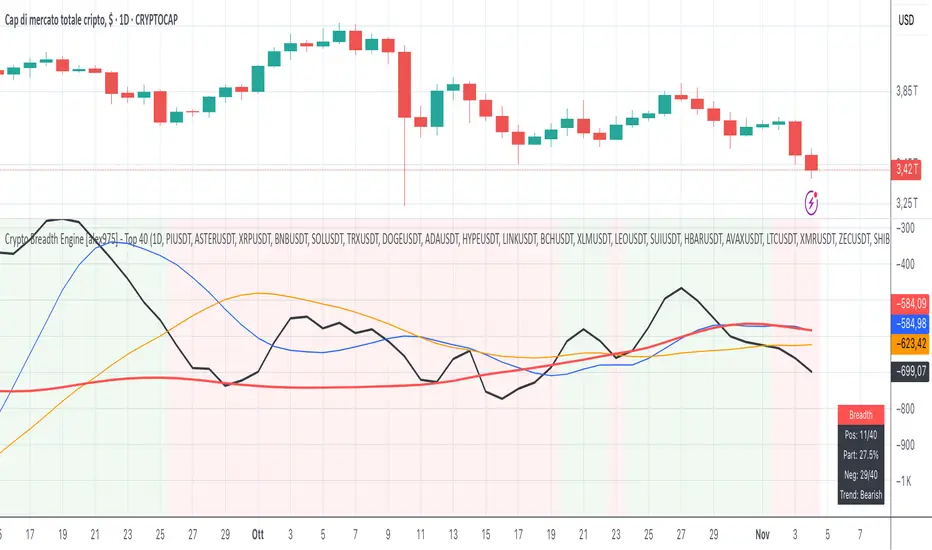
Crypto Breadth Engine [alex975] A normalized crypto market breadth indicator with a customizable 40 coin input panel — revealing whether rallies are broad and healthy across major coins and altcoins or led by only a few. 📊 Overview The Crypto Breadth Engine measures the real participation strength of the crypto market by analyzing the direction of the 40 largest cryptocurrencies by market capitalization. ⚙️ How It Works Unlike standard breadth tools that only count assets above a moving average, this indicator measures actual price direction: +1 if a coin closes higher, –1 if lower, 0 if unchanged. The total forms a Breadth Line, statistically normalized using standard deviation to maintain consistent readings across timeframes and volatility conditions. 🧩 Dynamic Input Mask All 40 cryptocurrencies are fully editable via the input panel, allowing users to easily replace or customize the basket (Top 40, Layer-1s, DeFi, Meme Coins, AI Tokens, etc.) without touching the code. This flexibility keeps the indicator aligned with the evolving crypto market. 🧭 Trend Bias The indicator classifies market structure as Bullish, Neutral, or Bearish, based on how the Breadth Line aligns with its moving averages (10, 20, 50). 💡 Dashboard A compact on-chart table displays in real time: • Positive and negative coins • Participation percentage • Current trend bias 🔍 Interpretation • Rising breadth → broad, healthy market expansion • Falling breadth → narrowing participation and structural weakness Ideal for TOTAL, TOTAL3, or custom crypto baskets on 1D,1W. Developed by alex975 – Version 1.0 (2025). ------------------------------------------------------------------------------------- 🇮🇹 Versione Italiana 📊 Panoramica Il Crypto Breadth Engine misura la partecipazione reale del mercato crypto, analizzando la direzione delle 40 principali criptovalute per capitalizzazione. Non si limita a contare quante coin sono sopra una media mobile, ma calcola la variazione effettiva del prezzo: +1 se sale, –1 se scende, 0 se invariato. La somma genera una Breadth Line normalizzata statisticamente, garantendo letture coerenti su diversi timeframe e fasi di volatilità. 🧩 Mascherina dinamica L’indicatore include una mascherina d’input interattiva che consente di modificare o sostituire liberamente i 40 ticker analizzati (Top 40, Layer-1, DeFi, Meme Coin, ecc.) senza intervenire nel codice. Questo lo rende sempre aggiornato e adattabile all’evoluzione del mercato crypto. ⚙️ Funzionamento e Trend Bias Classifica automaticamente il mercato come Bullish, Neutral o Bearish in base alla relazione tra la breadth e le medie mobili (10, 20, 50 periodi). 💡 Dashboard Una tabella compatta mostra in tempo reale: • Numero di coin positive e negative • Percentuale di partecipazione • Stato attuale del trend 🔍 Interpretazione • Breadth in crescita → mercato ampio e trend sano • Breadth in calo → partecipazione ridotta e concentrazione su pochi asset Ideale per analizzare TOTAL, TOTAL3 o panieri personalizzati di crypto. Funziona su timeframe 1D, 4H, 1W. Sviluppato da alex975 – Versione 1.0 (2025). Pine Script® 인디케이터Alex975의4417
🧠 Gelişmiş AI Trend Analiziautomatically determines support and resistance levels.Pine Script® 인디케이터Whalesdeadd의76
【SY】AI量化指标Strategy Description This strategy is designed to capture market momentum through structured price behavior and dynamic risk management. It seeks to identify moments when the market transitions between accumulation and expansion phases, entering positions that align with the prevailing directional bias. The approach prioritizes disciplined execution, precise trade timing, and consistent risk-to-reward balance. Position management follows a clear set of predefined conditions to reduce emotional interference and enhance long-term performance stability. Emphasis is placed on adaptability rather than prediction — the strategy reacts to changing market structure, allowing profits to grow while protecting capital through controlled exit conditions. It performs best in trending or transitional environments where volatility supports directional continuation.Pine Script® 인디케이터opekuch의5
Luxy BIG beautiful Dynamic ORBThis is an advanced Opening Range Breakout (ORB) indicator that tracks price breakouts from the first 5, 15, 30, and 60 minutes of the trading session. It provides complete trade management including entry signals, stop-loss placement, take-profit targets, and position sizing calculations. The ORB strategy is based on the concept that the opening range of a trading session often acts as support/resistance, and breakouts from this range tend to lead to significant moves. What Makes This Different? Most ORB indicators simply draw horizontal lines and leave you to figure out the rest. This indicator goes several steps further: Multi-Stage Tracking Instead of just one ORB timeframe, this tracks FOUR simultaneously (5min, 15min, 30min, 60min). Each stage builds on the previous one, giving you multiple trading opportunities throughout the session. Active Trade Management When a breakout occurs, the indicator automatically calculates and displays entry price, stop-loss, and multiple take-profit targets. These lines extend forward and update in real-time until the trade completes. Cycle Detection Unlike indicators that only show the first breakout, this tracks the complete cycle: Breakout → Retest → Re-breakout. You can see when price returns to test the ORB level after breaking out (potential re-entry). Failed Breakout Warning If price breaks out but quickly returns inside the range (within a few bars), the label changes to "FAILED BREAK" - warning you to exit or avoid the trade. Position Sizing Calculator Built-in risk management that tells you exactly how many shares to buy based on your account size and risk tolerance. No more guessing or manual calculations. Advanced Filtering Optional filters for volume confirmation, trend alignment, and Fair Value Gaps (FVG) to reduce false signals and improve win rate. Core Features Explained ### 1. Multi-Stage ORB Levels The indicator builds four separate Opening Range levels: ORB 5 - First 5 minutes (fastest signals, most volatile) ORB 15 - First 15 minutes (balanced, most popular) ORB 30 - First 30 minutes (slower, more reliable) ORB 60 - First 60 minutes (slowest, most confirmed) Each level is drawn as a horizontal range on your chart. As time progresses, the ranges expand to include more price action. You can enable or disable any stage and assign custom colors to each. How it works: During the opening minutes, the indicator tracks the highest high and lowest low. Once the time period completes, those levels become your ORB high and low for that stage. ### 2. Breakout Detection When price closes outside the ORB range, a label appears: BREAK UP (green label above price) - Price closed above ORB High BREAK DOWN (red label below price) - Price closed below ORB Low The label shows which ORB stage triggered (ORB5, ORB15, etc.) and the cycle number if tracking multiple breakouts. Important: Signals appear on bar close only - no repainting. What you see is what you get. ### 3. Retest Detection After price breaks out and moves away, if it returns to test the ORB level, a "RETEST" label appears (orange). This indicates: The original breakout level is now acting as support/resistance Potential re-entry opportunity if you missed the first breakout Confirmation that the level is significant The indicator requires price to move a minimum distance away before considering it a valid retest (configurable in settings). ### 4. Failed Breakout Detection If price breaks out but returns inside the ORB range within a few bars (before the breakout is "committed"), the original label changes to "FAILED BREAK" in orange. This warns you: The breakout lacked conviction Consider exiting if already in the trade Wait for better setup Committed Breakout: The indicator tracks how many bars price stays outside the range. Only after staying outside for the minimum number of bars does it become a committed breakout that can be retested. ### 5. TP/SL Lines (Trade Management) When a breakout occurs, colored horizontal lines appear showing: Entry Line (cyan for long, orange for short) - Your entry price (the ORB level) Stop Loss Line (red) - Where to exit if trade goes against you TP1, TP2, TP3 Lines (same color as entry) - Profit targets at 1R, 2R, 3R These lines extend forward as new bars form, making it easy to track your trade. When a target is hit, the line turns green and the label shows a checkmark. Lines freeze (stop updating) when: Stop loss is hit The final enabled take-profit is hit End of trading session (optional setting) ### 6. Position Sizing Dashboard The dashboard (bottom-left corner by default) shows real-time information: Current ORB stage and range size Breakout status (Inside Range / Break Up / Break Down) Volume confirmation (if filter enabled) Trend alignment (if filter enabled) Entry and Stop Loss prices All enabled Take Profit levels with percentages Risk/Reward ratio Position sizing: Max shares to buy and total risk amount Position Sizing Example: If your account is $25,000 and you risk 1% per trade ($250), and the distance from entry to stop loss is $0.50, the calculator shows you can buy 500 shares (250 / 0.50 = 500). ### 7. FVG Filter (Fair Value Gap) Fair Value Gaps are price inefficiencies - gaps left by strong momentum where one candle's high doesn't overlap with a previous candle's low (or vice versa). When enabled, this filter: Detects bullish and bearish FVGs Draws semi-transparent boxes around these gaps Only allows breakout signals if there's an FVG near the breakout level Why this helps: FVGs indicate institutional activity. Breakouts through FVGs tend to be stronger and more reliable. Proximity setting: Controls how close the FVG must be to the ORB level. 2.0x means the breakout can be within 2 times the FVG size - a reasonable default. ### 8. Volume & Trend Filters Volume Filter: Requires current volume to be above average (customizable multiplier). High volume breakouts are more likely to sustain. Set minimum multiplier (e.g., 1.5x = 50% above average) Set "strong volume" multiplier (e.g., 2.5x) that bypasses other filters Dashboard shows current volume ratio Trend Filter: Only shows breakouts aligned with a higher timeframe trend. Choose from: VWAP - Price above/below volume-weighted average EMA - Price above/below exponential moving average SuperTrend - ATR-based trend indicator Combined modes (VWAP+EMA, VWAP+SuperTrend) for stricter filtering ### 9. Pullback Filter (Advanced) Purpose: Waits for price to pull back slightly after initial breakout before confirming the signal. This reduces false breakouts from immediate reversals. How it works: - After breakout is detected, indicator waits for a small pullback (default 2%) - Once pullback occurs AND price breaks out again, signal is confirmed - If no pullback within timeout period (5 bars), signal is issued anyway Settings: Enable Pullback Filter: Turn this filter on/off Pullback %: How much price must pull back (2% is balanced) Timeout (bars): Max bars to wait for pullback (5 is standard) When to use: - Choppy markets with many fake breakouts - When you want higher quality signals - Combine with Volume filter for maximum confirmation Trade-off: - Better signal quality - May miss some valid fast moves - Slight entry delay How to Use This Indicator ### For Beginners - Simple Setup Add the indicator to your chart (5-minute or 15-minute timeframe recommended) Leave all default settings - they work well for most stocks Watch for BREAK UP or BREAK DOWN labels to appear Check the dashboard for entry, stop loss, and targets Use the position sizing to determine how many shares to buy Basic Trading Plan: Wait for a clear breakout label Enter at the ORB level (or next candle open if you're late) Place stop loss where the red line indicates Take profit at TP1 (50% of position) and TP2 (remaining 50%) ### For Advanced Traders - Customized Setup Choose which ORB stages to track (you might only want ORB15 and ORB30) Enable filters: Volume (stocks) or Trend (trending markets) Enable FVG filter for institutional confirmation Set "Track Cycles" mode to catch retests and re-breakouts Customize stop loss method (ATR for volatile stocks, ORB% for stable ones) Adjust risk per trade and account size for accurate position sizing Advanced Strategy Example: Enable ORB15 only (disable others for cleaner chart) Turn on Volume filter at 1.5x with Strong at 2.5x Enable Trend filter using VWAP Set Signal Mode to "Track Cycles" with Max 3 cycles Wait for aligned breakouts (Volume + Trend + Direction) Enter on retest if you missed the initial break ### Timeframe Recommendations 5-minute chart: Scalping, very active trading, crypto 15-minute chart: Day trading, balanced approach (most popular) 30-minute chart: Swing entries, less screen time 60-minute chart: Position trading, longer holds The indicator works on any intraday timeframe, but ORB is fundamentally a day trading strategy. Daily charts don't make sense for ORB. DEFAULT CONFIGURATION ON by Default: • All 4 ORB stages (5/15/30/60) • Breakout Detection • Retest Labels • All TP levels (1/1.5/2/3) • TP/SL Lines (Detailed mode) • Dashboard (Bottom Left, Dark theme) • Position Size Calculator OFF by Default (Optional Filters): • FVG Filter • Pullback Filter • Volume Filter • Trend Filter • HTF Bias Check • Alerts Recommended for Beginners: • Leave all defaults • Session Mode: Auto-Detect • Signal Mode: Track Cycles • Stop Method: ATR • Add Volume Filter if trading stocks Recommended for Advanced: • Enable ORB15 + ORB30 only (disable 5 & 60) • Enable: Volume + Trend + FVG • Signal Mode: Track Cycles, Max 3 • Stop Method: ATR or Safer • Enable HTF Daily bias check ## Settings Guide The settings are organized into logical groups. Here's what each section controls: ### ORB COLORS Section Show Edge Labels: Display "ORB 5", "ORB 15" labels at the right edge of the levels Background: Fill the area between ORB high/low with color Transparency: How see-through the background is (95% is nearly invisible) Enable ORB 5/15/30/60: Turn each stage on or off individually Colors: Assign colors to each ORB stage for easy identification ### SESSION SETTINGS Section Session Mode: Choose trading session (Auto-Detect works for most instruments) Custom Session Hours: Define your own hours if needed (format: HHMM-HHMM) Auto-Detect uses the instrument's natural hours (stocks use exchange hours, crypto uses 24/7). ### BREAKOUT DETECTION Section Enable Breakout Detection: Master switch for signals Show Retest Labels: Display retest signals Label Size: Visual size for all labels (Small recommended) Enable FVG Filter: Require Fair Value Gap confirmation Show FVG Boxes: Display the gap boxes on chart Signal Mode: "First Only" = one signal per direction per day, "Track Cycles" = multiple signals Max Cycles: How many breakout-retest cycles to track (6 is balanced) Breakout Buffer: Extra distance required beyond ORB level (0.1-0.2% recommended) Min Distance for Retest: How far price must move away before retest is valid (2% recommended) Min Bars Outside ORB: Bars price must stay outside for committed breakout (2 is balanced) ### TARGETS & RISK Section Enable Targets & Stop-Loss: Calculate and show trade management TP1/TP2/TP3 checkboxes: Select which profit targets to display Stop Method: How to calculate stop loss placement - ATR: Based on volatility (best for most cases) - ORB %: Fixed % of ORB range - Swing: Recent swing high/low - Safer: Widest of all methods ATR Length & Multiplier: Controls ATR stop distance (14 period, 1.5x is standard) ORB Stop %: Percentage beyond ORB for stop (20% is balanced) Swing Bars: Lookback period for swing high/low (3 is recent) ### TP/SL LINES Section Show TP/SL Lines: Display horizontal lines on chart Label Format: "Short" = minimal text, "Detailed" = shows prices Freeze Lines at EOD: Stop extending lines at session close ### DASHBOARD Section Show Info Panel: Display the metrics dashboard Theme: Dark or Light colors Position: Where to place dashboard on chart Toggle rows: Show/hide specific information rows Calculate Position Size: Enable the position sizing calculator Risk Mode: Risk fixed $ amount or % of account Account Size: Your total trading capital Risk %: Percentage to risk per trade (0.5-1% recommended) ### VOLUME FILTER Section Enable Volume Filter: Require volume confirmation MA Length: Average period (20 is standard) Min Volume: Required multiplier (1.5x = 50% above average) Strong Volume: Multiplier that bypasses other filters (2.5x) ### TREND FILTER Section Enable Trend Filter: Require trend alignment Trend Mode: Method to determine trend (VWAP is simple and effective) Custom EMA Length: If using EMA mode (50 for swing, 20 for day trading) SuperTrend settings: Period and Multiplier if using SuperTrend mode ### HIGHER TIMEFRAME Section Check Daily Trend: Display higher timeframe bias in dashboard Timeframe: What TF to check (D = daily, recommended) Method: Price vs MA (stable) or Candle Direction (reactive) MA Period: EMA length for Price vs MA method (20 is balanced) Min Strength %: Minimum strength threshold for HTF bias to be considered - For "Price vs MA": Minimum distance (%) from moving average - For "Candle Direction": Minimum candle body size (%) - 0.5% is balanced - increase for stricter filtering - Lower values = more signals, higher values = only strong trends ### ALERTS Section Enable Alerts: Master switch (must be ON to use any alerts) Breakout Alerts: Notify on ORB breakouts Retest Alerts: Notify when price retests after breakout Failed Break Alerts: Notify on failed breakouts Stage Complete Alerts: Notify when each ORB stage finishes forming After enabling desired alert types, click "Create Alert" button, select this indicator, choose "Any alert() function call". ## Tips & Best Practices ### General Trading Tips ORB works best on liquid instruments (stocks with good volume, major crypto pairs) First hour of the session is most important - that's when ORB is forming Breakouts WITH the trend have higher success rates - use the trend filter Failed breakouts are common - use the "Min Bars Outside" setting to filter weak moves Not every day produces good ORB setups - be patient and selective ### Position Sizing Best Practices Never risk more than 1-2% of your account on a single trade Use the built-in calculator - don't guess your position size Update your account size monthly as it grows Smaller accounts: use $ Amount mode for simplicity Larger accounts: use % of Account mode for scaling ### Take Profit Strategy Most traders use: 50% at TP1, 50% at TP2 Aggressive: Hold through TP1 for TP2 or TP3 Conservative: Full exit at TP1 (1:1 risk/reward) After TP1 hits, consider moving stop to breakeven TP3 rarely hits - only on strong trending days ### Filter Combinations Maximum Quality: Volume + Trend + FVG (fewest signals, highest quality) Balanced: Volume + Trend (good quality, reasonable frequency) Active Trading: No filters or Volume only (many signals, lower quality) Trending Markets: Trend filter essential (indices, crypto) Range-Bound: Volume + FVG (avoid trend filter) ### Common Mistakes to Avoid Chasing breakouts - wait for the bar to close, don't FOMO into wicks Ignoring the stop loss - always use it, move it manually if needed Over-leveraging - the calculator shows MAX shares, you can buy less Trading every signal - quality > quantity, use filters Not tracking results - keep a journal to see what works for YOU ## Pros and Cons ### Advantages Complete all-in-one solution - from signal to position sizing Multiple timeframes tracked simultaneously Visual clarity - easy to see what's happening Cycle tracking catches opportunities others miss Built-in risk management eliminates guesswork Customizable filters for different trading styles No repainting - what you see is locked in Works across multiple markets (stocks, forex, crypto) ### Limitations Intraday strategy only - doesn't work on daily charts Requires active monitoring during first 1-2 hours of session Not suitable for after-hours or extended sessions by default Can produce many signals in choppy markets (use filters) Dashboard can be overwhelming for complete beginners Performance depends on market conditions (trends vs ranges) Requires understanding of risk management concepts ### Best For Day traders who can watch the first 1-2 hours of market open Traders who want systematic entry/exit rules Those learning proper position sizing and risk management Active traders comfortable with multiple signals per day Anyone trading liquid instruments with clear sessions ### Not Ideal For Swing traders holding multi-day positions Set-and-forget / passive investors Traders who can't watch market open Complete beginners unfamiliar with trading concepts Low volume / illiquid instruments ## Frequently Asked Questions Q: Why are no signals appearing? A: Check that you're on an intraday timeframe (5min, 15min, etc.) and that the current time is within your session hours. Also verify that "Enable Breakout Detection" is ON and at least one ORB stage is enabled. If using filters, they might be blocking signals - try disabling them temporarily. Q: What's the best ORB stage to use? A: ORB15 (15 minutes) is most popular and balanced. ORB5 gives faster signals but more noise. ORB30 and ORB60 are slower but more reliable. Many traders use ORB15 + ORB30 together. Q: Should I enable all the filters? A: Start with no filters to see all signals. If too many false signals, add Volume filter first (stocks) or Trend filter (trending markets). FVG filter is most restrictive - use for maximum quality but fewer signals. Q: How do I know which stop loss method to use? A: ATR works for most cases - it adapts to volatility. Use ORB% if you want predictable stop placement. Swing is for respecting chart structure. Safer gives you the most room but largest risk. Q: Can I use this for swing trading? A: Not really - ORB is fundamentally an intraday strategy. The ranges reset each day. For swing trading, look at weekly support/resistance or moving averages instead. Q: Why do TP/SL lines disappear sometimes? A: Lines freeze (stop extending) when: stop loss is hit, the last enabled take-profit is hit, or end of session arrives (if "Freeze at EOD" is enabled). This is intentional - the trade is complete. Q: What's the difference between "First Only" and "Track Cycles"? A: "First Only" shows one breakout UP and one DOWN per day maximum - clean but might miss opportunities. "Track Cycles" shows breakout-retest-rebreak sequences - more signals but busier chart. Q: Is position sizing accurate for options/forex? A: The calculator is designed for shares (stocks). For options, ignore the share count and use the risk amount. For forex, you'll need to adapt the lot size calculation manually. Q: How much capital do I need to use this? A: The indicator works for any account size, but practical day trading typically requires $25,000 in the US due to Pattern Day Trader rules. Adjust the "Account Size" setting to match your capital. Q: Can I backtest this strategy? A: This is an indicator, not a strategy script, so it doesn't have built-in backtesting. You can visually review historical signals or code a strategy script using similar logic. Q: Why does the dashboard show different entry price than the breakout label? A: If you're looking at an old breakout, the ORB levels may have changed when the next stage completed. The dashboard always shows the CURRENT active range and trade setup. Q: What's a good win rate to expect? A: ORB strategies typically see 40-60% win rate depending on market conditions and filters used. The strategy relies on positive risk/reward ratios (2:1 or better) to be profitable even with moderate win rates. Q: Does this work on crypto? A: Yes, but crypto trades 24/7 so you need to define what "session start" means. Use Session Mode = Custom and set your preferred daily reset time (e.g., 0000-2359 UTC). ## Credits & Transparency ### Development This indicator was developed with the assistance of AI technology to implement complex ORB trading logic. The strategy concept, feature specifications, and trading logic were designed by the publisher. The implementation leverages modern development tools to ensure: Clean, efficient, and maintainable code Comprehensive error handling and input validation Detailed documentation and user guidance Performance optimization ### Trading Concepts This indicator implements several public domain trading concepts: Opening Range Breakout (ORB): Trading strategy popularized by Toby Crabel, Mark Fisher and many more talanted traders. Fair Value Gap (FVG): Price imbalance concept from ICT methodology SuperTrend: ATR-based trend indicator using public formula Risk/Reward Ratio: Standard risk management principle All mathematical formulas and technical concepts used are in the public domain. ### Pine Script Uses standard TradingView built-in functions: ta.ema(), ta.atr(), ta.vwap(), ta.highest(), ta.lowest(), request.security() No external libraries or proprietary code from other authors. ## Disclaimer This indicator is provided for educational and informational purposes only. It is not financial advice. Trading involves substantial risk of loss and is not suitable for every investor. Past performance shown in examples is not indicative of future results. The indicator provides signals and calculations, but trading decisions are solely your responsibility. Always: Test strategies on paper before using real money Never risk more than you can afford to lose Understand that all trading involves risk Consider seeking advice from a licensed financial advisor The publisher makes no guarantees regarding accuracy, profitability, or performance. Use at your own risk. --- Version: 3.0 Pine Script Version: v6 Last Updated: October 2024 For support, questions, or suggestions, please comment below or send a private message. --- Happy trading, and remember: consistent risk management beats perfect entry timing every time.Pine Script® 인디케이터orenluxy의업데이트됨 168168 4.9 K
Thematic Portfolio: Quantum Computing & Core TechThis indicator tracks the aggregated performance of a curated thematic portfolio representing the Quantum Computing & Core Technology sector. It combines leading equities and ETFs with predefined weights to reflect a diversified exposure across quantum hardware, AI infrastructure, and semiconductor backbones. Composition: Stocks: Rigetti (RGTI), IonQ (IONQ), D-Wave (QBTS), Palantir (PLTR), Intel (INTC), Arqit (ARQQ) ETFs: BUG, QTUM, SOXX, IHAK Methodology: Each component’s normalized performance is weighted according to its strategic importance within the theme (R&D intensity, infrastructure leverage, and hardware dependence). The indicator dynamically aggregates the weighted series to visualize the cumulative return of the quantum computing ecosystem versus traditional benchmarks. Intended use: Compare thematic returns vs. S&P 500 or NASDAQ Identify macro inflection points in the quantum tech narrative Backtest thematic exposure strategies or structure twin-win / delta-one certificates Note: This script is for analytical and educational purposes only and does not constitute financial advice.Pine Script® 인디케이터vplanzo의4
IREN PR Markers IREN Press Release Marker This indicator plots the dates and titles of official Iris Energy (IREN) press releases directly on the price chart. All events were sourced from IREN’s Investor Relations News & Updates page and include major company announcements such as data-center expansions, GPU purchases, financing deals, and AI-cloud milestones. You can overlay it on NASDAQ:IREN or any other chart (e.g., Bitcoin, NASDAQ, or S&P 500) to visualize how IREN’s corporate news aligns with broader market moves. Features Automatically marks each press release with a labeled event below the candle. Combines multiple announcements from the same day into one label. Works on any timeframe (best viewed on Daily). All data pulled directly from IREN’s public investor website. Use Cases Correlate IREN’s announcements with stock, crypto, or macro price reactions. Identify historical patterns around GPU orders, expansions, or earnings reports. Great for traders studying news-driven volatility and timing.Pine Script® 인디케이터Action8Jackson8의0
IREN Press Release Markers through Oct 26th 2025IREN Press Release Marker This indicator plots the dates and titles of official Iris Energy (IREN) press releases directly on the daily price chart. All events were sourced from IREN’s Investor Relations News & Updates page and include major company announcements such as data-center expansions, GPU purchases, financing deals, and AI-cloud milestones. You can overlay it on IREN or any other chart (e.g., Bitcoin, NASDAQ, or S&P 500) to visualize how IREN’s corporate news aligns with broader market moves. Features Automatically marks each press release with a labeled event below the candle. Combines multiple announcements from the same day into one label. Works on any timeframe (only viewed on Daily). All data pulled directly from IREN’s public investor website. Use Cases Correlate IREN’s announcements with stock, crypto, or macro price reactions. Identify historical patterns around GPU orders, expansions, or earnings reports. Great for traders studying news-driven volatility and timing. Pine Script® 인디케이터Action8Jackson8의1120
Trading Toolkit - Comprehensive AnalysisTrading Toolkit – Comprehensive Analysis A unified trading analysis toolkit with four sections: 📊 Company Info Fundamentals, market cap, sector, and earnings countdown. 📅 Performance Date‑range analysis with key metrics. 🎯 Market Sentiment CNN‑style Fear & Greed Index (7 components) + 150‑SMA positioning. 🛡️ Risk Levels ATR/MAD‑based stop‑loss and take‑profit calculations. Key Features CNN‑style Fear & Greed approximation using: Momentum: S&P 500 vs 125‑DMA Price Strength: NYSE 52‑week highs vs lows Market Breadth: McClellan Volume Summation (Up/Down volume) Put/Call Ratio: 5‑day average (inverted) Volatility: VIX vs 50‑DMA (inverted) Safe‑Haven Demand: 20‑day SPY–IEF return spread Junk‑Bond Demand: HY vs IG credit spread (inverted) Normalization: z‑score → percentile (0–100) with ±3 clipping. CNN‑aligned thresholds: Extreme Fear: 0–24 | Fear: 25–44 | Neutral: 45–54 | Greed: 55–74 | Extreme Greed: 75+. Risk tools: ATR & MAD volatility measures with configurable multipliers. Flexible layout: vertical or side‑by‑side columns. Data Sources S&P 500: CBOE:SPX or AMEX:SPY NYSE: INDEX:HIGN, INDEX:LOWN, USI:UVOL, USI:DVOL Options: USI:PCC (Total PCR), fallback INDEX:CPCS (Equity PCR) Volatility: CBOE:VIX Treasuries: NASDAQ:IEF Credit Spreads: FRED:BAMLH0A0HYM2, FRED:BAMLC0A0CM Risk Management ATR risk bands: 🟢 ≤3%, 🟡 3–6%, ⚪ 6–10%, 🟠 10–15%, 🔴 >15% MAD‑based stop‑loss and take‑profit calculations. Author: Daniel Dahan (AI Generated, Merged & enhanced version with CNN‑style Fear & Greed)Pine Script® 인디케이터danny_dahan의업데이트됨 5577
Kernel Market Dynamics🔍 Kernel Market Dynamics Pro - Advanced Distribution Divergence Detection System OVERVIEW Kernel Market Dynamics Pro (KMD Pro) is a revolutionary market regime detection system that employs Maximum Mean Discrepancy (MMD) - a cutting-edge statistical technique from machine learning - to identify when market behavior diverges from its recent historical distribution patterns. The system transforms complex statistical divergence analysis into actionable trading signals through kernel density estimation, regime classification algorithms, and multi-dimensional visualization frameworks that reveal hidden market transitions before traditional indicators can detect them. WHAT MAKES IT ORIGINAL While conventional indicators measure price or momentum divergence, KMD Pro analyzes distribution divergence - detecting when the statistical properties of market returns fundamentally shift from their baseline state. This approach, borrowed from high-frequency trading and quantitative finance, uses kernel methods to map market data into high-dimensional feature spaces where regime changes become mathematically detectable. The system is the first TradingView implementation to combine MMD with real-time regime visualization, making institutional-grade statistical arbitrage techniques accessible to retail traders. HOW IT WORKS (Technical Methodology) 1. KERNEL DENSITY ESTIMATION ENGINE Maximum Mean Discrepancy (MMD) Calculation: The core innovation - measures distance between probability distributions: • Maps return distributions to Reproducing Kernel Hilbert Space (RKHS) • Computes empirical mean embeddings for reference and test windows • Calculates supremum of mean differences across all RKHS functions • MMD = ||μ_P - μ_Q||_H where H is the RKHS induced by kernel k Three Kernel Functions Available: RBF (Radial Basis Function) Kernel: • k(x,y) = exp(-||x-y||²/2σ²) • Gaussian kernel with smooth, infinite-dimensional feature mapping • Bandwidth σ controls sensitivity (0.5-10.0 user configurable) • Optimal for normally distributed returns • Default choice providing balanced sensitivity Laplacian Kernel: • k(x,y) = exp(-|x-y|/σ) • Exponential decay with heavier tails than RBF • More sensitive to outliers and sudden moves • Ideal for volatile, news-driven markets • Faster regime shift detection at cost of more false positives Cauchy Kernel: • k(x,y) = 1/(1 + ||x-y||²/σ²) • Heavy-tailed distribution from statistical physics • Robust to extreme values and fat-tail events • Best for cryptocurrency and emerging markets • Most stable signals with fewer whipsaws Implementation Details: • Reference window: 30-300 bars of baseline distribution • Test window: 10-100 bars of recent distribution • Double-sum kernel matrix computation with O(m*n) complexity • EMA smoothing (period 3) reduces noise in raw MMD • Real-time updates every bar with incremental calculation 2. REGIME DETECTION FRAMEWORK Three-State Regime Classification: STABLE Regime (MMD < threshold): • Market follows historical distribution patterns • Mean-reverting behavior dominates • Low probability of breakouts • Reduced position sizing recommended • Visual: Subtle background coloring SHIFTING Regime (threshold < MMD < 2×threshold): • Distribution divergence detected • Transition period with directional bias emerging • Optimal entry zone for trend-following • Increased volatility expected • Visual: Yellow/orange zone highlighting EXTREME Regime (MMD > 2×threshold): • Severe distribution anomaly • Black swan or structural break potential • Maximum caution required • Consider hedging or exit • Visual: Red/magenta warning zones Adaptive Threshold System: • Base threshold: 0.05-1.0 (default 0.15) • Volatility adjustment: ±30% based on ATR ratio • Regime persistence: 20-bar minimum for stability • Cooldown periods prevent signal clustering 3. DIRECTIONAL BIAS DETERMINATION Multi-Factor Direction Analysis: Distribution Mean Comparison: • Recent mean = SMA(normalized_returns, test_window) • Reference mean = SMA(normalized_returns, reference_window) • Direction = sign(recent_mean - reference_mean) Momentum Confluence: • Price momentum = close - close • Volume momentum = volume/SMA(volume, reference_window) • Weighted composite direction score Trend Alignment: • Fast EMA vs Slow EMA positioning • Slope analysis of regression line • Multi-timeframe bias confirmation (optional) 4. SIGNAL GENERATION ARCHITECTURE Entry Signal Logic: Stage 1 - Regime Shift Detection: • MMD crosses above threshold • Sustained for minimum 2 bars • No signals within cooldown period Stage 2 - Direction Confirmation: • Distribution mean aligns with momentum • Volume ratio > 1.0 (optional) • Price above/below VWAP (optional) Stage 3 - Risk Assessment: • Calculate ATR-based stop distance • Verify risk/reward ratio > 1.5 • Check for nearby support/resistance Stage 4 - Signal Generation: • Long: Regime shift + bullish direction • Short: Regime shift + bearish direction • Extreme: MMD > 2×threshold warning 5. PROBABILITY CLOUD VISUALIZATION Adaptive Confidence Intervals: • Standard deviation multiplier = 1 + MMD × 3 • Inner band: ±0.5 ATR × multiplier (68% probability) • Outer band: ±1.0 ATR × multiplier (95% probability) • Width expands with divergence magnitude • Real-time adjustment every bar Interpretation: • Narrow cloud: Low uncertainty, stable regime • Wide cloud: High uncertainty, shifting regime • Asymmetric cloud: Directional bias present 6. MOMENTUM FLOW VECTORS Three-Style Momentum Visualization: Flow Arrows: • Length proportional to momentum strength • Width indicates confidence (1-3 pixels) • Angle shows rate of change • Frequency: Every 5 bars or on events Gradient Bars: • Vertical lines from price • Height = momentum/ATR ratio • Opacity based on strength • Continuous flow indication Momentum Ribbon: • Envelope around price action • Expands in momentum direction • Color intensity shows strength 7. SIGNAL CONNECTION SYSTEM Relationship Mapping: • Links consecutive signals with lines • Solid lines: Same direction (continuation) • Dotted lines: Opposite direction (reversal) • Maximum 10 connections maintained • Distance limit: 100 bars Purpose: • Identifies signal clusters • Shows trend development • Reveals regime persistence • Confirms directional bias 8. REGIME ZONE MAPPING Unified Zone Visualization: • Main zones: Full regime periods (entry to exit) • Emphasis zones: Specific trigger points • Historical memory: Last 20 regime shifts • Color gradient based on intensity • Border style indicates zone type Zone Analytics: • Duration tracking • Maximum excursion • Retest probability • Support/resistance conversion 9. DYNAMIC RISK MANAGEMENT ATR-Based Position Sizing: • Stop loss: 1.0 × ATR from entry • Target 1: 2.0 × ATR (2R) • Target 2: 4.0 × ATR (4R) • Volatility-adjusted scaling Visual Target System: • Entry pointer lines • Target boxes with prices • Stop boxes with invalidation • Real-time P&L tracking 10. PROFESSIONAL DASHBOARD Real-Time Metrics Display: Primary Metrics: • Current MMD value and threshold • Risk level (MMD/threshold ratio) • Velocity (rate of change) • Acceleration (second derivative) Signal Information: • Active signal type and entry • Stop loss and targets • Current P&L percentage • Bars since signal Market Metrics: • Directional bias (BULL/BEAR) • Confidence percentage • Win rate statistics • Signal count tracking Visual Design: • Four position options • Three size modes • Five color themes • Gauge visualizations • Status banners 11. MMD INFO PANEL Floating Statistics: • Compact 3×4 table • MMD vs threshold comparison • Velocity with direction arrows • Current bias indication • Always-visible reference FIVE COLOR THEMES Quantum: Cyan/Magenta/Yellow - Modern, high contrast, optimal visibility Matrix: Green/Red - Classic terminal aesthetic, traditional Fire: Orange/Gold/Red - Warm spectrum, energetic feel Aurora: Northern lights palette - Unique, beautiful gradients Nebula: Deep space colors - Purple/Blue, futuristic HOW TO USE Step 1: Select Your Kernel • RBF for normal markets (stocks, forex majors) • Laplacian for volatile markets (small-caps, news-driven) • Cauchy for fat-tail markets (crypto, emerging markets) Step 2: Configure Bandwidth • 0.5-2.0: Scalping (high sensitivity) • 2.0-5.0: Day trading (balanced) • 5.0-10.0: Swing trading (smooth signals) Step 3: Set Analysis Windows • Reference: 3-5× your holding period • Test: Reference ÷ 3 approximately • Adjust based on timeframe Step 4: Calibrate Threshold • Start with 0.15 default • Increase if too many signals • Decrease for earlier detection Step 5: Enable Visuals • Probability Cloud for volatility assessment • Momentum Flow for direction confirmation • Regime Zones for historical context • Signal Connections for trend visualization Step 6: Monitor Dashboard • Check MMD vs threshold • Verify regime state • Confirm directional bias • Review confidence metrics Step 7: Execute Signals • Wait for triangle markers • Verify regime shift confirmed • Check risk/reward setup • Enter at close or next open Step 8: Manage Position • Place stop at calculated level • Scale out at Target 1 (2R) • Trail remainder to Target 2 (4R) • Exit if regime reverses OPTIMIZATION GUIDE By Market Type: Forex Majors: • Kernel: RBF • Bandwidth: 2.0-3.0 • Windows: 100/30 • Threshold: 0.15 Stock Indices: • Kernel: RBF • Bandwidth: 3.0-4.0 • Windows: 150/50 • Threshold: 0.20 Cryptocurrencies: • Kernel: Cauchy • Bandwidth: 2.5-3.5 • Windows: 100/30 • Threshold: 0.10-0.15 Commodities: • Kernel: Laplacian • Bandwidth: 2.0-3.0 • Windows: 200/60 • Threshold: 0.15-0.25 By Timeframe: Scalping (1-5m): • Test Window: 10-20 • Reference: 50-100 • Bandwidth: 1.0-2.0 • Cooldown: 5-10 bars Day Trading (15m-1H): • Test Window: 30-50 • Reference: 100-150 • Bandwidth: 2.0-3.0 • Cooldown: 10-20 bars Swing Trading (4H-Daily): • Test Window: 50-100 • Reference: 200-300 • Bandwidth: 3.0-5.0 • Cooldown: 20-50 bars ADVANCED FEATURES Multi-Timeframe Capability: • HTF MMD calculation via security() • Regime alignment across timeframes • Fractal analysis support Statistical Arbitrage Mode: • Pair trading applications • Spread divergence detection • Cointegration breaks Machine Learning Integration: • Export signals for ML training • Regime labels for classification • Feature extraction support PERFORMANCE METRICS Computational Complexity: • MMD calculation: O(m×n) where m,n are window sizes • Memory usage: O(m+n) for kernel matrices • Update frequency: Every bar (real-time) • Optimization: Incremental updates where possible Typical Signal Frequency: • Conservative settings: 2-5 signals/week • Balanced settings: 5-10 signals/week • Aggressive settings: 10-20 signals/week Win Rate Expectations: • Trend following mode: 40-50% wins, 2:1 reward/risk • Mean reversion mode: 60-70% wins, 1:1 reward/risk • Depends heavily on market conditions IMPORTANT DISCLAIMERS • This indicator detects statistical divergence, not future price direction • MMD measures distribution distance, not predictive probability • Past regime shifts do not guarantee future performance • Kernel methods are descriptive statistics, not AI predictions • Requires minimum 100 bars historical data for stability • Performance varies significantly across market conditions • Not suitable for illiquid or heavily manipulated markets • Always use proper risk management and position sizing • Backtest thoroughly on your specific instruments • This is an analysis tool, not a complete trading system THEORETICAL FOUNDATION The Maximum Mean Discrepancy was introduced by Gretton et al. (2012) as a kernel-based statistical test for comparing distributions. In financial markets, we adapt this technique to detect when return distributions shift, indicating potential regime changes. The mathematical rigor of MMD provides a robust, non-parametric approach to identifying market transitions without assuming specific distribution shapes. SUPPORT & UPDATES • Questions or configuration help via TradingView messaging • Bug reports addressed within 48 hours • Feature requests considered for monthly updates • Video tutorials available on request • Join our community for strategy discussions FINAL NOTES KMD Pro represents a paradigm shift in technical analysis - moving from price-based indicators to distribution-based detection. By measuring statistical divergence rather than price divergence, the system identifies regime changes that precede traditional breakouts. This anticipatory capability, combined with comprehensive visualization and risk management, provides traders with an institutional-grade toolkit for navigating modern market dynamics. Remember: The edge comes not from the indicator alone, but from understanding when market distributions diverge from their normal state and positioning accordingly. Use KMD Pro as part of a complete trading strategy that includes fundamental analysis, risk management, and market context. Pine Script® 인디케이터DskyzInvestments의업데이트됨 59