Swing Data - Optimized SK60
v. 1.83
indicator adjust to time frame.
This Pine Script code generates a trading indicator that calculates and displays various data points on a stock, including Average Daily Range (ADR%), Market Cap, Current Volume, Free Cash Flow (FCF) Yield %, Float %, whether moving averages (MA) are inline, and the moving averages of certain indexes like the Russell 2000, Nasdaq 100, and S&P 500. Here’s a breakdown of the script and how to use it.
Key Concepts and Functionality
Indicator Definition: The script begins by defining the indicator with a title (Swing Data - Optimized ADR%...) and short title (Optimized Swing Data), which will appear on the chart. The overlay=true command ensures that the indicator is drawn on the main price chart rather than in a separate pane.
Sector and Ticker:
s = syminfo.tickerid: This stores the ticker ID of the stock being analyzed.
sector = syminfo.sector: This retrieves the sector to which the stock belongs. If the sector information is unavailable, it assigns the value "N/A".
Dynamic Inputs: Several input parameters allow you to customize the indicator:
adrp_len: Defines the length for ADR% calculation.
len: Defines the moving average length for volume.
tbl_size, bg_col, and txt_col: Control the table's appearance, including the size of the text, background color, and text color.
posTable: Allows positioning of the table on the chart. Options include top-left, top-right, bottom-left, and bottom-right.
show_empty_row: Adds an empty row above the displayed values if set to true.
Volume Unit Handling (f_vol_unit): This function converts volume into appropriate units, like thousands (K), millions (M), or billions (B), to make volume easier to read. It’s applied to both the current volume and the average daily volume.
Moving Averages for Indexes (f_ma_indexes): This function calculates the 10-day, 20-day, 50-day, and 200-day simple moving averages (SMAs) for an index (such as Russell 2000 or Nasdaq 100). It also checks whether the MAs are inline, meaning if shorter MAs are above longer MAs, which is usually a bullish sign. It returns the result as "YES" or "NO" and assigns a color (green for yes, red for no).
Volume and Price Data: The script fetches several important data points:
vol_display: Current volume in human-readable units.
avgDaVol: Average daily volume.
adrp: Average Daily Range (ADR%) over a specified length.
fcf_yield_percent: Free Cash Flow Yield percentage.
ADR Calculation: The ADR% is calculated using the formula 100 * (ta.sma(high / low, adrp_len) - 1) and is fetched for the daily timeframe.
FCF Yield Color Logic: The Free Cash Flow yield is classified into three categories:
Green: Undervalued if FCF yield is over 5%.
Yellow: Neutral between 2-5%.
Red: Overvalued if below 2%.
MA's Inline Check for the Stock: The script checks if the stock's 10-day, 20-day, 50-day, and 200-day moving averages are inline (i.e., in a bullish alignment where shorter MAs are higher than longer MAs).
Float % Calculation: The float percentage is calculated as the ratio of float shares outstanding (FSO) to total shares outstanding (TSO). The color is set based on its breakout potential:
Red: Below 20% (manipulation risk).
Green: 20-50% (ideal breakout range).
Yellow: Above 50%.
Price Change %: The script calculates the percentage change in price between the current and previous close.
Volume Color Logic: The color of the "Current Volume" is based on whether it indicates buying or selling pressure:
Green: Volume is higher than average, and the price increased more than ADR%.
Red: Volume is higher than average, and the price decreased more than ADR%.
Yellow: Default color if neither condition is met.
Market Cap: The market cap is calculated by multiplying the total shares outstanding (TSO) by the current close price, and it’s displayed in a human-readable unit (K, M, or B).
Display Table:
A table is created to display all the calculated data in an organized manner. It includes fields for Market Cap, Avg Volume, ADR%, Current Volume, FCF Yield %, Float %, MA's Inline status, and Sector. Additionally, it shows the inline status for the Russell 2000, Nasdaq 100, and S&P 500.
How to Use:
Customization: Users can customize the inputs, including the length of ADR% and volume moving averages, and adjust the table size, text color, and position.
Visualization: The indicator provides a comprehensive table on the chart showing key data points for technical analysis, including whether moving averages are inline for both the stock and major indexes.
This indicator is particularly useful for swing traders or technical analysts who want a clear overview of a stock’s volume, volatility (via ADR%), and the alignment of moving averages, combined with fundamental metrics like market cap and free cash flow yield.
스크립트에서 "range"에 대해 찾기

ICT Balance Price Range [UAlgo]The "ICT Balance Price Range " indicator identifies and visualizes potential balance price ranges (BPRs) on a price chart. These ranges are indicative of periods where the market exhibits balance between bullish and bearish forces, often preceding significant price movements.
🔶 What is Balanced Price Range (BPR) ?
Balanced Price Range is a concept based on Fair Value Gap. Balanced price range (BPR) is the area on price chart where two opposite fair value gaps overlap.
When price approaches the Balanced Price Range (BPR), we assume that the price will react quickly and strongly here. This is because its the combination of two fair value gaps and being a good point of interest for smart money traders.
🔶 Key Features:
Bars to Consider: Determines the number of bars to evaluate for BPR conditions.
Threshold for BPR: Sets the minimum range required for a valid BPR to be identified.
Remove Old BPR: Option to automatically remove invalidated BPRs from the chart.
Bearish/Bullish Box Color: Customizable colors for visual representation of bearish and bullish BPRs.
🔶 Disclaimer
This indicator is provided for educational and informational purposes only.
It should not be considered as financial advice or a recommendation to buy or sell any financial instrument.
The use of this indicator involves inherent risks, and users should employ their own judgment and conduct their own research before making any trading decisions. Past performance is not indicative of future results.
🔷 Related Scripts
Fair Value Gaps (FVG)

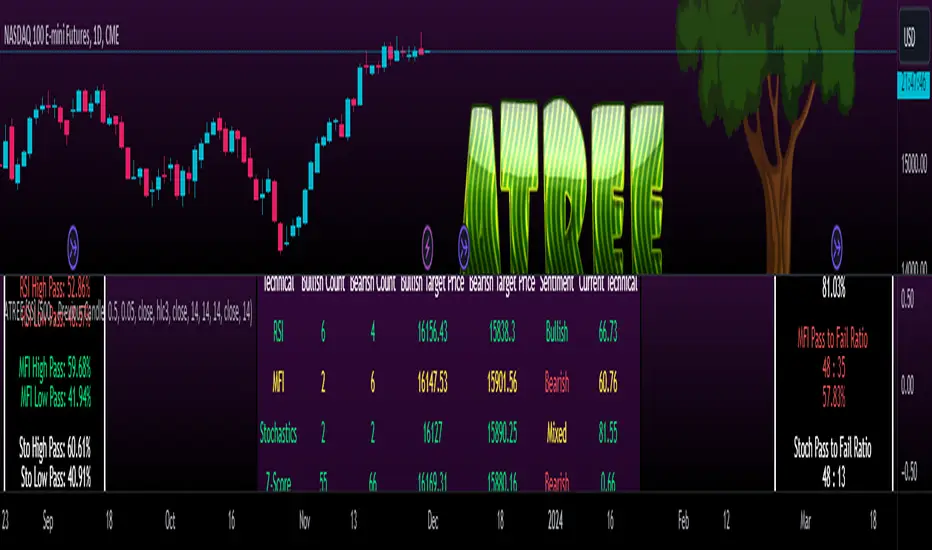
Advanced Technical Range and Expectancy Estimator [SS]Hello everyone,
This indicator is a from of momentum based probability modelling. It is derived from my own approaches to probability modelling but just simplified a bit.
How it works:
The indicator looks at various technical, including stochastics, RSI, MFI and Z-Score, to determine the likely sentiment. All of these, with the exception of Z-Score, are momentum based indicators and can alert us to likely sentiment. However, instead of us making the subjective determination ourselves as to whether the RSI or MFI or Stochastics are bullish, the indicator will look at previous instances of these occurrences, and tally the bullish and bearish follow throughs that happened. It will also calculate the average target price that was hit, under similar conditions, on the same timeframe.
The Z-Score is your "tie breaker". It is not a momentum based indicator and measures something a little different (the standard deviation and over-extension of the stock). For this reason, it provides an alternative assessment and tends to be a bit more reliable in times of low momentum.
Back-test Results:
The indicator back-tests itself over the previous 100 candles. I have limited it to 100 candles for pragmatic considerations (it has to back-test each technical individually and increasing the BT length will slow and potentially error out the indicator) as well as accuracy considerations.
One thing I have noticed in my years of trying to crack the code and develop probability models for tickers, is historical accuracy doesn't always matter because sentiment is always changing. You need to see what it has done over the most recent 100 to 200 candles.
There are two back-test windows, one for the price targets and the other for the sentiment accuracy. The most effective/most accurate will highlight green, the least effective/least accurate will highlight red:
In the image above, you can see that the most accurate predictor of sentiment is Z-Score, with a 90.32% accuracy rate over the past 100 candles.
The most accurate predictor of price is MFI, with a 60% (for bull targets) and 42% (for bear targets)accuracy rate.
Anchoring Points:
The indicator permits you to anchor by two points. The default setting is anchoring by previous candle. If you plan to use this as an oscillator, to see the current prediction for the current candle you are viewing, then you will need to leave this default setting. It will pull the data from the previous candle and give you the data for the current candle you are on.
If you are assess the likely sentiment for the next day after the day has closed off, you will want to anchor by current candle. This will take the current technicals that the day has closed off with and run the assessment for you.
Customizability
You can customize the technicals by source and length of assessment.
They are all defaulted to the traditional settings of these indicators, but if you want to customize your model to try and improve or enhance accuracy in one way or another, you are free and able to do so!
I do suggest leaving the defaults as they seem to work particular well :-).
Thresholds
Thresholds are the tolerance levels that we permit for our technical search range. If you want them to be exactly identical, then you can set it to 0. If you want it to be extremely similar, you can set it to 0.01. This will hone in on the ranges you are interest in and you can see how it affects your accuracy by reviewing the results in the back-test tables.
Keep Static Colour Option
I want to make a quick note on the "Keep Static Colour" option that is in your settings menu.
The primary table that shows you the probability and price targets change colours based on the accuracy of the assessment. This is so, if you are using a mobile device or smaller screen and can't have the back-test results open at the same time, you can see still which are the most reliable results. However, if you have the back-test tables open and you find these colour changes too distracted, you can toggle on the "Keep Static Colour" and it will resort the colour of the table to a solid white:
Show Technicals
The indicator can show you the current technical values if you are using it in place of an oscillator. Its less pivotal as its making the assessment for you, but just for your reference if you want to see what the current MFI, Z-Score or Stochastics etc. are, you have that option as well.
All Timeframes Permitted
You can view Weekly, Monthly, Hourly, 5 minute, 1 minute, its all supported!
That's the indicator in a nutshell.
Hope you enjoy and leave your questions below.
Safe trades everyone!
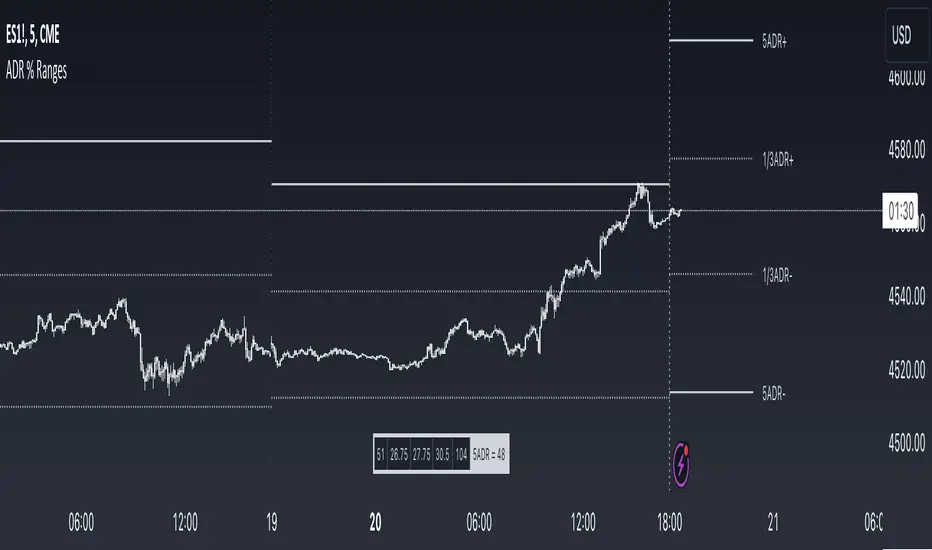
ADR % RangesThis indicator is designed to visually represent percentage lines from the open of the day. The % amount is determined by X amount of the last days to create an average...or Average Daily Range (ADR).
1. ADR Percentage Lines: The core function of the script is to apply lines to the chart that represent specific percentage changes from the daily open. It first calculates the average over X amount of days and then displays two lines that are 1/3rd of that average. One line goes above the other line goes below. The other two lines are the full "range" of the average. These lines can act as boundaries or targets to know how an asset has moved recently. *Past performance is not indicative of current or future results.
The calculation for ADR is:
Step 1. Calculate Today's Range = DailyHigh - DailyLow
Step 2. Store this average after the day has completed
Step 3. Sum all day's ranges
Step 4. Divide by total number of days
Step 5. Draw on chart
2. Customizable Inputs: Users have the flexibility to customize the script through various inputs. This includes the option to display lines only for the current trading day (`todayonly`), and to select which lines are displayed. The user can also opt to show a table the displays the total range of previous days and the average range of those previous days.
3. No Secondary Timeframe: The ADR is computed based on whatever timeframe the chart is and does not reference secondary periods. Therefore the script cannot be used on charts greater than daily.
This script is can be used by all traders for any market. The trader might have to adjust the "X" number of days back to compute a historical average. Maybe they only want to know the average over the past week (5 days) or maybe the past month (20 days).
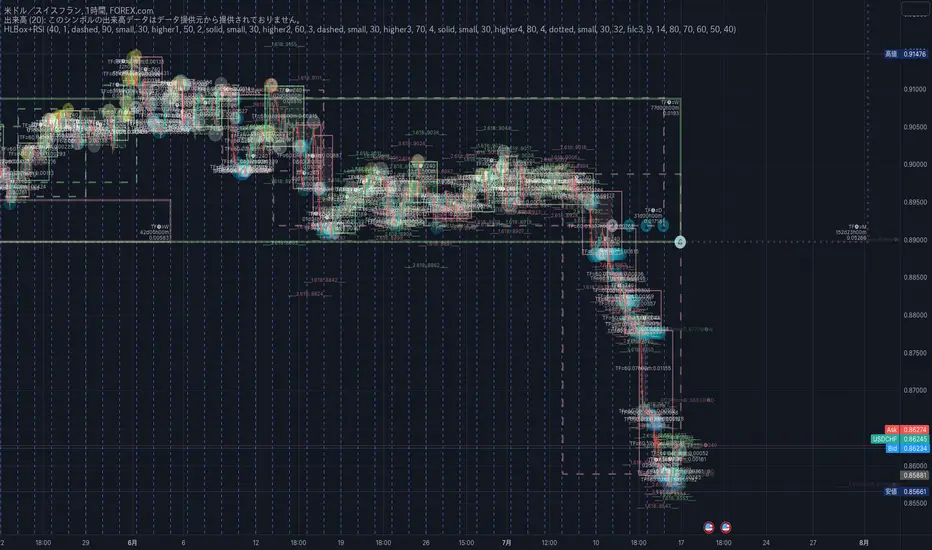
20/200MAs+LTF+4HTF and HighLowBox+3HTF20/200MAs
Shows 20 and 200 MAs in each TFs(tfChart,1 Lower and 4 Higher).
TFs:
current TF
Lower TF (default: lower1)
Higher TF1 (default: higher1)
Higher TF2 (default: higher1)
Higher TF3 (default: higher1)
Higher TF4 (default: higher1)
MAs:
20MA (default: sma)
1st 200MA (default: sma)
2nd 200MA (default: ema)
VWAP (optional)
HighLowBox+3HTF
Enclose in a square high and low range in each timeframe.
Shows price range and duration of each box.
In current timeframe, shows Fibonacci Scale inside(23.6%, 38.2%, 50.0%, 61.8%, 76.4%)/outside of each box.
Outside(161.8%,261.8,361.8%) would be shown as next target, if break top/bottom of each box.
1st box for current timeframe.
2nd box for higher timeframe.(default: higher1)
3rd box for higher timeframe.(default: higher2)
4th box for higher timeframe.(default: higher3)
static timeframes can also be used.

HighLowBox 1+3TF Enclose in a square high and low range in each timeframe.
Shows price range and duration of each box.
In current timeframe, shows Fibonacci Scale inside(23.6%, 38.2%, 50.0%, 61.8%, 76.4%)/outside of each box.
Outside(161.8%,261.8,361.8%) would be shown as next target, if break top/bottom of each box.
1st box for current timeframe.(default: Chart)
2nd-4th box for higher timeframes.(default: higher1,higher2,higher3)
static timeframes can also be used.
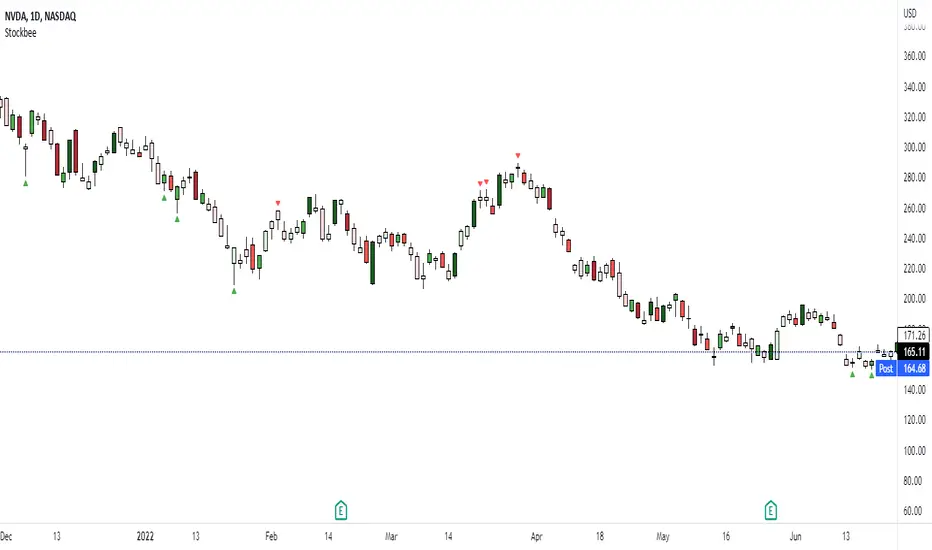
Stockbee Momentum BurstThis is a script to color code bars based on the bullish- and bearish combination.
Bullish Combination
Percent: Price >= 4% from yesterday and Volume today > Yesterday
Dollar: Price >= 0.9 dollar from open
Base Requirements
- Price > Yesterday's close
- Price > Open
- Price is within 30% of high
- Todays price range >= Yesterdays price range
- Yesterday's move <= 2%
- Volume >= 100 000
Bearish Combination
Percent: Price <= 4% from yesterday and Volume today > Yesterday
Dollar: Price <= 0.9 dollar from open
Base Requirements
- Price < Yesterday's close
- Price < Open
- Price is within 30% of low
- Todays price range >= Yesterdays price range
- Yesterday's move >= -2%
- Minimum volume for each of last 3 days >= 100 000
Momentum Filter
These are based on the 10 and 20 EMA crossover, where the former above would indicate upward momentum and below downward momentum. This can help to narrow down the color code to continuation phases. The linked option will override all other momentum filters, bullish candles will be displayed when EMA 10 > 20 and bearish candles when EMA 10 < 20.
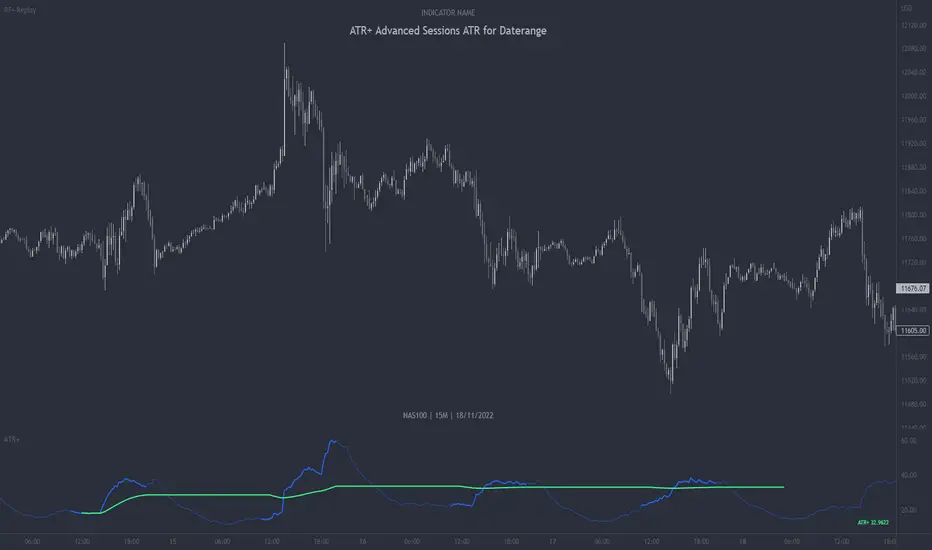
ATR+ Advanced Sessions ATR for DaterangeATR+ Advanced Sessions ATR for Daterange
The ATR+ adds the following additional filters to the stock ATR indicator by Tradingview:
- Calculates the overall average ATR for a user defined daterange, optionally filtered by trading session and selected weekdays, presented as a secondary line over the standard ATR line.
- Basic ATR line, with colour highlight to indicate the selected sessions, days and timeframe being calculated by the average ATR+ line.
- Average ATR+ line indicating the average of all ATRs within the defined timeframe, optionally filtered by instances of a selected trading session and selected weekdays.
- Customisable appearance.
- The ATR+ also includes the basic ATR configuration options typically found in the standard ATR by Tradingview, including period length and smoothing type. Defaults are set to the factory standards: 14 length, RMA smoothing type.
What Is the Average True Range (ATR)?
The ATR is a technical analysis tool that measures market volatility by decomposing the entire range asset price for that period. Investopedia describes the ATR as follows:
"The average true range (ATR) is a technical analysis indicator, introduced by market technician J. Welles Wilder Jr. in his book New Concepts in Technical Trading Systems, that measures market volatility by decomposing the entire range of an asset price for that period.
The true range indicator is taken as the greatest of the following: current high less the current low; the absolute value of the current high less the previous close; and the absolute value of the current low less the previous close. The ATR is then a moving average, generally using 14 days, of the true ranges."
For more information on the ATR and its calculations and use cases, see here:
Investopedia link here.
Tradingview link here.
Note
The indicator may time out if the number of bars being calculated is too long. If this happens, you will need to reduce the datetime range, or increase the chart timeframe in order to reduce the number of bars being calculated and the indicator will attempt to recalculate.
Asteroid Belt SpaceManBTCAsteroid Belt SpaceManBTC
Asteroid Belt is a trend analysis tool that provides 3 areas of importance, upper, lower, and main belt. The belts provide areas
of key interest that will likely cause a reaction on any asset that is being charted.
Within The Belt
There are 2 ways to play the belt, when trending in either direction, entering the belt can be seen as an area to buy a pullback, providing a strong entry in the trend. The Upper Belt will suffice in the strongest of trends, the middle of the belt indicates a trend that is still strong. A tap of the lowest belt is a weaker trend but often the bottom of any uptrend.
The other way to play the belt from within is play the range from one belt to the other usually the lower belt to the upper belt for a full range play is successful and the mid belt should be used to take partial profits/determine the strength of the move to the other side of the belt.
Responsiveness
3 Types of responsiveness, Fast, Slow and Normal. Slow being the default as its my preffered. The Slow belt will highlight entries with higher probability of causing reaction.
Normal is the best for reliable entries with less patience, it can be recommended for those who are faster to react to directional changes.
Fast belt should only really be used on the Higher timeframe trends as their pull backs can take significantly longer and therefore provides a reliable entry for a quicker than usual high time frame execution.
Dynamic Colors
This is a simple calculation which will be advanced in the future, it can be used to determine the strength of a trend in the belt, highlighting uptrend and downtrends when enabled. Can be disabled in settings.
Auto Aggregator is the primary difference by providing its own calculations very different to how previous auto calculations have worked in spacemanbtc indicators, this aggregator is a work in progress but should produce results that can be replicated accross all coins. Doing so allows for chart by chart switching and is useful for anyone who is in need of quick trend analysis. This can be disabled for manual fine tuning. On by default for new users to learn with.
To Do:
Add outer reversion belts for a full trading system.
Improve dynamic coloring logic.
Improve Auto Aggregator logic.

Rescaled RangeRescaled Range is an implementation of the fractal rescaled ranges developed by Harold Edwin Hurst and Benoit Mandlebrot.
Settings include:
“Window Size” - the number of time periods in a window over which price changes are analyzed. This will generally correspond to your trading horizon and defaults to 15.
“Number of Windows” - the number of “Window Size” intervals to average the rescaled range value over. By looking at a number of such periods, the study captures potential volatility that may have occurred in the recent past. This should be set long enough to capture the current trend (defaults to 63), but not so long to include volatility regimes no longer in play.
Each window in the average is offset by 1 time period from the the others - like a moving average.
This study plots two lines - “Rescaled Range High” which indicates overbought conditions when the price moves above it and “Rescaled Range Low” which indicates oversold conditions when the price moves below it.
This study builds upon the bridge range work of Joe Catanzaro (joecat808) and Caleb Sandfort (calebsandfort). Bridge ranges are used to position the rescaled range with respect to the closing price.
Note: Your time series must have (Window Size + Number of Windows) or more periods of data to complete this study. For example, using the defaults, your time series should have (15+63) = 78 periods or more of data.

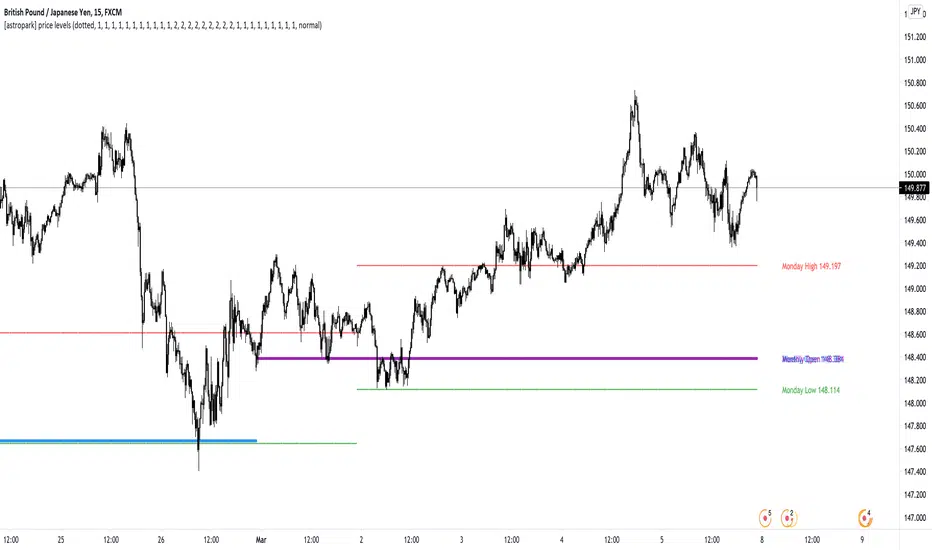
[astropark] price levelsDear Followers,
today another awesome Analysis Tool, that you can use in your trading journey: Price Levels !
Are you a range trading player? a scalper? or maybe a day-trader or a swing-trader? This is for you then. Indeed it's for everyone.
This indicator works on every timeframe, market and pair.
It keeps track of recent important levels generated by price action:
Monday high, low and middle range level
Tuesday high and low
Wednesday high and low
Thursday high and low
Friday high and low
Weekly open, high and low
Monthly open, high and low
Yearly open, high and low
Previous weekly open, high and low
Previous monthly open, high and low
Previous yearly open, high and low
You can:
choose price levels to hide and show
change each level color / thickness / display style (solid or dotted)
choose to show or hide price labels and change their size
Why such indicator should be helpful? How can I use it to do profit?
In multiple ways! Let's talk about Monday Range :
when Monday range is formed, price acceptance below Monday low is a bearish signal, so will more likely want to short / sell
equally price acceptance above Monday high is a bullish signal, so will more likely want to long / buy
it can happen that Monday high is simply retested, with price not being able to stay above it: this is called a retest (in case of a simple wick) or a deviation (in case of price staying above the level just for some candles) and what usually happens is price falling back to Monday middle range level and even back to Monday low.
the opposite can happen of course: you will become bullish if Monday low is tested or a deviation appears below Monday low: price tends to bounce on such occasions back to Monday middle range or even Monday high
Tuesday is usually a marker day within a trading week:
if Monday was pretty bullish, Tuesday high may mark the weekly top, following some red days
if Monday was pretty bearish, Tuesday low may mark the weekly bottom, following some green days
Thursday is the day when big players start to take profits, as the trading week is going to end the next day, so in an all-green week Thursday may be a red one, while in an all-red week it may be a bullish day
Thursday is the day when big players start to take profits, as the trading week is going to end the next day:
in an all-green week, Thursday may be a red one and it's low tends to mark the weekly low
while in an all-red week, it tends to be a bullish day, so here you will refill your shorts for the next blooding day
Let's talk now about the Weekly, Monthly and Yearly price levels : here it is the interesting part for Swing Traders
Weekly open is usually a defining level: on retest, if price keeps staying below then more downside is expected, if price keeps staying above then more upside is expected (similarly to what we said about Monday high and low)
Monthly and Yearly open price levels are usually a "no-brainer" buy level in a bullish trend or equally a sell level in a bearish trend: in this scenarios, a deviation structure is even more powerful in term of price reaction and efficiency
We trade Weekly, Monthly and Yearly high and low price levels as explained for the Monday high and low, but with a swing traders perspective (so a medium-long term trade)
Previous Weekly/Monthly/Yearly price levels are usually very useful as targets in your trades
Here below some screenshots that resumes what said above.
Weekly Open as support (bullish) and Monday High deviation (bearish)
Tuesday High, Weekly Open failing as support: bearish
Monday Low deviation (bullish)
Price Acceptance above Monday High and Weekly Open (bullish)
Yearly Open retests as buy opportunities
Deviation below Monthly Open (bullish), Price Acceptance below Monthly and Yearly Open (bearish)
This is a premium indicator , so send me a private message in order to get access to this script.
Consolidation Ranges [kingthies] Consolidation Range Analysis
Published by Eric Thies, January 2021
█ Indicator Summary
This tool calculates, analyzes and plots the visualization of a relative range over a given period of time
By adding to charts, users are enabled to see the impulsive nature of market cycles, along with their efforts to consolidate thereafter
The default period is 30, and should be adjusted to users preference
The default input is the current close price, on the chosen timeframe of the chart
█ Script Source
//
//@version=4
//© kingthies || This source code is subject to the terms of the Mozilla Public License 2.0 at mozilla.org
study("Consolidation Ranges ", shorttitle="CR ", overlay=true)
// !<------ User Inputs ----->
src = input(close, title='Range Input (Default set to Close'), lengthEMA=input(30,title='Length'),zoneToggle = input(true, title="Toggle Zone Highlights"), iCol = color.new(#FFFFFF, 100),
// !<---- Declarations & Calculations ---- >
trndUp = float(na),trndDwn = float(na), mid = float(na), e = ema(src, lengthEMA)
trndUp := src < nz(trndUp ) and src > trndDwn ? nz(trndUp ) : high, trndDwn := src < nz(trndUp ) and src > trndDwn ? nz(trndDwn ) : low, mid := avg(trndUp, trndDwn)
// !< ---- Plotting ----->
highRange = plot(trndUp == nz(trndUp ) ? trndUp : na, color=color.white, linewidth=2, style=plot.style_linebr, title="Top of Period Range")
lowRange = plot(trndDwn == nz(trndDwn ) ? trndDwn : na, color=color.white, linewidth=2, style=plot.style_linebr, title="Bottom of Period Range")
xzone = plot(zoneToggle ? src > e ? trndDwn : trndUp : na, color=iCol, style=plot.style_circles, linewidth=0, editable=false)
fill(highRange, xzone, color=color.lime,transp=70), fill(xzone, lowRange, color=color.red,transp=70)
//

@thecf RSI + 12-EMA + Magic 89-EMA + RangesThis RSI has a couple modifications. It works with bullish and bearish control zones and implements both a 12 EMA as well as the "magic" 89 Moving Average.
First, the ranges. Whenever the RSI moves above 65 the bulls are in control.
Whenever the RSI moves blow 45 the bears are in control. Everything in between in neutral. Traders can use these levels for information on strength of either bulls or bears and also for support and resistance .
Both EMAs are best used for crossovers, as well as support and resistance .
The idea for the "magic" 89 moving average, originally stems from Fibonacci values that some traders like to use for support and resistance on price.
From observation, it holds more information though, when used as a moving average of the RSI and in combination with a 12 EMA .
When the RSI crosses above the 89 moving average, it can be interpreted as a potential shift in trend up. The 12 EMA then shortly afterwards usually confirms it by also crossing above the 89 moving average.
The 89 moving average can also signalize a potential shift in trend coming up when reaching 70.
The magic MA works best on timeframes like the daily and upwards.
For more information about the indicator feel free to leave a comment.

Kalihari_Brothers_PRBBasic principle support ,resistance and flipping of support n resistance (support becomes resistance ,resistance becomes support)..
DRB- Previous Day Range High ( PDH ) and Low ( PDL )
WRB- Previous Week Range High (PWH) and Low (PWL)
MRB - Previous Monthly Range High (PMH) and Low (PML)
It gives Trending Market Signal for bullish (price breaks PDH range continuous in up direction and make support)
and similarly for bearish (price breaks PDL range continuous in down direction and make resistance)..
For sideways/Non-trending market stay with in a range not break high and low..(stay away from it)..
DRB act as minor support and resistance ..
WRB and MRB act as major support and resistance ...

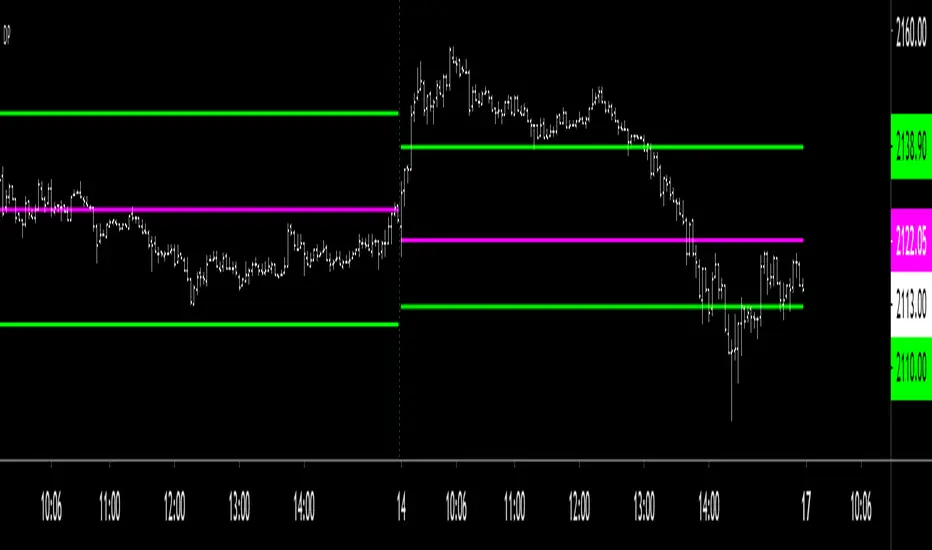
Decision_Pointclassic decision point for intraday
CDH- current day high(not fixed range)
CDL- current day low (not fixed range)
CDO- current day open(fixed range)
PDH- previous day high(fixed range)
PDL- previous day low(fixed range)
PDC- previous day close(fixed range)
above all are decision points where market reaction takes place..
make your own strategy for intraday using DP...
Volume Range EventsChanges in the feelings (positive, negative, neutral) in the market concerning the valuation of an instrument are often preceded with sudden outbursts of buying and selling frenzies. The aim of this indicator is to report such outbursts. We can see them as expansions of volume, sometimes 10 times more than usual. and as extensions of the trading range, also sometimes 10 times more than usual (e.g. usual range is 10 cent suddenly a whole dollar.) The changes are calculated in such a way that these fit between plus and minus 100 percent, the bars are scaled in some sort of logarithmic way. The Emoline is the same as the one in the True Balance of Power indicator, which I already published
ONLY RISES ARE EVENTS
Sometimes analysts are tempted to give meaning to low volume or small ranges. These simply mean that the market has little interest in trading this instrument. I believe that in such cases the trader needs to wait for expansion and extension events to happen, then he can make a better guess of where the market is heading. As events often mark the beginning or ending of a trend, this indicator provides an early and clear signal, because it doesn’t bother us about non-events.
WHAT IS USUAL?
If the algorithm would use an average as a normal to scale volume or range events, then previous peaks will act as spoilers by making the average so high that a following peak is scaled too small. I developed a function, usual() , that kicks out all extremes of a ‘population of values’ and which returns the average of the non-extreme values. It can be called with any serial. This function is called by both algorithms that report volume and range peaks, which guarantees that the results are really comparable. As this function has a fixed look back of 8 periods, we might state that ‘usual’ is a short lived relative value. I think this doesn’t matter for the practical use of the indicator.
COLORING AND INTERPRETATION
I follow the categories in the ‘Better Volume Indicator’, published by LeazyBear, these are:
1. Climactic Volumes, event >40 % (this means peak is 1.5 X usual)
LIME: Climax Buying Volume, direction up, range event also > 30 %
RED: Climax Selling Volume, direction down, range event also > 30 %
AQUA: Climax Churning Volume, both directions, range event < 30%
2. Smaller Volumes, event <40 %
GREEN: Supportive Volume, both directions, if combined with range event
BLUE: Churning Volume, both directions, if not combined with range event (Professional Trading)
3. Just Range Events
BLACK histogram bars (Amateurish Trading)

New York | Asia | London - Session Range + ORB - [EntryLab]Session Ranges & 15min ORB – Asia, London, New YorkShort Title
This indicator plots the high and low of the three major trading sessions (Asia, London, New York) as well as the Opening Range Breakout (ORB) levels based on the first 15 minutes of each session.
Features: Full session high/low ranges for Asia (00:00–09:00 UTC), London (07:00–16:00 UTC), and New York (~13:30–20:00 UTC). Times are approximate UTC and may need adjustment depending on broker timezone or DST.
ORB: high and low calculated from the first 15-minute period (or equivalent bars) at the start of each session.
Customizable: toggle sessions on/off, change ORB duration, line styles, colors.
How to use:
Traders often monitor price action around prior session highs and lows to identify potential liquidity grabs or sweeps. The ORB provides additional confluence for gauging the session's potential directional bias or breakout levels.For example:A sweep of a prior session high/low can signal liquidity being taken.
Price breaking above/below the session's ORB high/low may indicate momentum in that direction for the current session.
This script combines multi-session range visualization with per-session ORB levels in one tool, which can help assess where liquidity pools may exist and where price could be drawn to fill or sweep certain areas.Best used on lower timeframes (e.g., 1m–15m) for intraday analysis. Session times are fixed (no automatic DST handling); users can modify them in the code if needed.Not financial advice. Trading involves significant risk of loss. Use at your own discretion and always test thoroughly.

Key Candle Range [NextPercent]Key Candle Range
This indicator draws persistent horizontal levels from a user-selected candle on any chosen timeframe. It is designed to mark a key reference range and project it forward, allowing traders to monitor reactions to that candle’s high and low.
Features:
• Select any specific candle by date and time
• Works on a custom timeframe independent of the chart
• Automatically projects the selected candle’s high and low into the future
• Fully customizable line color, width, and style
• Clean visual reference for breakout, rejection, or range trading
How it works:
The script finds the candle that matches the chosen timestamp on the selected timeframe. Once identified, it draws two horizontal lines at that candle’s high and low and extends them to the right. These levels remain visible as long-term structural references.
Use cases:
• Marking important session candles (open range, news candle, etc.)
• Tracking breakout levels
• Identifying support and resistance zones
• Anchoring trade bias to a key event candle
Tip:
Use higher timeframes to mark major structural levels, or intraday timeframes to track session-based ranges.

CRT Market Structure Toolkit v2What This Script Does
CRT Market Structure Toolkit v2 is a contextual market analysis tool designed to help traders visualize liquidity, market structure, and session-based behavior on the chart.
This script does not generate trade signals and does not automate entries or exits.
Its purpose is to provide objective reference levels and market context that traders can integrate into their own discretionary trading models.
Why This Is NOT a Simple Indicator Mashup
Although this script combines multiple analytical components, each module serves a specific role within a single, unified market structure framework.
All components are designed to work together to answer three core questions:
Where is liquidity located?
When has liquidity been taken (swept)?
During which sessions is price more likely to expand or react?
This makes the script a cohesive toolkit, not a random collection of indicators.
Core Concepts Used
This script is based on widely used market structure and liquidity concepts, including:
Previous Day High / Low (daily liquidity pools)
Higher Timeframe Highs & Lows
Liquidity sweeps (wick-based stop runs)
Fair Value Gaps (price imbalance)
Balanced Price Ranges (overlapping imbalances)
Session timing and volatility windows (Killzones)
Module Explanation
1. Previous Day High / Low (PDH / PDL – New York Session)
Tracks the full 24-hour New York trading day
Projects previous day highs and lows forward
Detects when price wicks above or below these levels
Swept levels remain visible and change style for clarity
These levels are commonly used to identify daily liquidity targets.
2. Higher Timeframe Highs & Lows
Allows the user to select any higher timeframe (e.g. 4H)
Projects completed HTF highs and lows onto lower timeframes
Detects liquidity sweeps on these HTF levels
Each level maintains its own sweep state
This helps traders align lower timeframe execution with higher timeframe structure.
3. NY Midnight Open
Marks the New York midnight opening price
Acts as a daily equilibrium reference
Resets automatically every New York trading day
This level is often used for bias and mean reversion analysis.
4. Fair Value Gap (FVG) Detection & Nearest FVG Selection
Identifies bullish and bearish Fair Value Gaps using a 3-bar displacement model
Filters FVGs based on:
Lookback period
Minimum price gap
User-defined mitigation rules
Displays only the nearest valid FVG to current price
Detects Balanced Price Ranges (BPR) when bullish and bearish FVGs overlap
This module helps visualize price imbalance and potential reaction zones, not entries.
5. Killzones (Session-Based Analysis)
Highlights user-defined time windows (sessions)
Draws dynamic boxes that expand with price
Helps traders focus on periods where volatility and liquidity are typically higher
Sessions are fully configurable.
Liquidity Sweep Configuration
Lower Timeframe (LTF) sweeps can be filtered by specific hours or minute ranges, allowing traders to focus only on liquidity events relevant to their strategy.
Daily PDH / PDL levels are fixed to the full New York trading day and are not adjustable, ensuring consistency.
How This Script Is Intended To Be Used
This script is meant to be used as a visual decision-support tool, alongside:
Price action analysis
Risk management rules
A personal trading plan
It does not replace trader judgment and should not be used in isolation.
Disclaimer
This script is provided for educational and analytical purposes only.
It is not a signal indicator, does not provide trading advice, and does not guarantee any trading outcome.
All trading decisions and associated risks remain entirely the responsibility of the user.
The developer assumes no liability for losses or damages resulting from the use of this script.
Final Notes for Moderation
This script is original in structure and implementation
All components are intentionally integrated into a single market structure framework

10 Youtube Opening Range Strategies + Backtest 1. Quick Flip Scalper
A strategy centered on fading or following the initial move relative to the Opening Range (OR).
LONG Rules:
Reversal Mode: If the Opening Range is Bearish (Red), enter Long when price drops below the Opening Range Low (ORL).
Continuity Mode: If the Opening Range is Bullish (Green), enter Long when price drops below the Opening Range Low (ORL) (Buying the deep pullback/trap).
SHORT Rules:
Reversal Mode: If the Opening Range is Bullish (Green), enter Short when price breaks above the Opening Range High (ORH).
Continuity Mode: If the Opening Range is Bearish (Red), enter Short when price breaks above the Opening Range High (ORH) (Selling the deep pullback/trap).
2. First Candle Scalper
Identical to the Quick Flip Scalper but restricts entries to the very first retest only.
LONG Rules:
Same as Quick Flip Long, but only triggers once per session.
SHORT Rules:
Same as Quick Flip Short, but only triggers once per session.
3. Smart Money Trap (SMT)
Identifies a "fakeout" breakout followed immediately by a reversal candlestick pattern.
LONG Rules:
Condition: The previous candle low was below the ORL, but the candle closed back inside (above ORL).
Trigger: Must have a Bullish Engulfing or Bullish Rejection pattern closing above the ORL.
SHORT Rules:
Condition: The previous candle high was above the ORH, but the candle closed back inside (below ORH).
Trigger: Must have a Bearish Engulfing or Bearish Rejection pattern closing below the ORH.
4. Trident Pattern (TG Capital)
A London-session exclusive strategy requiring a Fair Value Gap (FVG) and a Doji confirmation.
LONG Rules:
Filter: Price is Above the 200 EMA (if enabled).
Setup: A Bullish FVG forms.
Confirmation: A Doji candle wicks down into the 50% level of the FVG.
Trigger: Enter on the next candle close.
SHORT Rules:
Filter: Price is Below the 200 EMA (if enabled).
Setup: A Bearish FVG forms.
Confirmation: A Doji candle wicks up into the 50% level of the FVG.
Trigger: Enter on the next candle close.
5. OTE Framework (MBB Trader)
Simulates an Optimal Trade Entry by combining a Liquidity Sweep with a Market Structure Shift (SMR).
LONG Rules:
Sweep: Price drops below the lowest low of the last 20 candles.
Structure: A Bullish SMR forms (Low → High → Lower Low → Higher High).
SHORT Rules:
Sweep: Price breaks above the highest high of the last 20 candles.
Structure: A Bearish SMR forms (High → Low → Higher High → Lower Low).
6. Liquidity Trap (Marco Trades)
A contrarian strategy that buys/sells purely on sweeps of major structural levels.
LONG Rules:
Trigger: Price sweeps (drops below) the lowest low of the last 50 candles.
SHORT Rules:
Trigger: Price sweeps (breaks above) the highest high of the last 50 candles.
7. Trojan Horse (Trader Mayne)
Uses Trend EMAs (50 & 200) to identify direction, then enters on a Lower Timeframe Breaker.
LONG Rules:
Trend: 50 EMA > 200 EMA (Uptrend).
Trigger: Price sweeps a recent 10-candle low, then immediately breaks a recent 5-candle high.
SHORT Rules:
Trend: 50 EMA < 200 EMA (Downtrend).
Trigger: Price sweeps a recent 10-candle high, then immediately breaks a recent 5-candle low.
8. Simplified SMT (9:30 Range)
Focuses on the 9:30 AM range. Waits for a breakout and a confirmed failure to sustain it.
LONG Rules:
Context: Price previously broke above the ORH.
Trigger: Price returns to the ORH (Retest) with a Bullish Engulfing/Rejection pattern.
SHORT Rules:
Context: Price previously broke below the ORL.
Trigger: Price returns to the ORL (Retest) with a Bearish Engulfing/Rejection pattern.
9. 9:30 One-Candle (Scarface)
Uses the high/low of the single 9:30 candle as the range.
LONG Rules:
Setup: Price closes above the 9:30 High.
Trigger: Price pulls back and touches/dips into the 9:30 High (Retest).
SHORT Rules:
Setup: Price closes below the 9:30 Low.
Trigger: Price pulls back and touches/wicks into the 9:30 Low (Retest).
10. London Breakout (Joovier)
Based on the 3 AM - 9 AM EST box.
LONG Rules:
Trigger: A candle's Body (Open and Close) forms completely above the Box High after the session opens.
SHORT Rules:
Trigger: A candle's Body (Open and Close) forms completely below the Box Low after the session opens.
⚠️ DISCLAIMER & LIMITATION OF LIABILITY
1. NO AFFILIATION / INDEPENDENT PROJECT This script is an independent coding project created solely for testing, research, and entertainment purposes. The creator of this indicator is not associated, affiliated, endorsed by, or in any way connected to the strategy authors or influencers mentioned within the tool (including but not limited to TG Capital, MBB Trader, Marco Trades, Trader Mayne, Scarface, or Joovier).
The strategy names are used strictly for identification purposes to credit the original concept creators.
This code represents an independent interpretation of public trading concepts. It may not reflect the exact, proprietary, or private methods taught by these individuals.
This is not an official product from any of the aforementioned parties.
2. FOR EDUCATIONAL PURPOSES ONLY This indicator is strictly for educational and informational purposes. It is not a signal service and does not constitute investment, financial, or trading advice. The buy/sell labels generated by this script are merely visual representations of specific code logic and should not be interpreted as instructions to execute trades.
3. EXCLUSION OF LIABILITY By using this script, you explicitly agree that:
The creator assumes no responsibility or liability for any direct, indirect, consequential, or incidental losses or damages resulting from the use of this tool.
You engage in trading entirely at your own risk.
You release the creator from any legal responsibility regarding your trading activities or financial results.
4. HYPOTHETICAL PERFORMANCE The statistics displayed on the "Dashboard" (Win Rate, P&L, etc.) are hypothetical and based on historical backtesting data.
Past performance is not indicative of future results.
These results do not account for slippage, spreads, commission fees, or real-time liquidity issues.
Strategies that performed well in the past may fail in current or future market conditions.
5. HIGH-RISK WARNING Trading in financial markets (Stocks, Forex, Crypto, Futures) involves a high degree of risk and is not suitable for all investors. You could lose some or all of your initial investment. You should not trade with money that you cannot afford to lose.
IF YOU DO NOT AGREE WITH THESE TERMS, DO NOT USE THIS SCRIPT.

Opening Range (RTH, Globex, Tokyo, London) [Tradeisto]This indicator provides a comprehensive solution for monitoring Opening Ranges across major global trading sessions—RTH (New York), Globex, Tokyo, and London, within a single script. It is designed for stability and precision on all timeframes.
Key Features
Multi-Session Support: Track four distinct opening ranges simultaneously:
RTH (New York): Auto-detects based on asset class:
Indices (NQ, ES, YM): 09:30 NY
Metals (Gold/Silver): 08:20 / 08:25 NY
Energy (Oil/NatGas): 09:00 NY
Currencies & More: Automatically sets the correct pit open.
Globex: 18:00 America/New_York
Tokyo: 09:00 Asia/Tokyo
London: 08:00 Europe/London
Native Timezone Handling:
Automatically adjusts for Daylight Saving Time (DST) using native Pine Script timezones.
Smart Labeling: Evening sessions (Globex, Tokyo) display the correct "Trading Day" date (e.g., Sunday evening labeled as Monday).
Hybrid Data Engine:
Ensures stability by automatically switching data fetching methods based on your chart's timeframe.
Zoom In: Uses request.security_lower_tf for high-resolution data when the Chart Timeframe > Session Duration.
Zoom Out: Uses standard request.security when the Chart Timeframe <= Session Duration, preventing runtime errors.
Customizable Durations:
Independently configure durations for each session (30s, 1m, 5m, 15m, 30m).
How to Use
Add Opening Range to your chart.
Open Settings to enable or disable specific sessions.
Select the desired Duration for each session.
Customize colors and borders to fit your chart theme.

Volatility Ranges LABDescription This is the "LAB" edition of a comprehensive Volatility Analysis System designed for precision trading. It combines multi-timeframe statistical ranges (ADR, AWR, AMR) with a real-time Data Dashboard to visualize expected market moves.
Underlying Concepts & Methodology The indicator calculates volatility based on historical averages using either SMA or RMA (Wilder's Smoothing).
Anchoring: Projects ranges from the opening price. Includes a specialized NY Midnight Open (00:00 EST) anchor for accurate Forex alignments.
Projections: Plots standard volatility limits (100%) and exhaustion extensions (up to 200%) to identify overextended price action.
Dashboard: A built-in panel monitors the current status of all three timeframes (Daily, Weekly, Monthly), acting as a risk scanner.
Key Features
3 Timeframes: Simultaneous Daily (ADR), Weekly (AWR), and Monthly (AMR) levels.
Expansion Zones: Optional levels (125%, 150%, 200%) to spot extreme reversals.
Smart Dashboard: Color-coded table indicating risk levels (Traffic Light system).
Customization: Full control over colors, line styles, and label visibility.
How to Use
Targeting: Use the 100% lines as statistical take-profit zones.
Reversals: When price reaches expansion zones (e.g., 125% of ADR), the probability of a reversal increases significantly.
Dashboard: Use it to check if the asset has already consumed its average range for the day/week.
To comply with House Rules regarding non-English UI, here is the translation of the script's settings menu:
0. Rótulos (Labels)
Tamanho do Texto = Text Size
Mostrar Período/Nome/Preço = Show Period/Name/Price
Mostrar Variação Real % = Show Real % Variation
1. Geral (General)
Escala do Gráfico = Chart Scale (Linear/Log)
Método de Cálculo = Calculation Method (SMA/RMA)
2. ADR (Daily Settings)
Ativar ADR = Enable ADR
Período Média = Average Period (Days)
Usar NY Midnight Open = Use NY Midnight Open
Projeção Futura = Future Projection (Bars)
Mostrar Expansões = Show Expansions (125-200%)
Estilo/Espessura = Style/Width
Cor Máxima/Mínima = High/Low Color
Mostrar Terços/25%/50% = Show Thirds/25%/50%
3. AWR (Weekly Settings)
Ativar AWR = Enable AWR
Período Média = Average Period (Weeks)
Usar Abertura Semanal = Use Weekly Open Ref
4. AMR (Monthly Settings)
Ativar AMR = Enable AMR
Período Média = Average Period (Months)
5. Dashboard
Mostrar Dashboard = Show Dashboard
Tema de Fundo = Background Theme (Dark/Light)
Unidade de Medida = Unit (Points/Pips)
Psicologia das Cores = Color Psychology (Traffic Light/Heatmap)
Posição na Tela = Screen Position

Average Daily Range by EleventradesThe Average Daily Range (ADR) indicator helps traders measure how much of the current day’s range has already been completed and how much movement may still be available.
This tool calculates the average range of previous daily candles and compares it with the current day’s price action. It displays how many points of the ADR have been consumed, how much remains, and the percentage of the daily range already covered. This allows traders to better judge whether price is still expanding or approaching exhaustion.
Key Features:
ADR Consumption Tracking
Shows how much of the daily range has already been used in both points and percentage terms.
Reversal Threshold
A customizable threshold that highlights when price exceeds a defined ADR value, signaling potential exhaustion or reversal zones.
Mean Reversion Logic
When price reaches a user-defined percentage of the ADR, the indicator helps identify areas where price may revert back toward the daily range.
ADR Exceeded Alert
Displays a message when price exceeds 100% of the average daily range.
Information Table
A clean table that summarizes ADR values, consumed range, remaining range, and percentage data for quick reference.
ADR Projection Levels
Projected upper and lower ADR levels are plotted using visual guide lines, helping traders see where the daily range may extend before exceeding typical limits.
