Rg btc levels Rg BTC Levels – Advanced Gann Rotation Levels
The Rg BTC Levels indicator is a refined implementation of W.D. Gann’s square of price and degree rotation principles, built to dynamically calculate and visualize Gann-based price levels for Bitcoin (or any instrument).
This tool lets traders explore how price reacts to mathematically significant degree levels (360°, 720°, 1080°, 1440°) — both above and below a central pivot — helping identify support, resistance, and rotation-based reversal zones.
⚙️ Key Features
✅ Dynamic Pivot Selection:
Automatically updates pivot levels based on your chosen resolution (1m to Monthly) or lets you manually set a base price.
✅ Rotation Control:
Adjust “Rotations” to raise or lower pivots by 1440° steps — perfect for aligning the grid with current price structure or higher Gann cycles.
✅ Flexible Price Source:
Choose from open, high, low, close, hlc3, ohlc4, etc. for precise level calculation.
✅ Resolution-Based Pivots:
Use any timeframe as the base resolution — from intraday to multi-month charts — to explore how major swings relate across time scales.
✅ Custom Multiplier:
Adaptable for different markets —
• 1.0 for prices between 1–999
• 10.0 for assets priced above 1000
• 0.001 for Forex or crypto pairs
✅ Automatic Base Price Memory:
Remembers and locks the last valid pivot price until the next rotation or resolution change — ensuring level stability.
✅ Visual Clarity:
Each degree level (±360°, ±720°, ±1080°, ±1440°) is distinctly color-coded for quick chart reading.
📊 How It Works
The indicator takes a pivot price (either manually set or dynamically derived from the previous period’s selected resolution).
It computes the square root of that price, adjusts it by any user-defined rotation offset, and then projects Gann angle levels by squaring the incremented/decremented root values.
These squared values represent key harmonic levels where price often pauses, reverses, or accelerates — a mathematical map of potential turning points.
🔍 Practical Use Cases
Identify support and resistance zones based on geometric price relationships.
Study rotation alignments between timeframes (e.g., weekly pivots influencing daily levels).
Combine with trend, volume, or cycle analysis to confirm turning zones.
Experiment with rotations and multipliers to visualize Gann’s “price-time square” across different markets.
⚠️ Note
This indicator is not a buy/sell signal tool.
It is designed for analytical and educational purposes, providing a geometric and cyclical framework for traders exploring Gann methodologies.
✨ Ideal For
Gann traders and price cycle researchers
Crypto and commodity analysts
Technical analysts seeking structure beyond conventional support/resistance
Traders experimenting with square root and geometric price harmonics
📘 Recommended Reading
If you wish to go deeper into these concepts:
📗 How to Make Profits in Commodities – W.D. Gann
📗 45 Years in Wall Street – W.D. Gann
📗 The Square of Nine Explained – C.J. Smiley
Developed by: ravi_matrix
Type: Educational / Analytical
Best Used On: BTCUSD or any instrument with sufficient price history
스크립트에서 "gann"에 대해 찾기

INDEX TRADING SecretWD Gann Indices Level Calculation with VWAP Confirmation for Intraday Trading
Overview
This Pine Script indicator unveils a powerful "secret" strategy inspired by WD Gann's principles for calculating support and resistance levels across multiple timeframes (daily, weekly, monthly, and yearly). It is designed specifically for intraday trading in Indian indices such as NIFTY, BANKNIFTY, FINNIFTY, and SENSEX. By leveraging Gann's Square of Nine methodology, the script derives key static support and resistance levels from significant highs and lows in each timeframe. These levels act as vibrational points where price is likely to react, based on Gann's geometric and mathematical insights into market cycles.
The script integrates Volume Weighted Average Price (VWAP) as a trend confirmation tool, helping traders filter signals and align with the prevailing market momentum. VWAP serves as a dynamic benchmark: prices above VWAP indicate bullish bias, while prices below suggest bearish conditions.
This approach combines Gann's time-price squaring with modern volume analysis, enabling precise entry/exit decisions in volatile intraday sessions. The levels are plotted as horizontal lines for easy visualization on lower timeframes (e.g., 5-min or 15-min charts), with options to toggle visibility for each timeframe to avoid clutter.
Key Features
Gann Level Calculation (Square of Nine Method):
For each timeframe (daily, weekly, monthly, yearly), the script identifies a pivot price, typically the square root of a key value like the previous period's high, low, or close.
Support levels are calculated by subtracting angular increments (e.g., 45°, 90°, 135°, 180°) from the square root of the pivot, then squaring the result:Support Level = (√Pivot - (Angle / 360))²
Resistance levels are calculated by adding the increments:Resistance Level = (√Pivot + (Angle / 360))²
Common angles used: 45° (0.125 increment), 90° (0.25), 135° (0.375), 180° (0.5), 225° (0.625), 270° (0.75), 315° (0.875), 360° (1.0).
Timeframe-specific pivots:
Daily: Based on previous day's high/low/close.
Weekly: Based on previous week's high/low/close (using security() function for higher timeframe data).
Monthly: Based on previous month's high/low/close.
Yearly: Based on previous year's high/low/close, ideal for long-term cycle analysis.
The script automatically fetches higher timeframe data via Pine's security() function, ensuring levels update in real-time on intraday charts.
VWAP Integration:
Plots the standard VWAP line (using ta.vwap for accuracy), resetting at session open for intraday focus.
VWAP acts as a trend filter: It confirms bullish conditions when price is above it and bearish when below.
Plotting and Customization:
Support levels plotted in green, resistance in red, with labels showing timeframe (e.g., "Daily S1", "Weekly R2").
User inputs for selecting which timeframes to display, line styles, and angular increments.
Alerts can be set for price crossing key levels or VWAP.
Trading Strategy: Intraday Rules Using Gann Levels and VWAP
This strategy focuses on confluence between Gann levels and VWAP for high-probability trades in Indian indices. Trade on intraday charts (e.g., 5-min) during market hours (9:15 AM - 3:30 PM IST). Always use risk management: Position size 1-2% of capital, with stops beyond the nearest Gann level.
Buy Signals:
Price above a Gann support level and above VWAP: Indicates upward momentum with support holding. Enter long, targeting the next resistance.
Price above a Gann resistance level and above VWAP: Suggests a breakout. Enter long for continuation, targeting higher timeframe resistance.
Sell Signals:
Price below a Gann support level and below VWAP: Indicates downward momentum with support broken. Enter short, targeting the next support.
Price below a Gann resistance level and below VWAP: Suggests rejection at resistance. Enter short for reversal, targeting lower support.
Alternative Use: Daily Levels as Stop Loss:
For simpler setups, ignore higher timeframes and use only daily Gann support/resistance as protective stops.
Example: In a long trade, place stop below daily support; in a short, above daily resistance. This minimizes risk while letting winners run with VWAP as the trailing guide.
Example Usage
On NIFTY 5-min chart: Daily support at 24,500 (calculated from prior day's low via Square of Nine). If price bounces above 24,500 and crosses VWAP upward, buy with target at weekly resistance (e.g., 24,800).
Risk: If price falls below support and VWAP, exit or reverse to short.
Backtesting and Notes
Backtest on historical Indian index data to validate. Gann levels work best in trending markets; combine with volume spikes or RSI for filters. Remember, markets are cyclical—yearly levels often define major turns, while daily/weekly handle intraday noise. This is not financial advice; test thoroughly

Harmonic BloomHarmonic Bloom - Advanced Geometric Analysis
Building upon my previous Fibonacci inspired indicator "TrendZone", Harmonic Bloom is a sophisticated geometric trading indicator inspired by W.D. Gann's legendary market geometry principles. It reveals market structure through three key pivot points and dynamic angular analysis, creating powerful harmonic intersections for precision trading.
🎯 Core Features:
📍 Three-Point Gann System:
Set 3 custom pivot points to define your analysis timeframe
Automatic trend detection (bullish/bearish) between pivots
Dynamic geometric box construction following Gann's square principles
📐 Gann-Style 45° Angle Projections:
Pivot 2 Line: Follows trend direction (up if bullish, down if bearish)
Pivot 3 Line: Creates opposition (opposite direction to Pivot 2)
Corner Line: Mirrors Pivot 2 from appropriate box corner
All angles project forward using Gann's 1x1 (45°) methodology for future price targets
⚡ POWER OF HARMONIC INTERSECTIONS:
Confluence Zones: Where multiple 45° angles intersect create the strongest support/resistance
Geometric Harmony: Intersections represent natural market turning points
Time-Price Balance: Following Gann's principle that time and price must be in harmony
Multiple Timeframe Resonance: Intersection points often align across different timeframes
High-Probability Reversals: Markets frequently respect these geometric intersection levels
📊 Customizable Retracement Levels:
8 fully configurable levels (default: 0.0, 0.25, 0.5, 0.75, 1.0, 1.25, 1.5, 1.75)
Choose between 25% or 50% trendline alignment
Individual style controls for each level
🔢 Advanced Gann Analytics:
Fibonacci sequence detection in bar counts (Gann studied natural number sequences)
Numerology sum analysis on pivot prices (Gann's mystical number approach)
Special highlighting for significant numbers
Optional on-chart labels for key metrics
📈 Trading Applications:
✅ Support/Resistance: Use retracement levels for entry/exit points
✅ Gann Angles: 45° lines show momentum direction and strength following Gann's time-price theory
✅ Intersection Trading: Most powerful signals occur at harmonic intersections where multiple angles converge
✅ Price Targets: Forward projections provide future price objectives using Gann's geometric principles
✅ Market Geometry: Identify harmonic patterns and geometric confluences
✅ Time Analysis: Fibonacci-based bar counting for timing decisions (Gann emphasized time cycles)
🌟 Why Harmonic Intersections Are So Powerful:
Gann believed that markets move in geometric harmony, and when multiple angles intersect, they create "magnetic price levels" where:
Maximum Energy Convergence: Multiple geometric forces meet at one point
Natural Turning Points: Markets respect these intersections as natural support/resistance
Time-Price Synchronicity: Intersections often coincide with significant time cycles
Multi-Dimensional Confirmation: Price, time, and geometry align simultaneously
⚙️ Highly Customizable:
All colors, widths, and styles adjustable
Toggle any feature on/off independently
Extend projections beyond the analysis box
Choose your preferred visual presentation
Perfect for traders who use Gann theory, geometric analysis, harmonic patterns, and mathematical market structure. The true power lies in trading the intersection points where multiple harmonic angles converge - these represent the market's most significant geometric turning points.

NIFTY BANKNIFTY MIDCAP SENSEX FINNIFTY LEVELS)this indicator uses Gann's methods which are based on the idea that markets move in predictable geometric patterns and are influenced by time and price.
Key Concepts of Gann Levels:
Gann Angles:
Gann believed that specific angles could indicate the trend of a market. The most notable is the 45-degree angle, which he called the "1x1" or "45-degree line."
Angles are drawn from a significant price point, such as a high or low, and represent the speed or slope of the price movement.
Gann Square of 9:
A mathematical tool that calculates support and resistance levels based on the square root of numbers and their geometric relationships.
It aligns numbers in a spiral format, starting from a central point, and helps identify key price levels at certain degrees.
Gann Fan:
A series of lines drawn at specific angles from a significant high or low. Common angles include 1x1 (45°), 2x1 (26.25°), and 1x2 (63.75°).
These angles help traders identify potential areas where the trend might accelerate, decelerate, or reverse.
Gann Retracements:
Levels based on key price ratios derived from natural laws and geometric principles. Common Gann retracement levels include 12.5%, 25%, 50%, and 75%.
Time Analysis:
Gann emphasized the importance of time cycles. He believed markets move in time-based patterns, such as yearly cycles, seasonal cycles, or specific time intervals.

Seasonal PeriodsThe great trader and analyst W.D. Gann developed unique methods for forecasting market movements based on mathematical, astronomical, and geometrical principles. One of his key concepts is the use of time cycles and seasonal periods to identify potential market turning points and plan trading strategies.
Description of Seasonal Periods:
These periods are often based on astronomical events such as equinoxes and solstices, giving them symbolic significance in market analysis. Here is a brief description of each period:
1. March 20 – May 5 (1/8 year or 46 days): Spring equinox and the beginning of the active season.
2. June 21 (1/4 year or 91 days): Summer solstice – peak summer activity.
3. July 23 (1/3 year or 121 days): Stabilization period after the peak.
4. August 5 (3/8 year or 136 days): Beginning of preparation for the autumn season.
5. September 22 (1/2 year or 182 days): Autumn equinox – mid-year point.
6. November 8 (5/8 year or 227 days): Transition period to winter.
7. November 22 (2/3 year or 242 days): Intensification of winter trends.
8. December 21 (3/4 year or 273 days): Winter solstice – peak winter activity.
9. February 4 (7/8 year or 319 days): Preparation period for the spring cycle.
10. March 20 (1 year or 365 days): Completion of the full annual cycle.
Gann’s Application in Trading:
Gann used these seasonal periods to identify potential market turning points and determine optimal moments to enter or exit positions. Here's how he might have applied these periods:
1. Planning Entry and Exit Points: By analyzing previous market cycles within these periods, Gann could predict when the market might show strength or a reversal.
2. Determining Market Trends: Correlating price movements with seasonal periods helped Gann identify the prevailing trend and its strength.
3. Risk Management: Knowing which periods traditionally exhibit higher volatility or stability allowed traders to adjust position sizes and set stop-loss orders more effectively.
4. Synchronization with Astrological Cycles: Gann believed in the influence of astrological phenomena on markets, so he linked seasonal periods with astrological events for more precise forecasting.
5. Combining with Other Analytical Methods: Gann integrated seasonal periods with his famous geometric angles and price levels (e.g., 1x1, 2x1, etc.), creating a comprehensive analysis system.
Practical Examples:
- Identifying Reversals: For instance, if historically during the period from March 20 to May 5 there was an increase in price growth after a correction, Gann might use this interval to plan long positions.
- Exiting Positions: During periods when the market traditionally experiences pressure or correction (e.g., around the winter solstice), a trader might anticipate exiting long positions or opening short ones.
Conclusion:
Gann’s use of seasonal periods in trading is based on the assumption that markets move not only under the influence of current events but also recurring cycles related to the time of year and astronomical phenomena. While modern traders may use more advanced tools and analysis methods, understanding seasonal cycles and their impact on market trends remains a valuable element of technical analysis.

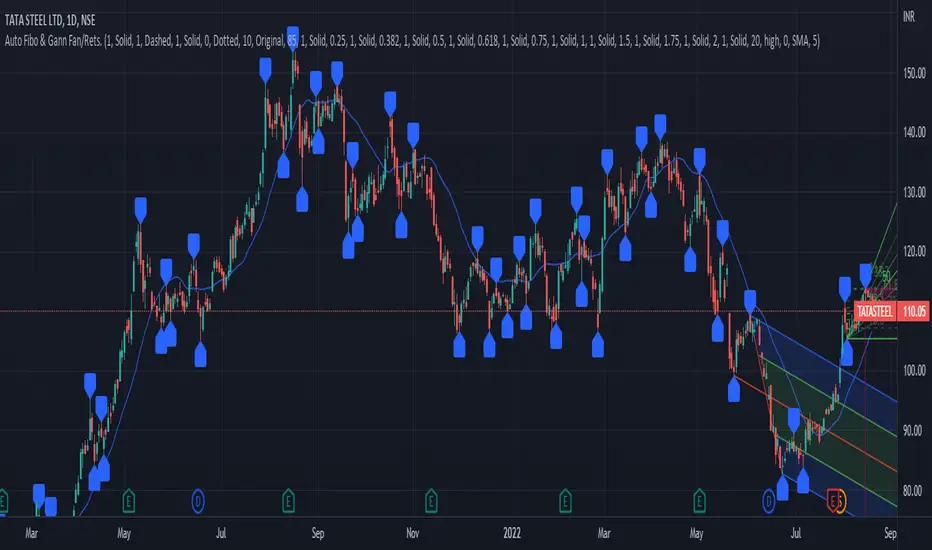
PrasiGanFanFibntroduction
This is a combination of Fibonacci and Gann fan /retracements.
The script can automatically draw as many:
Fibonacci Retracements
Fibonacci Fan
Gann Retracements
Gann Fan
as the user requires on the chart. Each level set or fan consists of 7 lines based on the most important ratios of Fibonacci/ Gann .
Basics
What are Fibonacci retracements?
Fibonacci retracement levels are horizontal lines that indicate where support and resistance are likely to occur. They stem from Fibonacci’s sequence. Each level is associated with a percentage which is how much of a prior move the price has retraced. The Fibonacci retracement levels are 23.6%, 38.2%, 61.8%, and 78.6%. While not officially a Fibonacci ratio, 50% is also used. The indicator is useful because it can be drawn between any two significant price points, such as a high and a low. The indicator will then create the levels between those two points.
What are Gann retracements?
A developer of technical analysis and trading was W.D. Gann . Gann theory expects a normal retracement of 50 percent. This means that under normal selling pressure, the stock price will decline half the amount of its most recent rise, and vice versa. It also suggests that retracements occur at the halfway point of a move, such as 25 percent (half of 50 percent), 12.5 percent (half of 25 percent), and so on.
What is Fibonacci fan?
Fibonacci fan is a set of sequential trend lines drawn from a trough or peak through a set of points dictated by Fibonacci retracements. The first step to create it is to draw a trend line covering the local lowest and highest prices of a security. To reach retracement levels, the trader divides the difference in price at the low and high end by ratios determined by the Fibonacci series. The lines formed by connecting the starting point for the base trend line and each retracement level create the Fibonacci fan.
What is Gann fan?
A Gann fan consists of a series of lines called Gann angles. These angles are superimposed over a price chart to show potential support and resistance levels. The resulting image is supposed to help technical analysts predict price changes. Gann believed the 45-degree angle to be most important, but the Gann fan also draws angles at degrees like 75, 63.75, 26.25 and 15. The Gann fan originates at a low or high point. The resulting lines show areas of potential future support and resistance . The 45-degree line is known as the 1:1 line because the price will rise or fall at a 45-degree angle when the price moves up/down one unit for each unit of time. All other lines in the Gann fan are drawn above and below the 1:1 line. The other angles are associated with 2:1, 3:1, 4:1, 8:1 and 1:8, 1:4, 1:3, and 1:2 time-to-price moves.
Challenges
The most of the time I dedicated to writing this script has been spent on handling these problems:
1. Finding Local Highest/Lowest Prices
In order to draw Fibonacci and Gann fan /retracements, it's necessary to find local highest and lowest price points (Extrema) on the chart. As this could be so challenging, most traders and coders draw the lines covering the low and high prices over a given period of time or a limited number of bars back instead. I already wrote an indicator using this approach (Auto Fibonacci Combo).
In this new script I tried to find the exact highest and lowest prices based on this idea that: if a high point is formed lower than previous high which was after a lowest point, then that previous one was the local highest point, and vice versa if a low point is formed higher than previous low which was after a highest point, then that previous one was the local lowest point. So logically an extremum price on the chart won't be found until the next high/low point is formed.
2. Finding Proper Chart Scale for Gann Fan
Based on the theory, Gann angles are sensitive to the chart price scale and in order to have the right angles, the chart must be made with the proper scale. J.A. Hyerczyk in his book "Pattern, Price & Time - Using Gann Theory in Technical Analysis" suggests that the easiest way to determine the scale of a market is by taking the difference between top-to-top and bottom-to-bottom and dividing it by the time it took the market to move from top to top and bottom to bottom.
Thus on a properly constructed chart, the basic equation for calculating Gann angles is: Price * Time.
3. Drawing Fans and Relocating Fan Labels at Each New Bar in Pine (A Programming-Related Subject)
To do this, I used linear equations and line slopes. Of course it was so complicated and exhausting, but finally I overcame that thanks to my genius cousin.
Settings and Usage
By default, the script shows detected extremum points plus 1 Fibonacci fan, 1 Gann fan , 1 set of Fibonacci retracements and no Gann retracements on the chart. All of these could be changed in the indicator settings beside the color and transparency of each line.
Feel free to use this and send me your thoughts!
Track Highest/Lowest last[n] CandlesThis indicator will track the last , (defval=8), Highest and Lowest and previous close price by placing LINES. I created this to make it easier to place lines in the 25%, 50%, 75% , and 100% of take profits depending if I'm going Long or Short using MTT or MMS. Part of the auto -GannBox i'm trying to finish. Anyways, this makes it easier. I hope everyone can benefit from it.

VWAP CATS background flipped 4.0VWAP CATS Background Flipped 4.0 is a sophisticated Pine Script v5 indicator for TradingView that combines a configurable moving average (MA) with dynamic Gann Square of 9 levels to create a multi-layered background shading system for price action analysis. It visualizes support/resistance zones around a central MA (often VWAP or RVWAP) using incremental offsets (either % or absolute points), generating symmetrical bands that resemble a "CATS" (Concentric Adaptive Tiered System) — hence the name.The background is "flipped" in the sense that shading intensity and structure emphasize higher-tier zones, and labels are placed to the right of the chart for future projection.Key FeaturesFeature
Description
Multi-MA Engine
Supports 20+ MA types: EMA, DEMA, TEMA, SMA, VWAP, RVWAP, HMA, ALMA, custom volume blends (CVB1–4)
RVWAP Mode
Rolling VWAP with adaptive or fixed time window (days/hours/minutes)
Gann Square of 9 Logic
Generates 80+ symmetric levels (0.25x to 17x increment) above/below the MA
Dual Increment Mode
Choose Percent or Points for spacing
Background Fills
Tiered transparency fills between Gann levels (darker = stronger zones)
Visual MA Offset
Shift MA line left/right without breaking fill alignment
Smart Labels
Projected labels on last bar: "FV", "normal", "high", "3/4" at key levels
Performance Optimized
Hidden plots + label cleanup to prevent lag
Primary Use Cases
1. Institutional VWAP Anchoring
Use RVWAP (1-day fixed) as maRaw
Set Increment = 0.5 points or 0.05%
Watch price interaction with "normal" (2x), "high" (4x), "3/4" (6x) zones
Ideal for intraday scalping on indices (ES, NQ) or forex
2. Swing Trading with Gann Projections
Use 400-period SMA/EMA on daily chart
Increment in Percent mode (~1.22%)
Identify confluence when price rejects at 2x, 4x, or 6x bands
Labels project future targets to the right
3. Volume-Weighted Mean Reversion
Select CVB1–CVB4 for heavy volume smoothing
Use Points mode for stocks with stable tick sizes (e.g. $0.50 increments)
Trade mean reversion between ±1x and ±2x bands
4. Risk Management & Stop Placement
Place stops beyond 2x or 4x bands
Take profits at next major tier (e.g. 4x → 6x)
Pro Tips
Enable "Use Fixed Time Period" for RVWAP to avoid session reset issues
Increase i_label_offset on lower timeframes to avoid overlap
Combine with volume profile or order flow for confluence
The "FV" label marks the Fair Value MA — core anchor
Summary"VWAP CATS Background Flipped 4.0" turns any moving average into a dynamic Gann-based pricing grid with intelligent background shading and forward-projected labels — perfect for institutional-style mean reversion, swing targeting, and risk-defined trading."

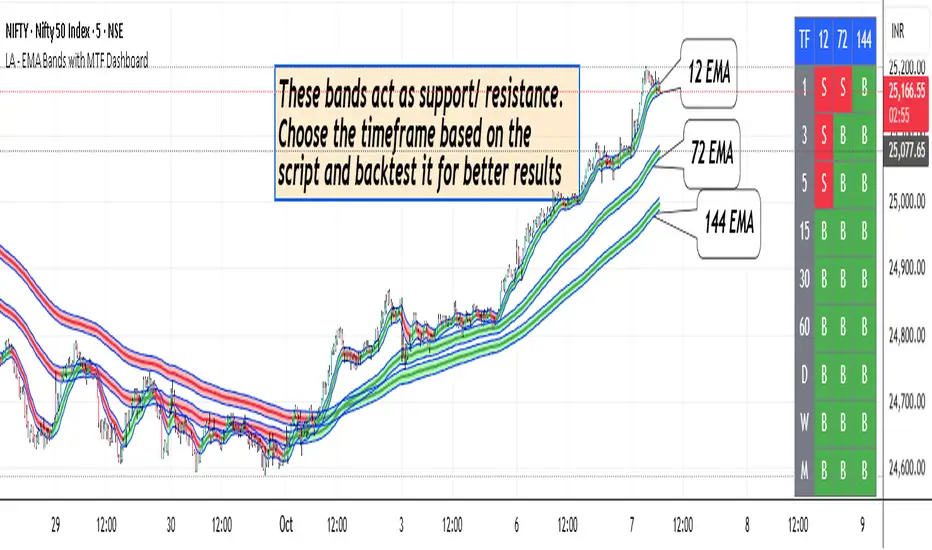
LA - EMA Bands with MTF DashboardDetailed Explanation of the LA - EMA Bands with MTF Dashboard Indicator
This custom Pine Script v6 indicator, designed for Trading View, overlays EMA-based price channels on the chart while incorporating a multi-timeframe (MTF) dashboard for broader market context. It focuses on visualizing trend direction and momentum through three sets of EMA bands, each representing different time horizons, and extends this with a tabular dashboard that summarizes signals across user-selected timeframes. The bands help identify support, resistance, and trend shifts, while the dashboard provides at-a-glance alignment across multiple periods, aiding in confirming trades or spotting divergences. Unlike volatility-based channels (e.g., Bollinger or Keltner), it relies solely on EMAs for simplicity and lag-reduced responsiveness.
Inputs Section
The script begins with user-configurable options grouped for ease. A timeframe input allows specifying a resolution for the EMA bands' data fetching, defaulting to the chart's timeframe if left empty—this enables higher-timeframe overlays on lower charts for context.
Next, a shared source input defines the price data for all midlines, defaulting to the midpoint of high and low (hl2) but customizable to close, open, or others.
The EMA bands have dedicated toggles and length inputs for each of the three sets: the first (long-term) defaults to 144 periods, the second (medium-term) to 72, and the third (short-term) to 12. These are inlined for compact settings panels, with minimum lengths of 1 to prevent errors.
A boolean toggle controls the visibility of the MTF dashboard. Following this are nine pairs of inputs for dashboard timeframes: each pair includes a show/hide toggle and an editable timeframe string (e.g., '1' for 1-minute, 'D' for daily). Defaults progress from short (1, 3, 5 minutes) to longer (15, 30, 60 minutes, daily, weekly, monthly), grouped in inlines for organization. Only enabled and non-empty timeframes appear in the dashboard.
Helpers Section
Two utility functions are defined here. The first computes an EMA on any source series over a specified length using Trading View's built-in function, reused throughout for midlines and bands.
The second function generates a signal string ("B" for buy/bullish, "S" for sell/bearish, or "-" for neutral) based on the direction of an EMA applied to high prices. It compares the current EMA value to the previous one, mirroring the band fill logic for consistency in the dashboard.
Core Components per Band Set:
Midline: An EMA calculated on a user-selectable source price (default: hl2, which is the midpoint between high and low prices). This acts as the central trend line.
Upper Band: An EMA applied directly to the high prices of each bar.
Lower Band: An EMA applied to the low prices of each bar.
These form a channel that captures the smoothed range of price action, highlighting potential support (lower band), resistance (upper band), and overall trend direction (midline).
Multiple Band Sets: The indicator includes three independent EMA band sets, each with its own length parameter for customization:
EMA1 (default length: 144) – Focuses on long-term trends.
EMA2 (default length: 72) – Targets medium-term trends.
EMA3 (default length: 12) – Emphasizes short-term momentum.
Each set can be toggled on or off via input checkboxes, allowing users to reduce chart clutter if needed.
Visual Elements:
Midline Plot: Displayed as a line colored based on its direction compared to the previous bar: green for rising (bullish), red for falling (bearish), and black for neutral (flat).
Band Fill: The area between the upper and lower bands is filled with a semi-transparent color indicating the trend of the upper band: light green for rising (suggesting expanding highs/upward momentum) and light pink for falling (contracting highs/downward pressure). The bands themselves are plotted in blue with a thin linewidth.
Multi-Timeframe Support: Users can input a custom timeframe (e.g., 'D' for daily), and the indicator fetches data from that resolution. This enables higher-timeframe context on lower-timeframe charts, such as viewing daily EMA bands on a 1-hour chart.
Calculation Mechanics:
All EMAs are computed using Trading View's built-in ta.ema() function.
Data is retrieved in a single request.security() call for efficiency, with lookahead enabled to avoid repainting.
No multipliers or volatility adjustments are included, making it a simple EMA-based envelope rather than a true volatility channel.
In practice, this indicator helps traders identify trend strength, potential breakouts (price crossing bands), or mean-reversion opportunities (price bouncing within bands). It's particularly useful for swing or position trading where multi-period alignment (e.g., all midlines green) signals conviction.
Pros
Multi-Period Insight: By combining short (12), medium (72), and long (144) periods, it offers a layered view of trends across time horizons, helping confirm alignments or divergences without needing multiple separate indicators.
Visual Clarity: Color-coded trends and fills make it easy to spot bullish/bearish shifts at a glance, reducing analysis time.
Flexibility: Custom timeframe input allows for multi-timeframe analysis, while shared source and toggles provide user control.
Simplicity and Efficiency: Purely EMA-based, it's computationally light and avoids overcomplication, making it accessible for beginners while still useful for spotting channel-based setups like squeezes or expansions.
No Repainting: With lookahead, plots are stable once bars close.
Cons
Lagging Nature: EMAs inherently lag price action, especially longer ones like 144-period, which may cause delayed signals in fast-moving or ranging markets.
Lack of Volatility Adjustment: Unlike Keltner Channels or Bollinger Bands, it doesn't incorporate ATR or standard deviation, so bands may not accurately reflect true volatility—potentially leading to false breakouts in high-volatility environments.
Chart Clutter: Displaying all three band sets simultaneously can overcrowd the chart, particularly on lower timeframes or volatile assets.
Subjective Interpretation: Color changes and band interactions require trader discretion; there's no built-in alerting or quantitative signals, which might lead to inconsistent results.
Market Dependency: Defaults may not suit all assets (e.g., stocks vs. crypto); shorter periods like 12 could whipsaw in noisy markets, while 144 might be too slow for intraday trading.
Justification for Default Values (12, 72, and 144)
The default lengths of 12, 72, and 144 are not arbitrary but draw from established trading principles, particularly W.D. Gann's geometric and numerical theories, as well as Fibonacci sequences, to create a harmonic progression for short-, medium-, and long-term analysis. Here's the rationale:
12 (Short-Term): This is a common period for capturing recent momentum in technical indicators, often seen in setups like the MACD (which uses 12- and 26-day EMAs). It aligns with natural cycles, such as the 12 months in a year, and in Gann theory, 12 serves as a base unit for squaring price and time (e.g., in the "Square of 12" where multiples like 12, 24, etc., measure cycles in days, weeks, or months). At 12 periods, the EMA reacts quickly to price changes without excessive noise, making it ideal for short-term trend detection.
72 (Medium-Term): This acts as an intermediate bridge, derived from Gann's divisions of the 360-degree circle (a key Gann concept representing a full cycle). Specifically, 72 is 360/5 (relating to pentagonal geometry and natural harmonics) and appears in Gann's time cycle measurements (e.g., as a multiple in the Square of 12: 12×6=72). It's roughly half of 144, providing a balanced midpoint for medium-term trends without overlapping too closely with the others. In practice, 72 periods smooth out short-term fluctuations while still responding to developing trends.
144 (Long-Term): This is a powerhouse number in trading lore, being both 12 squared (12×12=144, central to Gann's "Square of 144" for monthly charts and major cycle turns, as there are 12 months in a year) and a Fibonacci sequence value (1, 1, 2, 3, 5, 8, 13, 21, 34, 55, 89, 144...). Fibonacci periods are popular in moving averages for their alignment with natural growth patterns in markets, and 144 is often used for long-term regime definition (e.g., confirming trends over 144 bars). It helps identify major support/resistance in extended cycles.
Overall, these values form a geometric/harmonic series (12, 72=12×6, 144=12×12), promoting alignment with market cycles as per Gann and Fibonacci principles, rather than generic lengths like 50 or 200. They can be adjusted based on the asset or timeframe, but the defaults provide a starting point rooted in time-tested trading numerology for balanced multi-period analysis.
Please use this along with other indicators (eg. Pivot, MACD, etc) for better results.
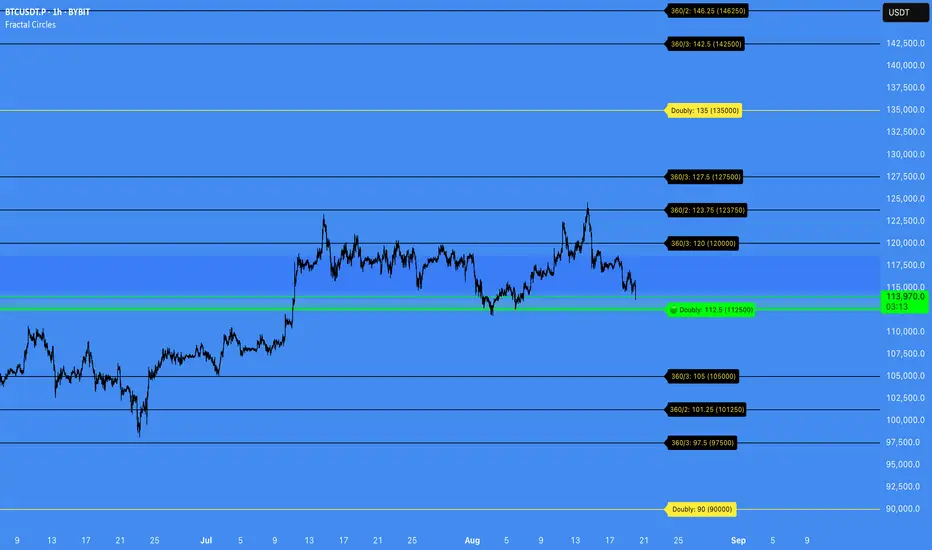
Fractal Circles#### FRACTAL CIRCLES ####
I combined 2 of my best indicators Fractal Waves (Simplified) and Circles.
Combining the Fractal and Gann levels makes for a very simple trading strategy.
Core Functionality
Gann Circle Levels: This indicator plots mathematical support and resistance levels based on Gann theory, including 360/2, 360/3, and doubly strong levels. The system automatically adjusts to any price range using an intelligent multiplier system, making it suitable for forex, stocks, crypto, or any market.
Fractal Wave Analysis: Integrates real-time trend analysis from both current and higher timeframes. Shows the current price range boundaries (high/low) and trend direction through dynamic lines and background fills, helping traders understand market structure.
Key Trading Benefits
Active Level Detection: The closest Gann level to current price is automatically highlighted in green with increased line thickness. This eliminates guesswork about which level is most likely to act as immediate support or resistance.
Real-Time Price Tracking: A customizable line follows current price with an offset to the right, projecting where price sits relative to upcoming levels. A gradient-filled box visualizes the exact distance between current price and the active Gann level.
Multi-Timeframe Context: View fractal waves from higher timeframes while maintaining current timeframe precision. This helps identify whether short-term moves align with or contradict longer-term structure.
Smart Alert System: Comprehensive alerts trigger when price crosses any Gann level, with options to monitor all levels or focus only on the active level. Reduces the need for constant chart monitoring while ensuring you never miss significant level breaks.
Practical Trading Applications
Entry Timing: Use active level highlighting to identify the most probable support/resistance for entries. The real-time distance box helps gauge risk/reward before entering positions.
Risk Management: Set stops based on Gann level breaks, particularly doubly strong levels which tend to be more significant. The gradient visualization makes it easy to see how much room price has before hitting key levels.
Trend Confirmation: Fractal waves provide immediate context about whether current price action aligns with broader market structure. Bullish/bearish background fills offer quick visual confirmation of trend direction.
Multi-Asset Analysis: The auto-scaling multiplier system works across all markets and timeframes, making it valuable for traders who monitor multiple instruments with vastly different price ranges.
Confluence Trading: Combine Gann levels with fractal wave boundaries to identify high-probability setups where multiple technical factors align.
This tool is particularly valuable for traders who appreciate mathematical precision in their technical analysis while maintaining the flexibility to adapt to real-time market conditions.
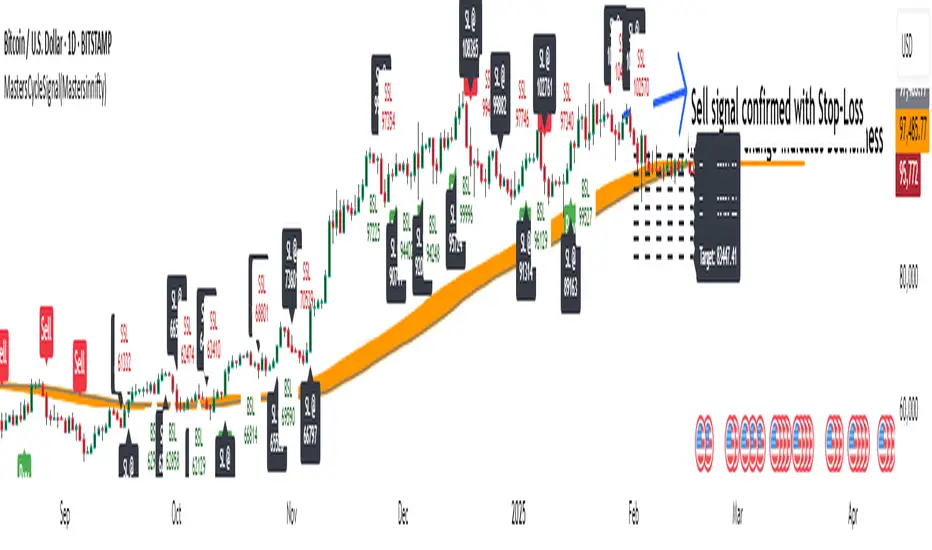
MastersCycleSignal(Mastersinnifty)Overview
MastersCycleSignal is a high-precision market timing and projection indicator for trend-following and swing traders.
It combines an adaptive cycle detection algorithm, forward-looking sine wave projections, dynamic momentum confirmation, and Gann Square of 9-based geometric targets into a complete structured trading framework.
The script continuously analyzes price oscillations to detect dominant cycles, projects expected price behavior with future-facing sine approximations, and generates buy/sell signals once confirmed by adaptive momentum filtering.
Upon confirmation, it calculates mathematically consistent Gann-based target levels and risk-managed stop-loss suggestions.
Users also benefit from auto-extending targets as price action unfolds — helping traders anticipate rather than react to market shifts.
---
Uniqueness
MastersCycleSignal stands apart through a unique fusion of techniques:
- Dynamic Cycle Detection
- Detects dominant cycles using a cosine correlation maximization method between detrended price (close minus SMA) and theoretical cosine curves, dynamically recalibrated across a sliding window.
- Sine Wave Future Projection
- Smooths and projects future price paths by approximating a forward sine wave based on the real-time detected dominant cycle.
- Adaptive Momentum Filtering
- Volatility is scaled by divergence between normalized returns and a 5-period EMA, further adjusted by an RSI(2) factor.
- This makes buy/sell signal confirmation robust against noise and false breakouts.
- Gann-Based Target Computation
- Uses a square-root transformation of price, incremented by selectable Gann Square of 9 degrees, for calculating progressive and dynamically expanding price targets.
- Auto-Extending Targets
- As price achieves a projected target, the system automatically draws subsequent new targets based on the prior target differential — providing continuous guidance in trending conditions.
---
Usefulness
MastersCycleSignal is built to help traders:
- Identify early trend reversals through cycle shifts.
- Forecast probable price paths in advance.
- Plan systematic target and stop-loss zones with geometric accuracy.
- Reduce guesswork in trend-following and swing trading.
- Maintain structured discipline across intraday, swing, and positional strategies.
It works seamlessly across stocks, indices, forex, commodities, and crypto markets — on any timeframe.
---
How to Use
- Attach the indicator to your desired chart.
- When a Buy Signal or Sell Signal appears (green or red markers):
- Use the attached stop-loss labels to manage risk.
- Monitor the automatically plotted target lines for partial exits or full profits.
- The orange projected sine wave illustrates the expected future market path.
- Customization Options:
- Cycle Detection Length — adjust to fine-tune cycle sensitivity.
- Projection Length — modify the forward distance of sine wave forecast.
- Gann Square of 9 Degrees — personalize target increments.
- Toggle Signals and Target visibility as needed.
---
Disclaimer
- MastersCycleSignal uses no future data or lookahead bias.
- All projections are based on geometric extrapolations from historical price action — not guaranteed predictions.
- Trading involves risks, and historical cycle behavior may differ in future conditions.
Enigma Unlocked 2.0Description for "Enigma Unlocked 2.0" Pine Script Indicator
Overview
Enigma Unlocked 2.0 is an advanced and highly customizable indicator designed to deliver actionable buy and sell signals by leveraging precise candlestick logic during specific market transitions. This indicator is built for flexibility, helping traders identify high-probability trade setups during key trading periods, specifically the transitions between the Asian Kill Zone and London Kill Zone as well as the London Kill Zone and New York Kill Zone on the 30-minute timeframe.
By combining Enigma Unlocked 2.0 with the ICT Killzones & Pivots indicator, traders can gain a deeper understanding of the timing and location of these transitions. Waiting for signals during these defined kill zones increases the likelihood of finding high-probability trade setups.
How to Use
Follow the Kill Zone Transitions:
Use the ICT Killzones & Pivots indicator to clearly visualize the boundaries of the Asian, London, and New York kill zones.
Focus on the signals generated by Enigma Unlocked 2.0 that align with these kill zone transitions.
Plotting Entries and Targets with Gann Box:
For Buy Signals:
Use the Gann Box tool to mark the high and low of the signal candle.
Ensure your Gann Box settings include only the 50%, 0%, and 100% levels.
Your entry zone lies between the 50% and 100% levels (discount zone). This is where buy trades are expected to offer an optimal risk-reward ratio.
For Sell Signals:
Similarly, plot the Gann Box on the high and low of the signal candle.
The 50% to 100% zone acts as the premium area for sell trades.
Setting Stop Loss and Targets:
To identify a safe stop loss, split the 50% zone of the Gann Box using another Gann Box.
Draw the secondary Gann Box from 50% to 100% of the initial box, then extend it to double the height.
For sell trades, place the stop loss above the extended 100% level.
For buy trades, place the stop loss below the extended 100% level.
Aim for a minimum of 1:1 risk-to-reward to ensure optimal trade management.
How It Works
Buy Logic:
Buy Logic 1: Detects a bullish candle (close > open) that:
Closes above its midpoint (50% of the candle body).
Has a low lower than the previous candle's low.
Buy Logic 2: Identifies a bearish candle (close < open) that:
Closes above its midpoint (50% of the candle body).
Has a low lower than the previous candle's low.
Sell Logic:
Sell Logic 1: Detects a bearish candle (close < open) that:
Closes below its midpoint (50% of the candle body).
Has a high higher than the previous candle's high.
Sell Logic 2: Identifies a bullish candle (close > open) that:
Closes below its midpoint (50% of the candle body).
Has a high higher than the previous candle's high.
Real-Time Alerts and Visual Cues:
Green triangles below candles indicate buy opportunities.
Red triangles above candles indicate sell opportunities.
Built-in alert conditions notify you of signals in real-time, so you never miss a trading opportunity.
Why Use Enigma Unlocked 2.0?
Precision: Advanced candlestick logic ensures that signals are generated only under optimal conditions.
Session-Based Filtering: Signals occur exclusively during the most active market sessions (kill zones), improving trade quality.
Visualization: Simple yet effective tools like Gann Box integration and clear visual signals make this indicator easy to use and highly effective.
Real-Time Alerts: Stay informed of potential trades even when you're away from your screen.
Enigma Unlocked 2.0 empowers traders to harness the power of candlestick analysis and session-based strategies for disciplined and effective trading. Pair this with a solid understanding of risk management and kill zones to achieve consistent results in your trading journey.

Dynamic Horizontal Lines
Gann levels (squares of 9) have multiple levels. Adding lines at all these levels would add too much noise on the chart.
This indicator adds horizontal lines as per the Gann levels (Squares of 9) closest to the days close.
The current indicator add horizontal lines at the Gann level closest to the days close. It also adds 4 lines above & below the closest Gann level
I have considered Gann levels from 1 to 10000. You can append the Gann levels based on your requirements.

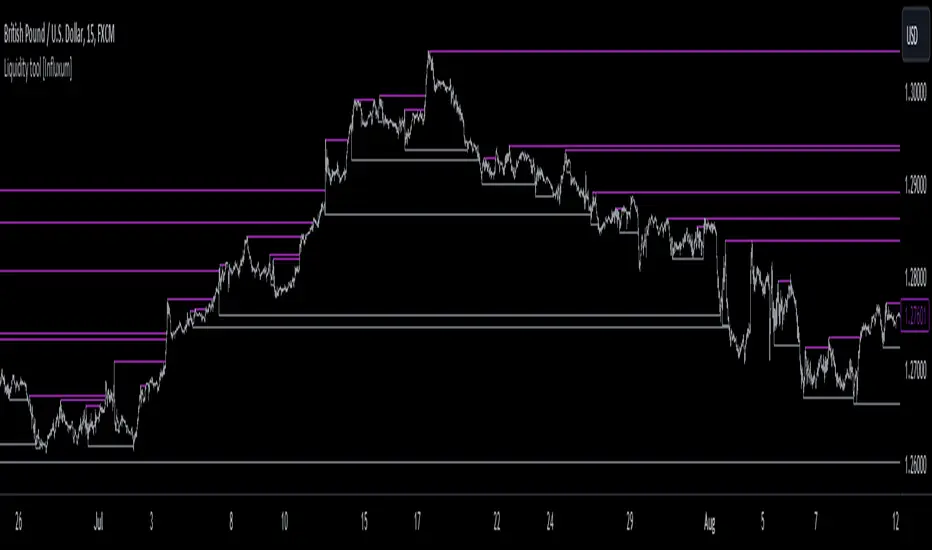
Liquidity tool [Influxum]One of the most widespread concepts that can give you an edge when trading in the markets is liquidity. There are several ways to identify and plot liquidity. This indicator aims to show how liquidity can be plotted entirely objectively, thus laying the foundation for a consistent trading system.
Pivot
One of the ways to identify liquidity is using pivots. Pivots are candles that are locally the highest or the lowest. We identify them using strength, which is a number that determines how many candles to the left and right of the pivot candle are lower for a pivot high and higher for a pivot low. It is important to keep in mind that a pivot candle is only confirmed when the last candle to the right closes. If I have the pivot number set to 10, it means that a pivot high is a candle that has 10 lower candles on the left and 10 lower candles on the right. Only after the 10th candle to the right closes is the pivot candle confirmed as a pivot high. Within this indicator, the liquidity line is drawn at this moment.
Tip for traders:
If you work with liquidity from both lower and higher timeframes, try adding two Liquidity Tool indicators to your chart: set a lower pivot number, for example, 5 for one, and a higher pivot number, for example, 20 for the other. At the same time, adjust the line width for liquidity with a higher pivot number to a higher value. This way, you achieve a combination of liquidity from significant higher timeframe structures and lower timeframe structures.
Gann Swing
The Gann swing is another objective way to mark liquidity in the market. Unlike pivot liquidity, which is based on the highest highs or lowest lows of candles, the Gann swing is based on the highest or lowest closes. We then mark liquidity when the current candle closes above the highest close of the last few candles or below the lowest close of the last few candles. While a pivot high might only show a local extreme in price development, the Gann swing deals with the actual closing of the price. Liquidity points determined by the Gann swing may thus be more indicative of where the price actually wants to go, not just where it was at a particular moment before sharply rebounding (as with pivot liquidity).
Percent Change
One of the most objective ways to identify liquidity is the percentage change in price. We plot liquidity only in places where there has been a sufficiently large swing/significant price movement. This can be particularly relevant for filtering out moments when the price is moving within a narrow range. In such a situation, many pivot highs and lows or Gann swings can occur, which may be only a few pips or fractions of a percent apart. If you set it so that you want liquidity to be plotted only on a swing of 0.1% (for forex, where this is a sufficiently large movement), you can easily filter out moments when the price was moving in a narrow range.
Liquidity Session
For Pivot, Gann, and Percentage liquidity, you have the option to set a trading session. This determines the time period for which you want liquidity to be plotted. You might want to see only the liquidity from the Asian session, for example. Check the checkbox with BG. This will display the background for the currently selected session. You can then check if you are working only with the liquidity of your intended session.
Note:
Sometimes you may notice that liquidity lines start even outside the selected session. This is not a mistake. As mentioned above with pivot liquidity, if the pivot number (strength) is 10, we wait for the tenth candle to close before liquidity is confirmed. The pivot candle itself is thus located 10 candles back, and that is where the liquidity line also begins. However, the crucial moment for this indicator is when the liquidity point is confirmed.
Visual Settings
To customize the indicator to your preferences as much as possible, you have the option to set the style of the liquidity line, its color, and its thickness. The analyses you share will then match your exact vision.
Delete Grabbed Liquidity
Check this option when you want to see only uncrossed liquidity on the charts, meaning liquidity lines that have not yet been crossed by the price.
Display Liquidity Grab Point
When you check this option, it highlights the points on the candles where liquidity was grabbed.
Liquidity Duration
Some strategies require that only internal liquidity be taken, meaning liquidity that was created recently. To accommodate this, we have embedded several options in the indicator to work with the validity duration of liquidity.
Delete Liquidity End of Day
This option deletes the liquidity line at the end of the calendar day. This way, you can display only intraday liquidity.
Tip for traders: If you check both "delete liquidity end of day" and "delete grabbed liquidity," only the liquidity of the current day will be displayed on the chart.
Delete Liquidity End of Next Day
This option works similarly to the above. By deleting liquidity only at the end of the next day, you can work with yesterday's liquidity. Many strategies use the liquidity of the previous day (or the high and low of the previous day), allowing you to focus exclusively on yesterday's and today's liquidity.
Liquidity Duration in Bars
The final option allows you to delete liquidity after a certain time has elapsed. For the purposes of the indicator, we have set the time in terms of the number of bars. So, if you are on a 5-minute timeframe and want liquidity to be deleted after an hour, set the liquidity duration to 12 bars (12 x 5 minutes is 60 minutes).
Fibonacci Archer Box [ChartPrime]Fibonacci Archer Box (ChartPrime) is a full featured Fibonacci box indicator that automatically plots based on pivot points. This indicator plots retracement levels, time lines, fan lines, and angles. Each one of these features are fully customizable with the ability to disable individual features. A unique aspect to this implementation is the ability to set targets based on retracement levels and time zones. This is set to 0.618 by default but you can pick any Fibonacci zone you like. Also included are markings that show you when Fibonacci levels are met or exceeded. These moments are plotted on the chart as colored dots that can be enabled or disabled. Along with these markings are crosses that can be shown when targets are hit. Both of these markings are colored with the related Fibonacci level colors.
When there is a zig-zag, this indicator will test to see if the zig-zag meets the criteria set up by the user before plotting a new Fibonacci box. You can pick from either higher highs or lower highs for bearish patterns, and higher lows or lower lows for bullish patterns. Both patterns can be set to use both when finding new boxes if you want to make it more sensitive. You also have the option to filter based on minimum and maximum size. If the box isn't within the selected size range, it will simply be ignored. The pivot levels can be configured to use either candle wicks or candle bodies. By default this is configured to use candle wick with a lookforward of 5 and lookback of 10.
We have included alerts for Fibonacci level crosses, Fibonacci time crosses, and target hits. All alerts are found in the add alert section built into tradingview to make alert creation as easy as possible. Each alert is labeled with their correct names to make navigation simple.
W.D. Gann, a renowned figure in the world of trading and market analysis, is often questioned for his use of Fibonacci levels in his strategies. However, evidence points to the fact that Gann did not directly employ Fibonacci price levels in his work. Instead, Gann had his unique approach, dividing price ranges into thirds, eighths, and other fractions, which, although somewhat aligning with Fibonacci levels, are not exact matches. It is clear that Gann was familiar with Fibonacci and the golden ratio, as references to them appear in his recommended reading list and some of his writings. Despite this awareness, Gann chose not to incorporate Fibonacci levels explicitly in his methodologies, preferring instead to use his divisions of price and time. Notably, Gann's emphasis on the 50% level—a marker not associated with Fibonacci numbers—further illustrates his departure from Fibonacci usage. This level, despite its popularity among some Fibonacci enthusiasts, does not stem from Fibonacci's sequence. This is why we opted to call this indicator Fibonacci Archer Box instead of a Gann Box as we didn't feel like it was appropriate.
In summary, the Fibonacci Archer Box (ChartPrime) is a tool that incorporates Fibonacci retracements and projections with an automated pivot point-based plotting system. It allows for customization across various features including retracement levels, timelines, fan lines, and angles, and integrates visual cues for level crosses and target hits. While it acknowledges the methodologies of W.D. Gann, it distinctively utilizes Fibonacci techniques, providing a straightforward tool for market analysis. We hope you enjoy using this indicator as much as we enjoyed making it!
Enjoy

Angles v3 [Med]Greetings,
This indicator is about Gann Angles, based on the idea that the market is geometric and cyclical in nature, it consists of a series of lines and shapes (ex: Gann Angles) to illustrate potential support/resistance levels and price cycles. The resulting image is supposed to help technical analysts predict price changes and shifts over time. this is v3 of the indicator, with so many changes and additions.
The indicator contains:
- Price/time grid
- Three types of Gann fans
- Gann star
- Squares that englobe the price direction (with future support and resistance and possible direction change dates)
- Channels
- Two types of diagonal Grids
- Price Angles
- Time cycles
- Alerts
and many more helpful and interactive features!
* All of the above using two different ways of calculations, Gann and Fibo-Gann,
* The indicator projects different lines into the future to help predict future price changes
* Total control of everything in the chart (colorings, size, place ..etc.)
This is a paid indicator, Only available to selected people. Use the links below to contact us or for more information about how you can gain access.
Good luck!

Angles 540 By MedHello All,
This indicator is about Gann Angles, it consist of a series of horizontal lines ( Gann Angles), time vertical levels along with Gann Star to show potential support and resistance levels. The resulting image is supposed to help technical analysts predict price changes and shifts over time.
The indicator contains:
- Price/time grid
- Gann star
- Price Angles
* All of the above using Gann calculations and methods
* The indicator projects different lines into the future to help predict future price changes
* Total control of line coloring and styles!
This is a paid indicator, Only available to the 540 R&D team, and 540 Group
(Use the links below to contact me for more information about how you can obtain access to this indicator
Good luck!

[VIP] Trading ToolkitIndicator includes:
Auto fibonacci retracement
Auto Gannfan (modified)
Linear Regression
Buy and Sell Signal
Fibonacci extension
Moving averages
Alert includes:
When Buy signal appear
When Sell signal appear
Touch Top Linear Regression
Touch Bottom Linear Regression
Crossunder Middle Linear Regression
Crossover Middle Linear Regression
Disclaimer:
Chart colours and styles are dedicated for Dark template (soon for bright version)
More question or request trial? check links below

SQ9+ : A Index Trading System(Intraday) By TruStoxHi Fellow Traders,
Around 6 months back I launched Excel based SQ9 Index Trading System(Intraday) here , With the feedback from our users the SQ9 System is updated to Tradingview for ease of charting, efficient trailing & some more fantastic features that no normal trader can have .
Please Note: SQ9+ is a full fledged trading system with defined rules to entry , exits & risk to reward management ( Check Reviews )
To know more & register for SQ9 : Click Here!
I hope this simply advanced trading system assists you in trading.
Do Visit Us @ TruStox
Enjoy & Happy Trading
#A Happy Note : SQ9+ for scripts will be launched soon..

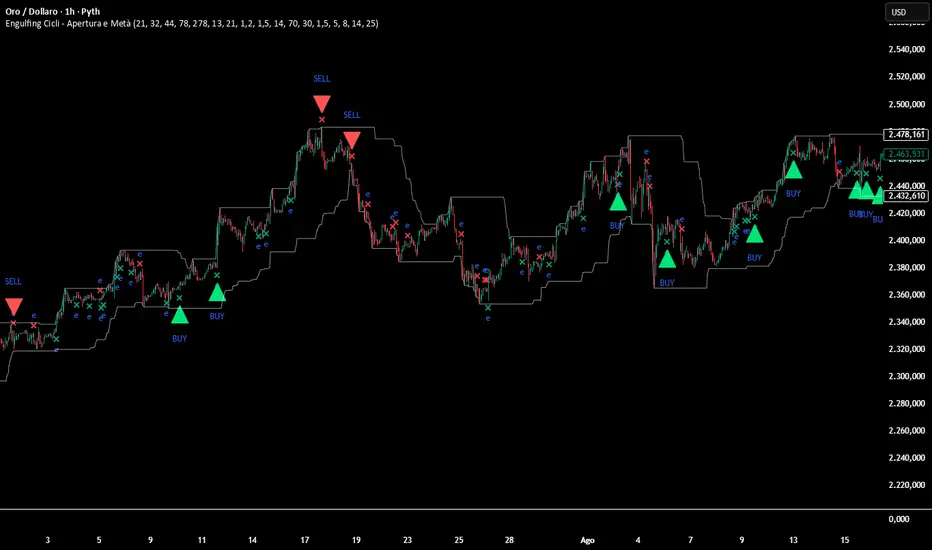
Engulfing Cycle# **Engulfing Cycles - Opening & Mid Phase** 📊⚡
## **Advanced Cyclical Timing Strategy with Engulfing Patterns**
### **🎯 CORE CONCEPT**
Innovative strategy combining **engulfing candlestick patterns** with **market cycle analysis** to identify high-probability entry points during opening and mid-cycle phases. Not just another engulfing detector, but a complete system selecting ONLY patterns occurring at cyclically optimal moments.
### **⚙️ HOW IT WORKS**
**1. TWO CYCLE TYPES:**
- **Index Cycle**: From pivot low to pivot high (bullish phase)
- **Inverse Cycle**: From pivot high to pivot low (bearish phase)
**2. PRIVILEGED TIMING ZONES:**
- **OPENING ZONE**: First 8 bars after a pivot (maximum cycle energy)
- **MID ZONE**: Bars 14-25 (momentum renewal)
**3. MULTI-LEVEL SIGNAL SYSTEM:**
```
Level 1: Basic engulfing (gray signals)
Level 2: Engulfing in valid zone (orange)
Level 3: OPTIMAL engulfing with ≥3/6 filters (green/red)
```
### **🔍 INTEGRATED CONFIRMATION FILTERS**
**PRIMARY TREND:**
- Gann High/Low system for directional bias
- Dual EMA (78/278) for momentum confirmation
**MOMENTUM:**
- RSI for overbought/oversold conditions
- Volume above average (configurable)
**STRUCTURE:**
- Dynamic support/resistance levels
- Minimum distance from EMA for movement space
- Pullback validation
### **📈 COMPLETE VISUALIZATION**
**GRAPHICAL ELEMENTS:**
- ✅ **Color-coded signals** (gray → orange → green/red)
- ✅ **Cycle zone backgrounds** (green/blue for opening/mid)
- ✅ **EMA & Gann lines** with trend coloring
- ✅ **Support/Resistance** with circle style
- ✅ **Real-time info table** (top-right corner)
**INCLUDED DATA TABLE:**
- Total/optimal signal statistics
- Current cycle type (Index/Inverse)
- Bars since pivot counters
- Active filter status
- Current cycle zone
- Anti-spam lock status
### **⚡ MULTI-LEVEL ALERT SYSTEM**
**5 CONFIGURABLE ALERT TYPES:**
1. 🔔 **Any Engulfing** - General monitoring
2. ⬆️ **Bull Engulfing** - Basic bullish pattern
3. ⬇️ **Bear Engulfing** - Basic bearish pattern
4. 🟠 **In Valid Zone** - Added cyclical timing
5. 🟢🔴 **OPTIMAL SIGNALS** - Premium signals with maximum confirmation
### **🎚️ FULLY ADJUSTABLE PARAMETERS**
**CYCLES:**
- Minimum/Average/Maximum (21/32/44 default)
- Opening Zone (8 bars) and Mid Zone (14-25 bars)
**FILTERS:**
- Volume multiplier (1.2x default)
- Minimum engulfing body size (1.5x default)
- RSI thresholds (70/30)
- Minimum EMA distance (1.5%)
**TECHNICALS:**
- EMA periods (78/278)
- Gann periods (13/21)
- Pivot length (5)
### **🛡️ PROTECTION SYSTEMS**
**ANTI-SPAM:**
- 5-bar lock after signal
- Price stagnation detection
- Only 1 signal per movement
**QUALITY CONTROL:**
- Minimum 3/6 active filters required
- Cycle zone validation
- Volume and momentum confirmation
### **📊 PRACTICAL APPLICATION**
**RECOMMENDED TIMEFRAMES:** 1H, 4H, Daily
**ASSETS:** Major Forex pairs, Indices, Liquid stocks
**CONTEXT:** Best in markets with defined cycles
**OPTIMAL SIGNAL =**
```
+
+
+
+
```
### **🎨 PROFESSIONAL DESIGN**
- Clean, non-invasive interface
- Intuitive color coding
- All elements toggleable
- Light performance (max_bars_back=500)
### **📋 UNIQUE FEATURES**
1. **CYCLICAL TIMING** - Not just WHAT, but WHEN
2. **SIGNAL GRADATION** - From basic to optimal
3. **SELF-CONTROL** - Built-in anti-false system
4. **TRANSPARENCY** - All filters visible in table
5. **FLEXIBILITY** - Adaptable to different trading styles
---
**⚠️ DISCLAIMER:** This is an advanced analytical tool. "Optimal" signals (green/red) offer higher reliability but still require appropriate risk management. Always backtest on historical data before live use.
**Author:** Alblanz
**Category:** Patterns + Cycles + Timing
**Complexity:** Medium-High
**Version:** 5.0
**Updated:** [4/12/2025
*For support or suggestions, leave a comment on the script page.*
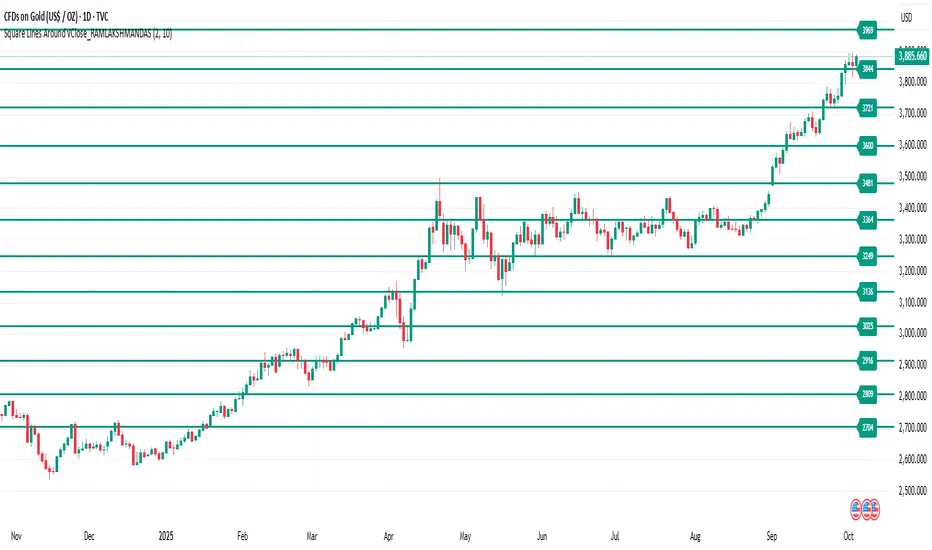
Square of natural number_RAMLAKSHMANDASThis indicator draws horizontal lines at square-number price levels around the square root of the current closing price. Inspired by Gann’s geometric approach, these lines serve as potential support and resistance levels. Each line is labeled with its price for easy identification. Traders can use it to visualize mathematically significant zones, identify reversal points, and enhance numerical trading strategies.
Pine Script Indicator: Odd Square Levels
This Pine Script indicator, designed for TradingView v6, plots dynamic horizontal support and resistance levels on the chart based on the square root of the current close price. It adheres to the specific principles of Gann theory, focusing exclusively on odd square numbers.
How it Works:
The indicator first calculates a base number by taking the square root of the current bar's close price and rounding it. This base number acts as the center of a user-defined range. The script then iterates through all the natural numbers within this range.
For each number in the range, it performs a check:
If the number is odd, the script calculates its square and plots a horizontal line at that price level.
If the number is even, the script adds 1 to the number before squaring it and plotting the line. This ensures that only levels corresponding to odd squares are ever drawn.
Key Features:
Dynamic Levels: The levels automatically adjust as the market price changes, providing real-time support and resistance zones.
Customizable Range: The user can specify an offset (e.g., ±10) around the square root of the price to control the number of levels displayed.
Visual Customization: Users can modify the color and width of the lines to suit their preference.
On-Chart Labels: The indicator can be configured to display a label next to each line, showing the number squared and the resulting price level (e.g., 3² = 9).
Performance Optimization: The indicator is designed to run efficiently by deleting old drawings on each new bar, preventing chart clutter and ensuring a smooth experience.
Ideal Usage:
This indicator is a powerful tool for traders who follow Gann theory or are looking for unconventional support and resistance levels. The levels are particularly useful for identifying potential trend reversals or areas of strong confluence with other trading strategies. It is recommended to use the indicator on volatile asset classes where price movements are significant, such as cryptocurrencies, as these assets tend to follow these types of mathematical relationships.
PSP Gyani Baba 9 Number [Good for all types of trading]The PSP Gyani Baba 9 Number indicator is a powerful tool based on the Gann Square of 9 methodology, designed to identify key support and resistance levels on your chart. This indicator calculates dynamic price levels using the square root of the current price, incorporating Gann's incremental adjustments to plot up to 10 customizable support and resistance lines. It features:
Support/Resistance Levels: Automatically displays bullish (green) and bearish (red) levels with adjustable line styles (solid, dashed, or dotted).
Cardinal Points: Highlights critical North, South, East, and West cardinal levels in orange for high-impact trading zones.
Trading Signals: Generates buy and sell signals based on price crossing cardinal East and West levels, with visual alerts and optional notifications.
Info Table: Provides a real-time summary of current price, square root, and next support/resistance levels.
Customization: Offers adjustable inputs for level count, colors, and alert preferences.
Ideal for traders seeking Gann-based insights, this indicator enhances decision-making with clear visual cues and actionable alerts. Perfect for all timeframes and markets!

CirclesCircles - Support & Resistance Levels
Overview
This indicator plots horizontal support and resistance levels based on W.D. Gann's mathematical approach of dividing 360 degrees by 2 and by 3. These divisions create natural price magnetism points that have historically acted as significant support and resistance levels across all markets and timeframes.
How It Works
360÷2 Levels (Blue): 5.63, 11.25, 33.75, 56.25, 78.75, etc.
360÷3 Levels (Red): 7.5, 15, 30, 37.5, 52.5, 60, 75, etc.
Both Levels (Yellow): 22.5, 45, 67.5, 90, 112.5, 135, 157.5, 180 - These are "doubly strong" as they appear in both calculations
Key Features
Auto-Scaling: Automatically adjusts for any price range (from $0.001 altcoins to $100K+ Bitcoin)
Manual Scaling: Choose from 0.001x to 1000x multipliers or set custom values
Full Customization: Colors, line widths, styles (solid/dashed/dotted)
Historical View: Option to show all levels regardless of current price
Clean Display: Adjustable label positioning and line extensions
Use Cases
Identify potential reversal zones before price reaches them
Set profit targets and stop losses at key mathematical levels
Confirm breakouts when price decisively moves through major levels
Works on all timeframes and all markets (stocks, crypto, forex, commodities)
Gann Theory
W.D. Gann believed that markets move in mathematical harmony based on geometric angles and time cycles. These 360-degree divisions represent natural balance points where price often finds support or resistance, making them valuable for both short-term trading and long-term analysis.
Perfect for traders who use:
Support/Resistance trading
Fibonacci levels
Pivot points
Mathematical/geometric analysis
Multi-timeframe analysis
