PROTECTED SOURCE SCRIPT
업데이트됨 Custom Sign [Alert + Marker]
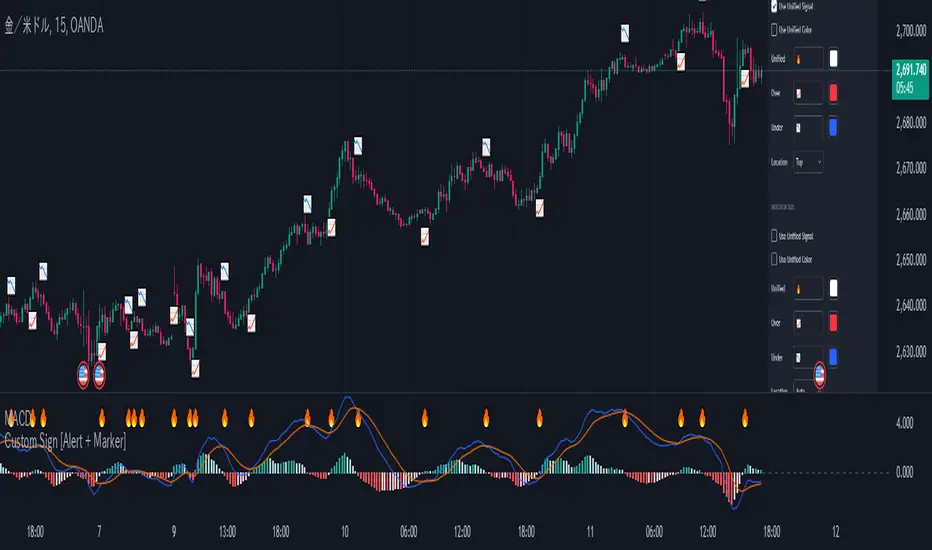
Custom Sign [Alert + Marker]
An indicator that detects crossovers between two values and displays them with customizable markers and colors on your TradingView chart.
Key Features
Settings
Source Settings
Oscillator Side
Indicator Side
Color Settings
* Unified: Color for unified mode
* CrossOver: Color for upward cross
* CrossUnder: Color for downward cross
* Unified: Color for unified mode
* CrossOver: Color for upward cross
* CrossUnder: Color for downward cross
Alert Settings
Notes
An indicator that detects crossovers between two values and displays them with customizable markers and colors on your TradingView chart.
Key Features
- Detection of crossover, crossunder, and cross (both) events
- Two display modes: Oscillator and Indicator
- Customizable markers and colors
- Bar-close alerts
Settings
Source Settings
- Source 1: Select the first value to compare
- Cross Type: Select cross type (⏫up, ⏬down, 🔀both)
- Source 2: Select the second value to compare
Oscillator Side
- Use Unified Signal: Toggle unified marker
- Unified: Shape for unified marker
- CrossOver: Marker for upward cross
- CrossUnder: Marker for downward cross
- Location: Marker position (Top/Bottom/Invisible)
Indicator Side
- Use Unified Signal: Toggle unified marker
- Unified: Shape for unified marker
- CrossOver: Marker for upward cross
- CrossUnder: Marker for downward cross
- Location: Marker position (Auto/Top/Bottom/AboveBar/BelowBar/Invisible)
Color Settings
- Oscillator
* Unified: Color for unified mode
* CrossOver: Color for upward cross
* CrossUnder: Color for downward cross
- Indicator
* Unified: Color for unified mode
* CrossOver: Color for upward cross
* CrossUnder: Color for downward cross
Alert Settings
- Alert Message: Customize alert message
Notes
- Oscillator and Indicator sides can be configured independently
- Different markers and colors can be used for each side
- Alerts trigger once per bar at close
릴리즈 노트
Fix Bug.보호된 스크립트입니다
이 스크립트는 비공개 소스로 게시됩니다. 하지만 이를 자유롭게 제한 없이 사용할 수 있습니다 – 자세한 내용은 여기에서 확인하세요.

면책사항
해당 정보와 게시물은 금융, 투자, 트레이딩 또는 기타 유형의 조언이나 권장 사항으로 간주되지 않으며, 트레이딩뷰에서 제공하거나 보증하는 것이 아닙니다. 자세한 내용은 이용 약관을 참조하세요.
면책사항
해당 정보와 게시물은 금융, 투자, 트레이딩 또는 기타 유형의 조언이나 권장 사항으로 간주되지 않으며, 트레이딩뷰에서 제공하거나 보증하는 것이 아닙니다. 자세한 내용은 이용 약관을 참조하세요.