INVITE-ONLY SCRIPT
업데이트됨 Gap Analyzer [WMT] - Data for Gap Up and Gap Down
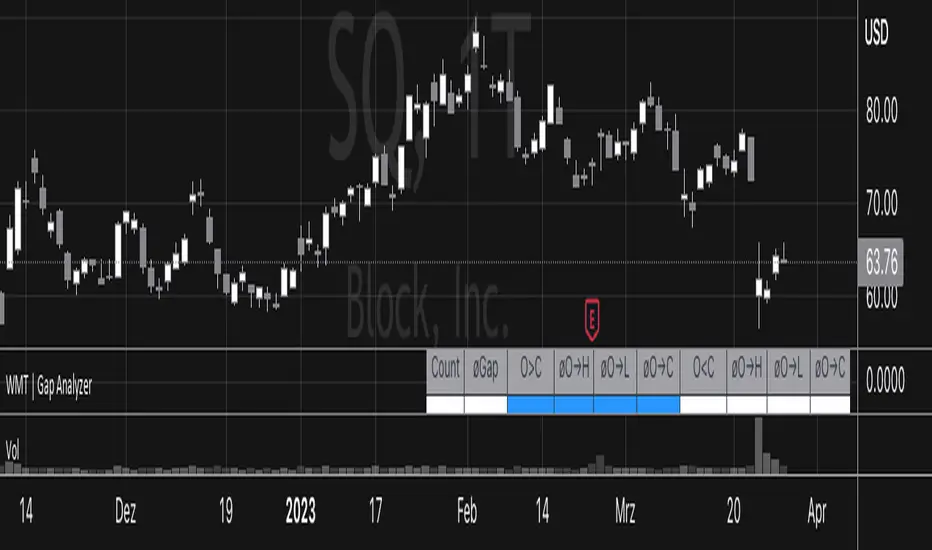
Get data for gaps with Gap Analyzer
Definitions for Gap Up
Definitions for Gap Down
For each of those, we get:
- Change the gap mode in settings to switch between a Gap Up (default) or Gap Down
- Change the threshold for the minimum (Gap Up) and maximum (Gap Down) gap
- Change Data Years -> Years of the look back period to calculate the stats
- Retrieve valuable information for past statistics on how the instrument behaved with the given gap
Definitions for Gap Up
- Price can fade lower from the open or (Gap Up Fade)
- Price can continue higher from the open (Gap Up Continuation)
Definitions for Gap Down
- Price can continue lower from the open or (Gap Down Continuation)
- Price can bounce higher from the open (Gap Down Bounce)
For each of those, we get:
- "øO→H": average percentage movement from open to high of the day
- "øO→L": average percentage movement from open to low of the day
- "øO→C": Average percentage movement from open to close of the day
릴리즈 노트
- Fixed input threshold for down gaps to maximum of -0.1
릴리즈 노트
Optimization- Switch Mode changed to "Gap Mode" and can now be changed via drop down for better UI. Thanks to @rn1ee for this idea.
- New label for DataYears: "Evaluation Period".
초대 전용 스크립트
이 스크립트는 작성자가 승인한 사용자만 접근할 수 있습니다. 사용하려면 요청 후 승인을 받아야 하며, 일반적으로 결제 후에 허가가 부여됩니다. 자세한 내용은 아래 작성자의 안내를 따르거나 WirmachenTrader에게 직접 문의하세요.
트레이딩뷰는 스크립트의 작동 방식을 충분히 이해하고 작성자를 완전히 신뢰하지 않는 이상, 해당 스크립트에 비용을 지불하거나 사용하는 것을 권장하지 않습니다. 커뮤니티 스크립트에서 무료 오픈소스 대안을 찾아보실 수도 있습니다.
작성자 지시 사항
This script is available via our website. The link can be found in our profile.

Erfolgreich traden lernen.
wirmachentrader.de
wirmachentrader.de
면책사항
해당 정보와 게시물은 금융, 투자, 트레이딩 또는 기타 유형의 조언이나 권장 사항으로 간주되지 않으며, 트레이딩뷰에서 제공하거나 보증하는 것이 아닙니다. 자세한 내용은 이용 약관을 참조하세요.
초대 전용 스크립트
이 스크립트는 작성자가 승인한 사용자만 접근할 수 있습니다. 사용하려면 요청 후 승인을 받아야 하며, 일반적으로 결제 후에 허가가 부여됩니다. 자세한 내용은 아래 작성자의 안내를 따르거나 WirmachenTrader에게 직접 문의하세요.
트레이딩뷰는 스크립트의 작동 방식을 충분히 이해하고 작성자를 완전히 신뢰하지 않는 이상, 해당 스크립트에 비용을 지불하거나 사용하는 것을 권장하지 않습니다. 커뮤니티 스크립트에서 무료 오픈소스 대안을 찾아보실 수도 있습니다.
작성자 지시 사항
This script is available via our website. The link can be found in our profile.
Erfolgreich traden lernen.
wirmachentrader.de
wirmachentrader.de
면책사항
해당 정보와 게시물은 금융, 투자, 트레이딩 또는 기타 유형의 조언이나 권장 사항으로 간주되지 않으며, 트레이딩뷰에서 제공하거나 보증하는 것이 아닙니다. 자세한 내용은 이용 약관을 참조하세요.