PROTECTED SOURCE SCRIPT
ALGOME - Standard Parabolic SAR + SuperTrend_V22.2.0
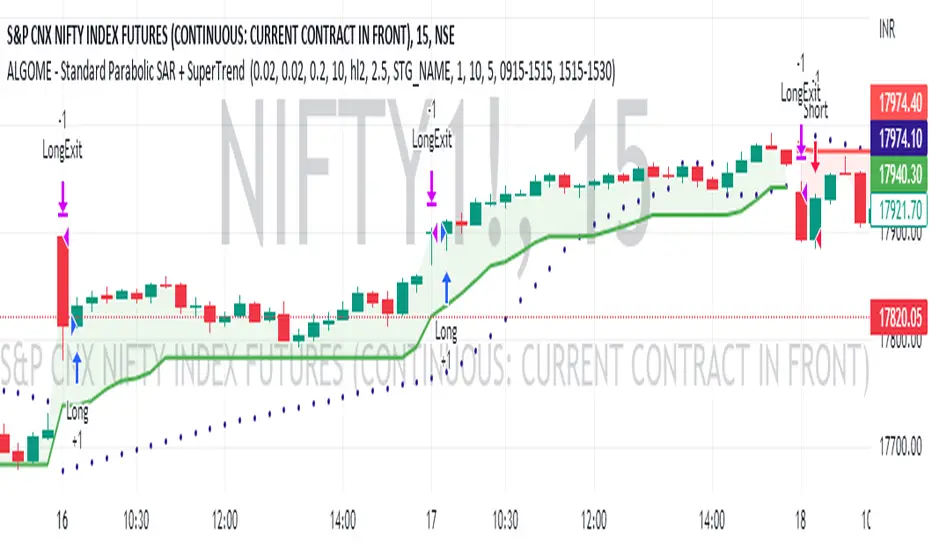
SuperTrend and Parabolic SAR (Stop And Reverse) combination can be an exciting technical analysis tool for trend-following indication.
About SuperTrend:
tradingview.com/chart/?solution=43000634738
About Parabolic SAR:
tradingview.com/support/solutions/43000502597-parabolic-sar-sar/
Directional Indication:
Useful Parameters & Settings:
Alert Message:
Type in the alert message as "{{strategy.order.alert_message}}"
How To Access, Setup, Integrate & Execute Live Alerts?
algome.in/post/how-to-setup-strategy-create-alerts-on-tradingview
About SuperTrend:
tradingview.com/chart/?solution=43000634738
About Parabolic SAR:
tradingview.com/support/solutions/43000502597-parabolic-sar-sar/
Directional Indication:
- Enter LONG position when SuperTrend + Parabolic SAR changes direction from down-trend to up-trend
- Enter SHORT position when SuperTrend + Parabolic SAR changes direction from up-trend to down-trend
Useful Parameters & Settings:
- Set Start, Increment, Max Value, ATR Period, ATR Multiplier & Time Frame values that best suits
- To trade on the Real-time bar, Go to Strategy Settings >> Properties >> Recalculate and select the "On Every Tick" option.
- Untick the "Signal Labels" option from Settings >> Style property window for a clean chart view.
Alert Message:
Type in the alert message as "{{strategy.order.alert_message}}"
How To Access, Setup, Integrate & Execute Live Alerts?
algome.in/post/how-to-setup-strategy-create-alerts-on-tradingview
보호된 스크립트입니다
이 스크립트는 비공개 소스로 게시됩니다. 하지만 이를 자유롭게 제한 없이 사용할 수 있습니다 – 자세한 내용은 여기에서 확인하세요.

면책사항
해당 정보와 게시물은 금융, 투자, 트레이딩 또는 기타 유형의 조언이나 권장 사항으로 간주되지 않으며, 트레이딩뷰에서 제공하거나 보증하는 것이 아닙니다. 자세한 내용은 이용 약관을 참조하세요.
면책사항
해당 정보와 게시물은 금융, 투자, 트레이딩 또는 기타 유형의 조언이나 권장 사항으로 간주되지 않으며, 트레이딩뷰에서 제공하거나 보증하는 것이 아닙니다. 자세한 내용은 이용 약관을 참조하세요.