PROTECTED SOURCE SCRIPT
C320up EMA by Chart Resolution
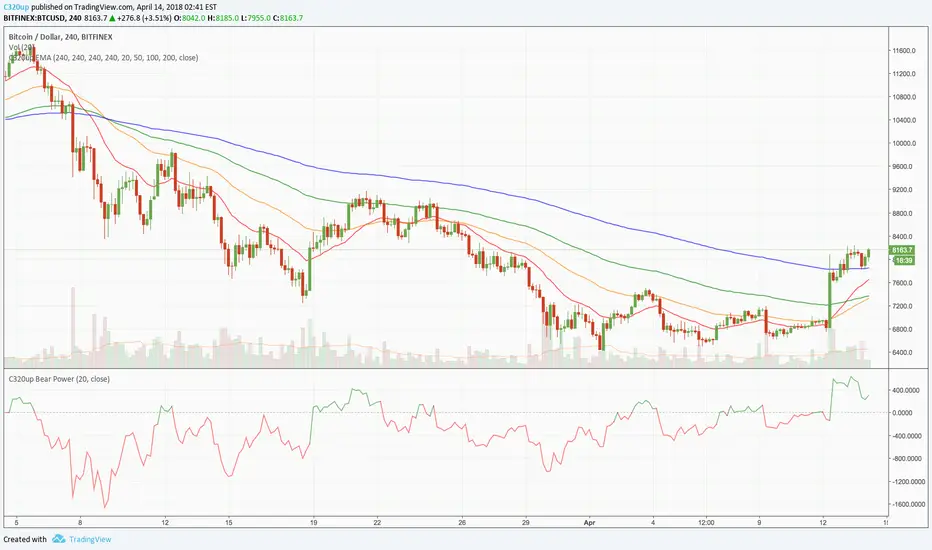
C320up EMA by Chart Resolution
- You may only want your EMA’s to appear on specific chart resolutions.
Use this indicator to select up to four resolutions and four EMA’s.
Sometimes a certain EMA (Exponential Moving Average) doesn’t give a good indication on a smaller time frame or vice versa, so you can customise these to suit.
Default settings are “240” Minutes for all EMA’s to appear.
Default EMA’s are 20, 50, 100, and 200.
To change the resolution, type in one of these examples:
15 = 15 Minutes, 60 = 1 Hour, 240 = 4 Hours, D = Day, W = Week, M = Month, 2M = 2 Months, etc.
You could have just the one EMA appear on multiple time frames, or have 2 appear on 2 time frames, etc.
Check out our scripts page for more indicators.
Any questions, just leave a comment.
- You may only want your EMA’s to appear on specific chart resolutions.
Use this indicator to select up to four resolutions and four EMA’s.
Sometimes a certain EMA (Exponential Moving Average) doesn’t give a good indication on a smaller time frame or vice versa, so you can customise these to suit.
Default settings are “240” Minutes for all EMA’s to appear.
Default EMA’s are 20, 50, 100, and 200.
To change the resolution, type in one of these examples:
15 = 15 Minutes, 60 = 1 Hour, 240 = 4 Hours, D = Day, W = Week, M = Month, 2M = 2 Months, etc.
You could have just the one EMA appear on multiple time frames, or have 2 appear on 2 time frames, etc.
Check out our scripts page for more indicators.
Any questions, just leave a comment.
보호된 스크립트입니다
이 스크립트는 비공개 소스로 게시됩니다. 하지만 이를 자유롭게 제한 없이 사용할 수 있습니다 – 자세한 내용은 여기에서 확인하세요.

면책사항
해당 정보와 게시물은 금융, 투자, 트레이딩 또는 기타 유형의 조언이나 권장 사항으로 간주되지 않으며, 트레이딩뷰에서 제공하거나 보증하는 것이 아닙니다. 자세한 내용은 이용 약관을 참조하세요.
면책사항
해당 정보와 게시물은 금융, 투자, 트레이딩 또는 기타 유형의 조언이나 권장 사항으로 간주되지 않으며, 트레이딩뷰에서 제공하거나 보증하는 것이 아닙니다. 자세한 내용은 이용 약관을 참조하세요.