INVITE-ONLY SCRIPT
업데이트됨 Risk Parity Calculator | QuantumResearch
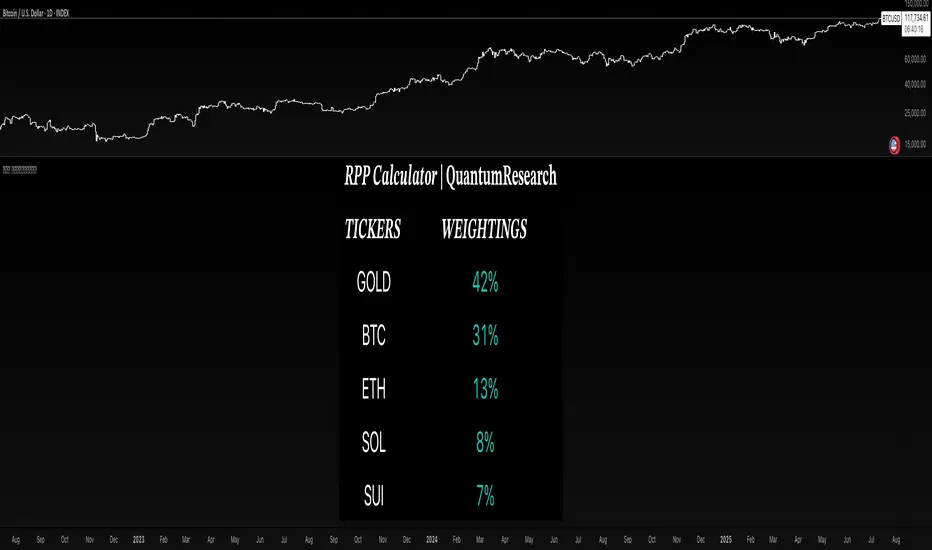
📊 Risk Parity Calculator | QuantumResearch
The Risk Parity Calculator by QuantumResearch is a dynamic asset allocation tool designed to help traders and portfolio managers distribute risk equally across multiple assets based on their relative volatility.
This script implements a simplified risk parity methodology, where allocation weights are inversely proportional to the recent volatility of each asset. The goal is to construct a portfolio in which each asset contributes equally to overall risk, rather than allocating by notional value or market cap.
🧠 How It Works
The indicator allows you to select up to 5 different assets (crypto, forex, indices, or commodities) and computes the following:
Logarithmic Return Volatility:
Uses log returns to calculate historical standard deviation over a custom period (default 14 bars).
Inverse Volatility Weighting:
Each asset’s weight is determined by 1 / volatility. Lower volatility assets receive higher weights.
Normalization:
All inverse volatility values are summed, and each is divided by that sum to generate the final weight (∑weights = 1).
Visual Output:
The results are shown in a custom table displaying:
Asset Tickers
Their respective portfolio weightings
Color-coded visuals to quickly assess risk-balanced contributions
This method favors diversification and seeks to reduce concentration risk by avoiding overexposure to more volatile assets like BTC or SOL, unless their volatility drops.
⚙️ Key Features
🔢 Supports 5 Custom Assets
Easily choose any combination of assets to construct your portfolio.
⚖️ Equalized Risk Contribution
Allocations scale automatically to reduce overexposure to high-volatility instruments.
🎨 Color-Coded Table
Visualizes relative weights, with color cues based on magnitude.
🔧 Adjustable Lookback
Modify the length used to compute volatility, giving you control over sensitivity.
🖥️ Flexible Table Position & Font Size
Fully customizable to match your layout preferences.
💡 How to Use It
Select your 5 assets using the input panel.
Set the length to control the volatility calculation window.
Observe the table output showing current risk-parity weights.
Use this to rebalance your portfolio, or validate your current exposure.
This is especially useful for portfolio reallocation, ETF modeling, or any strategy seeking risk-balanced diversification.
🛑 Disclaimer
This tool provides a simplified view of risk parity allocation and does not include cross-asset correlations or covariance matrix modeling. It is not a financial recommendation. Past performance and calculated weights do not guarantee future outcomes. Always apply proper risk management and conduct your own analysis.
The Risk Parity Calculator by QuantumResearch is a dynamic asset allocation tool designed to help traders and portfolio managers distribute risk equally across multiple assets based on their relative volatility.
This script implements a simplified risk parity methodology, where allocation weights are inversely proportional to the recent volatility of each asset. The goal is to construct a portfolio in which each asset contributes equally to overall risk, rather than allocating by notional value or market cap.
🧠 How It Works
The indicator allows you to select up to 5 different assets (crypto, forex, indices, or commodities) and computes the following:
Logarithmic Return Volatility:
Uses log returns to calculate historical standard deviation over a custom period (default 14 bars).
Inverse Volatility Weighting:
Each asset’s weight is determined by 1 / volatility. Lower volatility assets receive higher weights.
Normalization:
All inverse volatility values are summed, and each is divided by that sum to generate the final weight (∑weights = 1).
Visual Output:
The results are shown in a custom table displaying:
Asset Tickers
Their respective portfolio weightings
Color-coded visuals to quickly assess risk-balanced contributions
This method favors diversification and seeks to reduce concentration risk by avoiding overexposure to more volatile assets like BTC or SOL, unless their volatility drops.
⚙️ Key Features
🔢 Supports 5 Custom Assets
Easily choose any combination of assets to construct your portfolio.
⚖️ Equalized Risk Contribution
Allocations scale automatically to reduce overexposure to high-volatility instruments.
🎨 Color-Coded Table
Visualizes relative weights, with color cues based on magnitude.
🔧 Adjustable Lookback
Modify the length used to compute volatility, giving you control over sensitivity.
🖥️ Flexible Table Position & Font Size
Fully customizable to match your layout preferences.
💡 How to Use It
Select your 5 assets using the input panel.
Set the length to control the volatility calculation window.
Observe the table output showing current risk-parity weights.
Use this to rebalance your portfolio, or validate your current exposure.
This is especially useful for portfolio reallocation, ETF modeling, or any strategy seeking risk-balanced diversification.
🛑 Disclaimer
This tool provides a simplified view of risk parity allocation and does not include cross-asset correlations or covariance matrix modeling. It is not a financial recommendation. Past performance and calculated weights do not guarantee future outcomes. Always apply proper risk management and conduct your own analysis.
릴리즈 노트
Ability now to able/enable the number of tickers.초대 전용 스크립트
이 스크립트는 작성자가 승인한 사용자만 접근할 수 있습니다. 사용하려면 요청 후 승인을 받아야 하며, 일반적으로 결제 후에 허가가 부여됩니다. 자세한 내용은 아래 작성자의 안내를 따르거나 QuantumResearch에게 직접 문의하세요.
트레이딩뷰는 스크립트의 작동 방식을 충분히 이해하고 작성자를 완전히 신뢰하지 않는 이상, 해당 스크립트에 비용을 지불하거나 사용하는 것을 권장하지 않습니다. 커뮤니티 스크립트에서 무료 오픈소스 대안을 찾아보실 수도 있습니다.
작성자 지시 사항
Get access to this script here: https://whop.com/quantumresearch-tradingsuite

🌐 Gain access to our cutting-edge tools:
whop.com/quantum-whop/
⚒️ Get access to our toolbox here for free:
quantumresearchportfolio.carrd.co
All tools and content provided are for informational and educational purposes only.
whop.com/quantum-whop/
⚒️ Get access to our toolbox here for free:
quantumresearchportfolio.carrd.co
All tools and content provided are for informational and educational purposes only.
면책사항
해당 정보와 게시물은 금융, 투자, 트레이딩 또는 기타 유형의 조언이나 권장 사항으로 간주되지 않으며, 트레이딩뷰에서 제공하거나 보증하는 것이 아닙니다. 자세한 내용은 이용 약관을 참조하세요.
초대 전용 스크립트
이 스크립트는 작성자가 승인한 사용자만 접근할 수 있습니다. 사용하려면 요청 후 승인을 받아야 하며, 일반적으로 결제 후에 허가가 부여됩니다. 자세한 내용은 아래 작성자의 안내를 따르거나 QuantumResearch에게 직접 문의하세요.
트레이딩뷰는 스크립트의 작동 방식을 충분히 이해하고 작성자를 완전히 신뢰하지 않는 이상, 해당 스크립트에 비용을 지불하거나 사용하는 것을 권장하지 않습니다. 커뮤니티 스크립트에서 무료 오픈소스 대안을 찾아보실 수도 있습니다.
작성자 지시 사항
Get access to this script here: https://whop.com/quantumresearch-tradingsuite
🌐 Gain access to our cutting-edge tools:
whop.com/quantum-whop/
⚒️ Get access to our toolbox here for free:
quantumresearchportfolio.carrd.co
All tools and content provided are for informational and educational purposes only.
whop.com/quantum-whop/
⚒️ Get access to our toolbox here for free:
quantumresearchportfolio.carrd.co
All tools and content provided are for informational and educational purposes only.
면책사항
해당 정보와 게시물은 금융, 투자, 트레이딩 또는 기타 유형의 조언이나 권장 사항으로 간주되지 않으며, 트레이딩뷰에서 제공하거나 보증하는 것이 아닙니다. 자세한 내용은 이용 약관을 참조하세요.