PROTECTED SOURCE SCRIPT
업데이트됨 Candle Multi-TimeFrame Count
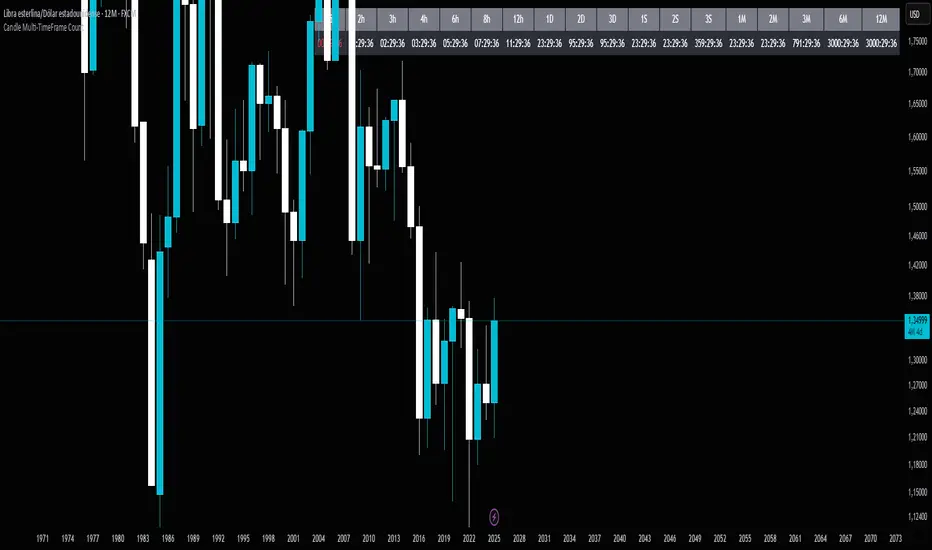
Candle Multi-TimeFrame Count is an advanced TradingView indicator that displays real-time countdowns to candle closes across multiple timeframes, along with intelligent multi-close alerts. Perfect for traders who operate across different timeframes and need to efficiently manage their entries and exits.
⚡ Key Features
🕐 Multi-Timeframe Countdown
10 configurable timeframes: From 1 minute to 1 week
Real-time tracking: Precise countdown in HH:MM:SS format
Visual alerts: Color changes when less than 30 seconds remaining (short timeframes) or 1 hour (long timeframes)
🌍 Timezone Selector
Adjustable UTC offset: Manually configure your timezone
Pre-configured settings: NY (-5/-4), Chicago (-6/-5), London (0), Spain (+1/+2)
Manual mode: Set any hour for testing and simulation
🔔 Multi-Close Alerts
Smart prediction: Detects which timeframes will close in the next hour
Specific schedules: Based on actual closing times for each timeframe:
✅ 1H: Every hour on the hour
✅ 2H: Odd hours (01:00, 03:00, 05:00...)
✅ 3H: 02:00, 05:00, 08:00, 11:00, 14:00, 17:00, 20:00, 23:00
✅ 4H: 01:00, 05:00, 09:00, 13:00, 17:00, 21:00
✅ 6H: 05:00, 11:00, 17:00, 23:00
✅ 8H: 01:00, 09:00, 17:00
✅ 12H: 05:00, 17:00
🎨 Complete Customization
Timeframe selector: Choose which to display (up to 10 simultaneously)
Visual customization: Adjust colors, transparency, and text size
Clean interface: Organized table that integrates seamlessly with your chart
🚀 Use Cases
📈 For Day Traders
Manage entries/exits across multiple timeframes
Anticipate important candle closes
Optimize trade timing
⏰ For Swing Traders
Monitor daily and weekly closes
Plan operations based on major candle closures
Identify key temporal convergence moments
🌐 For International Traders
Adapt the indicator to any timezone
Trade global markets with time precision
Maintain consistency regardless of your location
⚙️ Quick Setup
Select timeframes: Choose up to 10 timeframes to monitor
Adjust timezone: Configure UTC offset according to your location
Customize appearance: Modify colors and transparency
Enable alerts: Observe multiple closures in the next hour
💡 Key Benefits
Time savings: No more manual close calculations
Precision: Exact alerts for convergent closes
Flexibility: Adaptable to any trading style
Clear visualization: Critical information at a glance
📋 Technical Information
Language: Pine Script v6
Compatibility: All TradingView instruments
Performance: Optimized to not slow down your charts
🎯 Ideal for: Day traders, swing traders, scalpers, and any trader who needs to efficiently manage multiple timeframes.
🔮 Enhance your trading: Never miss an important close again with Candle Multi-TimeFrame Count!
⚡ Key Features
🕐 Multi-Timeframe Countdown
10 configurable timeframes: From 1 minute to 1 week
Real-time tracking: Precise countdown in HH:MM:SS format
Visual alerts: Color changes when less than 30 seconds remaining (short timeframes) or 1 hour (long timeframes)
🌍 Timezone Selector
Adjustable UTC offset: Manually configure your timezone
Pre-configured settings: NY (-5/-4), Chicago (-6/-5), London (0), Spain (+1/+2)
Manual mode: Set any hour for testing and simulation
🔔 Multi-Close Alerts
Smart prediction: Detects which timeframes will close in the next hour
Specific schedules: Based on actual closing times for each timeframe:
✅ 1H: Every hour on the hour
✅ 2H: Odd hours (01:00, 03:00, 05:00...)
✅ 3H: 02:00, 05:00, 08:00, 11:00, 14:00, 17:00, 20:00, 23:00
✅ 4H: 01:00, 05:00, 09:00, 13:00, 17:00, 21:00
✅ 6H: 05:00, 11:00, 17:00, 23:00
✅ 8H: 01:00, 09:00, 17:00
✅ 12H: 05:00, 17:00
🎨 Complete Customization
Timeframe selector: Choose which to display (up to 10 simultaneously)
Visual customization: Adjust colors, transparency, and text size
Clean interface: Organized table that integrates seamlessly with your chart
🚀 Use Cases
📈 For Day Traders
Manage entries/exits across multiple timeframes
Anticipate important candle closes
Optimize trade timing
⏰ For Swing Traders
Monitor daily and weekly closes
Plan operations based on major candle closures
Identify key temporal convergence moments
🌐 For International Traders
Adapt the indicator to any timezone
Trade global markets with time precision
Maintain consistency regardless of your location
⚙️ Quick Setup
Select timeframes: Choose up to 10 timeframes to monitor
Adjust timezone: Configure UTC offset according to your location
Customize appearance: Modify colors and transparency
Enable alerts: Observe multiple closures in the next hour
💡 Key Benefits
Time savings: No more manual close calculations
Precision: Exact alerts for convergent closes
Flexibility: Adaptable to any trading style
Clear visualization: Critical information at a glance
📋 Technical Information
Language: Pine Script v6
Compatibility: All TradingView instruments
Performance: Optimized to not slow down your charts
🎯 Ideal for: Day traders, swing traders, scalpers, and any trader who needs to efficiently manage multiple timeframes.
🔮 Enhance your trading: Never miss an important close again with Candle Multi-TimeFrame Count!
릴리즈 노트
📊 Candle Multi-TimeFrame Count🔍 Overview
Countdown Timer Pro is an advanced TradingView indicator that displays real-time countdowns to candle closes across multiple timeframes, along with intelligent multi-close alerts. Perfect for traders who operate across different timeframes and need to efficiently manage their entries and exits.
⚡ Key Features
🕐 Multi-Timeframe Countdown
10 configurable timeframes: From 1 minute to 1 week
Real-time tracking: Precise countdown in HH:MM:SS format
Visual alerts: Color changes when less than 30 seconds remaining (short timeframes) or 1 hour (long timeframes)
🌍 Timezone Selector
Adjustable UTC offset: Manually configure your timezone
Pre-configured settings: NY (-5/-4), Chicago (-6/-5), London (0), Spain (+1/+2)
Manual mode: Set any hour for testing and simulation
🔔 Multi-Close Alerts
Smart prediction: Detects which timeframes will close in the next hour
Specific schedules: Based on actual closing times for each timeframe:
✅ 1H: Every hour on the hour
✅ 2H: Odd hours (01:00, 03:00, 05:00...)
✅ 3H: 02:00, 05:00, 08:00, 11:00, 14:00, 17:00, 20:00, 23:00
✅ 4H: 01:00, 05:00, 09:00, 13:00, 17:00, 21:00
✅ 6H: 05:00, 11:00, 17:00, 23:00
✅ 8H: 01:00, 09:00, 17:00
✅ 12H: 05:00, 17:00
🎨 Complete Customization
Timeframe selector: Choose which to display (up to 10 simultaneously)
Visual customization: Adjust colors, transparency, and text size
Clean interface: Organized table that integrates seamlessly with your chart
🚀 Use Cases
📈 For Day Traders
Manage entries/exits across multiple timeframes
Anticipate important candle closes
Optimize trade timing
⏰ For Swing Traders
Monitor daily and weekly closes
Plan operations based on major candle closures
Identify key temporal convergence moments
🌐 For International Traders
Adapt the indicator to any timezone
Trade global markets with time precision
Maintain consistency regardless of your location
⚙️ Quick Setup
Select timeframes: Choose up to 10 timeframes to monitor
Adjust timezone: Configure UTC offset according to your location
Customize appearance: Modify colors and transparency
Enable alerts: Observe multiple closures in the next hour
💡 Key Benefits
Time savings: No more manual close calculations
Precision: Exact alerts for convergent closes
Flexibility: Adaptable to any trading style
Clear visualization: Critical information at a glance
📋 Technical Information
Language: Pine Script v6
Compatibility: All TradingView instruments
Performance: Optimized to not slow down your charts
🎯 Ideal for: Day traders, swing traders, scalpers, and any trader who needs to efficiently manage multiple timeframes.
🔮 Enhance your trading: Never miss an important close again with Candle Multi-TimeFrame Count
보호된 스크립트입니다
이 스크립트는 비공개 소스로 게시됩니다. 하지만 이를 자유롭게 제한 없이 사용할 수 있습니다 – 자세한 내용은 여기에서 확인하세요.

면책사항
해당 정보와 게시물은 금융, 투자, 트레이딩 또는 기타 유형의 조언이나 권장 사항으로 간주되지 않으며, 트레이딩뷰에서 제공하거나 보증하는 것이 아닙니다. 자세한 내용은 이용 약관을 참조하세요.
보호된 스크립트입니다
이 스크립트는 비공개 소스로 게시됩니다. 하지만 이를 자유롭게 제한 없이 사용할 수 있습니다 – 자세한 내용은 여기에서 확인하세요.
면책사항
해당 정보와 게시물은 금융, 투자, 트레이딩 또는 기타 유형의 조언이나 권장 사항으로 간주되지 않으며, 트레이딩뷰에서 제공하거나 보증하는 것이 아닙니다. 자세한 내용은 이용 약관을 참조하세요.