INVITE-ONLY SCRIPT
업데이트됨 Gunbot PingPong
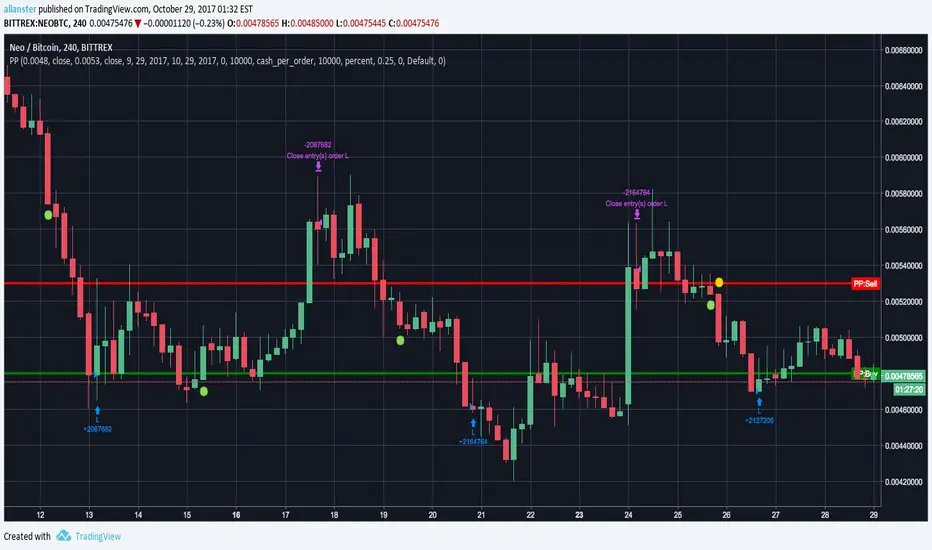
Simulation of Gunbot PingPong strategy useful for fine tuning settings and backtesting. First load the instrument and chart period you are wanting to trade and note the general low and high prices. You will need these for "dialing in" your PingPong Buy and Sell prices once you load the indicator. Defaults are set for current USDT-BTC prices.
In Pine Editor -> Open "Gunbot PingPong" -> Add To Chart -> On Indicator -> Format -> Input your desired settings to test.
Red = PingPong Sell Price
Green = PingPong Buy Price
NOTICE: By requesting access to this script you acknowledge that you have read and understood that this is for research purposes only and I am not responsible for any financial losses you may incur by using this script!
In Pine Editor -> Open "Gunbot PingPong" -> Add To Chart -> On Indicator -> Format -> Input your desired settings to test.
Red = PingPong Sell Price
Green = PingPong Buy Price
NOTICE: By requesting access to this script you acknowledge that you have read and understood that this is for research purposes only and I am not responsible for any financial losses you may incur by using this script!
릴리즈 노트
Changed default settings to higher trade amounts to allow for USDT-BTC pairs without the need for adjusting amounts, removed need for setting present date if backtesting up to current moment in time.릴리즈 노트
Incorporated several improvements that are used in the new Gunbot Deluxe script.Changed source to more closely match Gunbot's use of Bid/Ask prices.
Removed necessity to enter current dates each time, you may still do so by clicking on Enable Date Range.
Changed PP_BUY and PP_SELL lines to auto range closely to current high and low prices and to appear only after entering desired buy and sell prices.
To use:
Once you have been granted access, you will receive notification in TradingView (Bell).
Then right click on Chart area -> click "Insert Indicator..." -> click "Invite-Only Scripts" -> click "Gunbot PingPong" -> Add To Chart
At bottom -> click "Strategy Tester" -> click the "Gear" icon (Format) -> Input your desired settings to test.
Enter your desired PP_BUY and PP_SELL prices and the green buy and red sell lines will appear. When you switch to a different instrument (pair) you will need to click the Defaults:Reset Settings button to recenter chart for the new instrument (pair) that you are viewing.
NOTICE: There were some changes made to this script that may cause it to behave erratically if you have saved layouts with a previous version of this indicator. Please remove this (click [x] on indicator) from any saved layout charts and save those charts, refresh (reload) your browser page, then add the indicator back to your desired charts. If you still have problems you may have to empty the cache on your browser, sign out and sign back in.
릴리즈 노트
Altered default behavior so that it no longer trades based off auto range and waits for user to enter position values.Added short title "PPr4" to indicator that appears on screen for faster visual checking that you have the latest version.
To insure you are using latest version look at very bottom of Format -> Inputs settings. It should say "PP: Rev 4".
If you do not see "PP: Rev 4" then delete the indicator from all charts including any saved charts (save each saved chart after removing). Refresh browser and then reload the indicator.
초대 전용 스크립트
이 스크립트는 작성자가 승인한 사용자만 접근할 수 있습니다. 사용하려면 요청 후 승인을 받아야 하며, 일반적으로 결제 후에 허가가 부여됩니다. 자세한 내용은 아래 작성자의 안내를 따르거나 allanster에게 직접 문의하세요.
트레이딩뷰는 스크립트의 작동 방식을 충분히 이해하고 작성자를 완전히 신뢰하지 않는 이상, 해당 스크립트에 비용을 지불하거나 사용하는 것을 권장하지 않습니다. 커뮤니티 스크립트에서 무료 오픈소스 대안을 찾아보실 수도 있습니다.
작성자 지시 사항

lux ex tenebris • deuro mea umbra absens • Telegram: t.me/allanster
면책사항
해당 정보와 게시물은 금융, 투자, 트레이딩 또는 기타 유형의 조언이나 권장 사항으로 간주되지 않으며, 트레이딩뷰에서 제공하거나 보증하는 것이 아닙니다. 자세한 내용은 이용 약관을 참조하세요.
초대 전용 스크립트
이 스크립트는 작성자가 승인한 사용자만 접근할 수 있습니다. 사용하려면 요청 후 승인을 받아야 하며, 일반적으로 결제 후에 허가가 부여됩니다. 자세한 내용은 아래 작성자의 안내를 따르거나 allanster에게 직접 문의하세요.
트레이딩뷰는 스크립트의 작동 방식을 충분히 이해하고 작성자를 완전히 신뢰하지 않는 이상, 해당 스크립트에 비용을 지불하거나 사용하는 것을 권장하지 않습니다. 커뮤니티 스크립트에서 무료 오픈소스 대안을 찾아보실 수도 있습니다.
작성자 지시 사항
lux ex tenebris • deuro mea umbra absens • Telegram: t.me/allanster
면책사항
해당 정보와 게시물은 금융, 투자, 트레이딩 또는 기타 유형의 조언이나 권장 사항으로 간주되지 않으며, 트레이딩뷰에서 제공하거나 보증하는 것이 아닙니다. 자세한 내용은 이용 약관을 참조하세요.