INVITE-ONLY SCRIPT
업데이트됨 Support/Resistance Zone Auto [PRO]
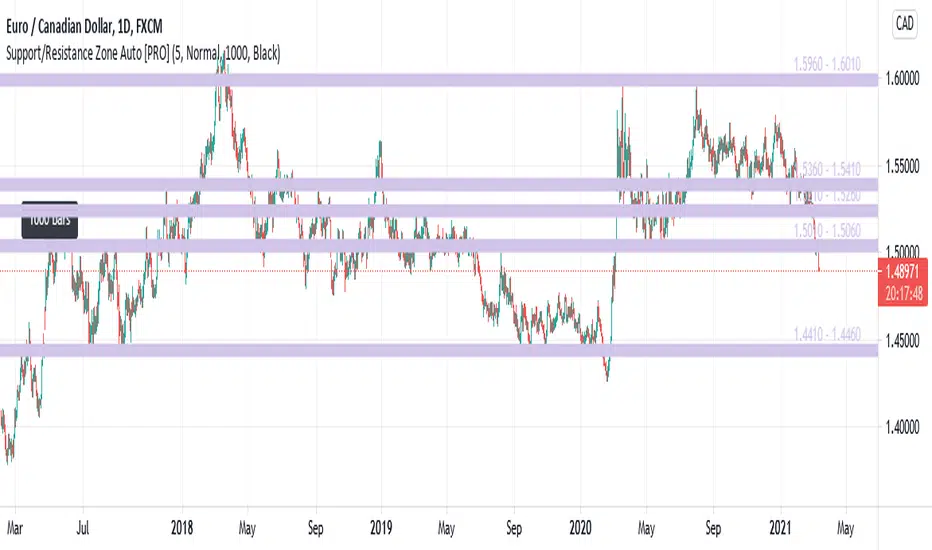
This is an indicator that automatically detects and displays support / resistance zones.
It displays up to 5 zones with a large number of reversals.
<Description of Input>
- Zone Color : Set the zone color.
- Number Of Zones : Set the number of zones to display. Can be set from 1 to 5.
- Zone Width : Set zone width. Selectable from "Very Wide", "Wide", "Normal", "Narrow", "Very Narrow".
- Number Of Reference Bars : Set the number of bars to reference. Selectable from "500", "1000" and "1500". When "1000" is set, the past 1000 bars are referenced from the latest bar (current bar) to investigate the reversal status.
- Reference Point Label : Set the color of the label displayed at the reference start position. Selectable from "Black", "White", and "None". If this parameter is "Black" and the "Number Of Reference Bars" parameter is "1000", a black label with "1000 bars" will be displayed 1000 bars before the current bar.
<Difference from [FREE] version>
- Increased maximum zone display from 3 to 5.
- Zone color can be set with Input.
- Display the price range of the zone (eg 1.5600 - 1.5650)
- Display Reference Point Label.
It displays up to 5 zones with a large number of reversals.
<Description of Input>
- Zone Color : Set the zone color.
- Number Of Zones : Set the number of zones to display. Can be set from 1 to 5.
- Zone Width : Set zone width. Selectable from "Very Wide", "Wide", "Normal", "Narrow", "Very Narrow".
- Number Of Reference Bars : Set the number of bars to reference. Selectable from "500", "1000" and "1500". When "1000" is set, the past 1000 bars are referenced from the latest bar (current bar) to investigate the reversal status.
- Reference Point Label : Set the color of the label displayed at the reference start position. Selectable from "Black", "White", and "None". If this parameter is "Black" and the "Number Of Reference Bars" parameter is "1000", a black label with "1000 bars" will be displayed 1000 bars before the current bar.
<Difference from [FREE] version>
- Increased maximum zone display from 3 to 5.
- Zone color can be set with Input.
- Display the price range of the zone (eg 1.5600 - 1.5650)
- Display Reference Point Label.
릴리즈 노트
Updates:Fixed an issue that caused errors in some currency pairs.
초대 전용 스크립트
이 스크립트는 작성자가 승인한 사용자만 접근할 수 있습니다. 사용하려면 요청 후 승인을 받아야 하며, 일반적으로 결제 후에 허가가 부여됩니다. 자세한 내용은 아래 작성자의 안내를 따르거나 HarmonicLab에게 직접 문의하세요.
트레이딩뷰는 스크립트의 작동 방식을 충분히 이해하고 작성자를 완전히 신뢰하지 않는 이상, 해당 스크립트에 비용을 지불하거나 사용하는 것을 권장하지 않습니다. 커뮤니티 스크립트에서 무료 오픈소스 대안을 찾아보실 수도 있습니다.
작성자 지시 사항
If you would like to use this script, please see here:
https://harmoniclab.info/srzone.html

Contact : harmoniclab.info/
면책사항
해당 정보와 게시물은 금융, 투자, 트레이딩 또는 기타 유형의 조언이나 권장 사항으로 간주되지 않으며, 트레이딩뷰에서 제공하거나 보증하는 것이 아닙니다. 자세한 내용은 이용 약관을 참조하세요.
초대 전용 스크립트
이 스크립트는 작성자가 승인한 사용자만 접근할 수 있습니다. 사용하려면 요청 후 승인을 받아야 하며, 일반적으로 결제 후에 허가가 부여됩니다. 자세한 내용은 아래 작성자의 안내를 따르거나 HarmonicLab에게 직접 문의하세요.
트레이딩뷰는 스크립트의 작동 방식을 충분히 이해하고 작성자를 완전히 신뢰하지 않는 이상, 해당 스크립트에 비용을 지불하거나 사용하는 것을 권장하지 않습니다. 커뮤니티 스크립트에서 무료 오픈소스 대안을 찾아보실 수도 있습니다.
작성자 지시 사항
If you would like to use this script, please see here:
https://harmoniclab.info/srzone.html
Contact : harmoniclab.info/
면책사항
해당 정보와 게시물은 금융, 투자, 트레이딩 또는 기타 유형의 조언이나 권장 사항으로 간주되지 않으며, 트레이딩뷰에서 제공하거나 보증하는 것이 아닙니다. 자세한 내용은 이용 약관을 참조하세요.