PROTECTED SOURCE SCRIPT
업데이트됨 Mykung's Financial Table (Revenue, EPS, Net margin)
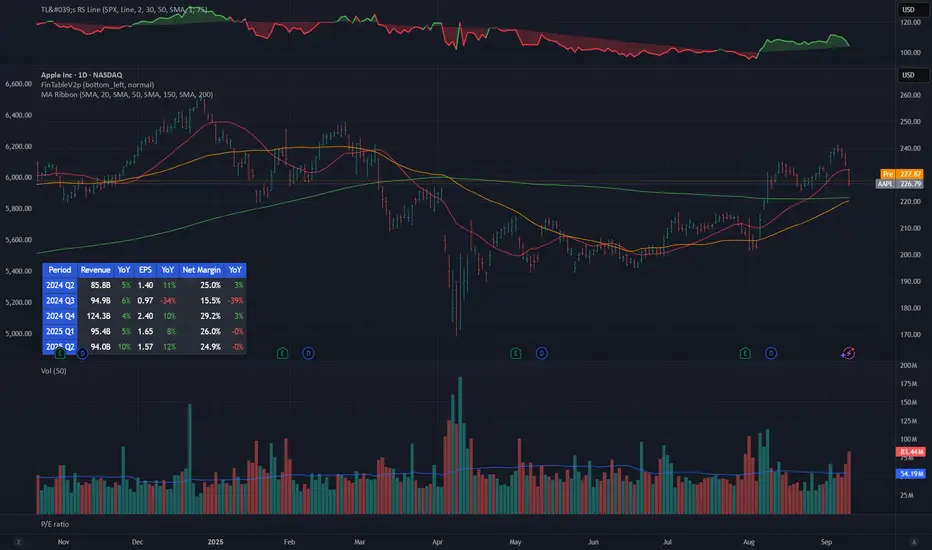
A compact fundamentals dashboard that displays the last **8 fiscal quarters** for the current symbol. It’s designed for clarity (minimal decimals) and flexible presentation, with a dynamic column layout and accurate quarter labels.
## What it shows
**Columns (left → right):**
`Quarter | Revenue | YoY % | QoQ % | EPS | YoY % | QoQ % | [Net Margin | YoY % | QoQ %]`
* **Quarter** — formatted as `YYYY Q#` (e.g., `2025 Q2`).
Labels are derived from **fiscal period end dates** for accuracy.
* **Revenue** — compact notation (K/M/B/T), **no decimals**.
* **EPS** — uses **Diluted EPS** by default and falls back to **Basic EPS** if Diluted is unavailable. Displayed with **2 decimals**.
* **Net Margin** — displayed with **1 decimal**.
*Note:* Its YoY/QoQ columns represent **percentage-point** changes (absolute differences), not relative percent changes.
* **YoY % and QoQ %** — shown as **integers** (no decimals). Positive values are colored green; negative values red.
## Key features
* **Accurate quarter labels** from fundamentals (`FISCAL_PERIOD_END_DATE` → fallback `FINANCIAL_END_TIME`).
* **Dynamic layout:**
* Show all 10 columns (include Net Margin group), or
* Hide Net Margin to render a **7-column** table automatically.
* **Row order:** **Oldest at top → Latest at bottom** (chronological reading).
* **Customization:**
* Table position (nine presets: corners/centers).
* Text size.
* Table background color.
* **Header colors** (text & background) — also applied to the **Quarter** column cells for visual grouping.
* **Body text color** for data cells.
## Inputs (Settings)
* **Table Position** — place the table anywhere on the chart.
* **Text Size** — auto/tiny/small/normal/large/huge.
* **Table Background** — overall table BG color.
* **Header Background Color** — header & Quarter column background.
* **Header Text Color** — header & Quarter column text color.
* **Body Text Color** — data cells text color.
* **Show Net Margin Group (Cols 7–9)** — toggle between 10-col or 7-col layout.
## Calculations
* **QoQ %** = $(Current − Previous) / |Previous|$ × 100
* **YoY %** = $(Current − 4Q Ago) / |4Q Ago|$ × 100
* **Net Margin YoY / QoQ** = **difference in percentage points** (e.g., 12.4% → 10.9% = −1.5pp)
## Notes & limitations
* Requires symbols with **quarterly fundamentals** on TradingView. If a field is unavailable, it shows **N/A**.
* Fundamentals are updated by TradingView; values may refresh after earnings filings.
* Works on any chart timeframe; data comes from **fundamentals**, not price bars.
* Colors are indicative only and not investment advice.
**Built for readability**: minimal decimals (EPS 2dp, Net Margin 1dp), integer percentages, and compact revenue formatting—so you can scan eight quarters at a glance.
## What it shows
**Columns (left → right):**
`Quarter | Revenue | YoY % | QoQ % | EPS | YoY % | QoQ % | [Net Margin | YoY % | QoQ %]`
* **Quarter** — formatted as `YYYY Q#` (e.g., `2025 Q2`).
Labels are derived from **fiscal period end dates** for accuracy.
* **Revenue** — compact notation (K/M/B/T), **no decimals**.
* **EPS** — uses **Diluted EPS** by default and falls back to **Basic EPS** if Diluted is unavailable. Displayed with **2 decimals**.
* **Net Margin** — displayed with **1 decimal**.
*Note:* Its YoY/QoQ columns represent **percentage-point** changes (absolute differences), not relative percent changes.
* **YoY % and QoQ %** — shown as **integers** (no decimals). Positive values are colored green; negative values red.
## Key features
* **Accurate quarter labels** from fundamentals (`FISCAL_PERIOD_END_DATE` → fallback `FINANCIAL_END_TIME`).
* **Dynamic layout:**
* Show all 10 columns (include Net Margin group), or
* Hide Net Margin to render a **7-column** table automatically.
* **Row order:** **Oldest at top → Latest at bottom** (chronological reading).
* **Customization:**
* Table position (nine presets: corners/centers).
* Text size.
* Table background color.
* **Header colors** (text & background) — also applied to the **Quarter** column cells for visual grouping.
* **Body text color** for data cells.
## Inputs (Settings)
* **Table Position** — place the table anywhere on the chart.
* **Text Size** — auto/tiny/small/normal/large/huge.
* **Table Background** — overall table BG color.
* **Header Background Color** — header & Quarter column background.
* **Header Text Color** — header & Quarter column text color.
* **Body Text Color** — data cells text color.
* **Show Net Margin Group (Cols 7–9)** — toggle between 10-col or 7-col layout.
## Calculations
* **QoQ %** = $(Current − Previous) / |Previous|$ × 100
* **YoY %** = $(Current − 4Q Ago) / |4Q Ago|$ × 100
* **Net Margin YoY / QoQ** = **difference in percentage points** (e.g., 12.4% → 10.9% = −1.5pp)
## Notes & limitations
* Requires symbols with **quarterly fundamentals** on TradingView. If a field is unavailable, it shows **N/A**.
* Fundamentals are updated by TradingView; values may refresh after earnings filings.
* Works on any chart timeframe; data comes from **fundamentals**, not price bars.
* Colors are indicative only and not investment advice.
**Built for readability**: minimal decimals (EPS 2dp, Net Margin 1dp), integer percentages, and compact revenue formatting—so you can scan eight quarters at a glance.
릴리즈 노트
Change from percentage-point (pp) to % (relative change) for Net margin YoY% and QoQ%릴리즈 노트
fixed many bugs릴리즈 노트
fixed some values릴리즈 노트
A simplified and lightweight financial table designed for quick stock analysis.- Shows 5 most recent reporting periods with Revenue, EPS, and optional Net Margin
- Displays only YoY (%) growth (no QoQ for cleaner view)
- Column headers are simplified (“Period”, “YoY”)
- Flexible table layout: choose 7 or 10 columns depending on Net Margin visibility
- Minimalist number formatting for a clear, modern look
- Missing data points are displayed as “-”
- Fully customizable header colors, background, and text colors
This public version is lighter and faster, making it ideal for traders and analysts who want essential quarterly metrics at a glance.
릴리즈 노트
Fixed the digit of revenue릴리즈 노트
Fixed some bugs보호된 스크립트입니다
이 스크립트는 비공개 소스로 게시됩니다. 하지만 이를 자유롭게 제한 없이 사용할 수 있습니다 – 자세한 내용은 여기에서 확인하세요.

면책사항
해당 정보와 게시물은 금융, 투자, 트레이딩 또는 기타 유형의 조언이나 권장 사항으로 간주되지 않으며, 트레이딩뷰에서 제공하거나 보증하는 것이 아닙니다. 자세한 내용은 이용 약관을 참조하세요.
면책사항
해당 정보와 게시물은 금융, 투자, 트레이딩 또는 기타 유형의 조언이나 권장 사항으로 간주되지 않으며, 트레이딩뷰에서 제공하거나 보증하는 것이 아닙니다. 자세한 내용은 이용 약관을 참조하세요.