PROTECTED SOURCE SCRIPT
업데이트됨 SMT-Dashboard-MTF
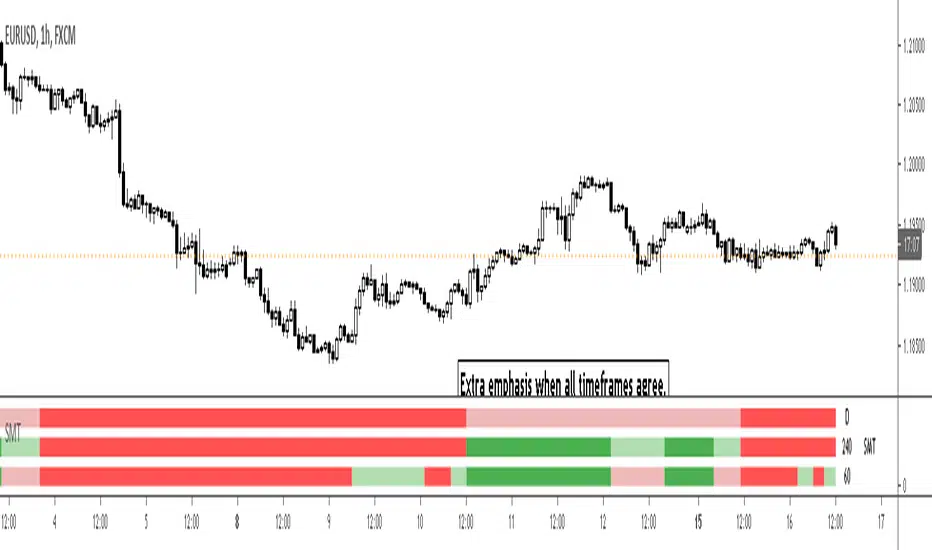
- Ability to view the smt trend of 3 times frames in one indicator
- Time frames are user configurable
- Turn on/off agreement highlights
- Alerts enabled for each time-frame and for when all time frames are all in agreement
Usage Note: To accurately display the smt trends the chart must be opened on a time-frame that is equal to or less than the lowest time-frame specified in the indicator. Tradingview can accurately display higher time frame information on a lower time frame chart but not vice-versa. e.g If the lowest time frame selected is the H1 then view the indicator on the H1 chart or below.
릴리즈 노트
-릴리즈 노트
- Time frames can now be configured on/off
릴리즈 노트
- Option added to turn repainting off. This is set to true by default.
보호된 스크립트입니다
이 스크립트는 비공개 소스로 게시됩니다. 하지만 이를 자유롭게 제한 없이 사용할 수 있습니다 – 자세한 내용은 여기에서 확인하세요.

면책사항
해당 정보와 게시물은 금융, 투자, 트레이딩 또는 기타 유형의 조언이나 권장 사항으로 간주되지 않으며, 트레이딩뷰에서 제공하거나 보증하는 것이 아닙니다. 자세한 내용은 이용 약관을 참조하세요.
면책사항
해당 정보와 게시물은 금융, 투자, 트레이딩 또는 기타 유형의 조언이나 권장 사항으로 간주되지 않으며, 트레이딩뷰에서 제공하거나 보증하는 것이 아닙니다. 자세한 내용은 이용 약관을 참조하세요.